 PH
PHZ-Info 1.0.38
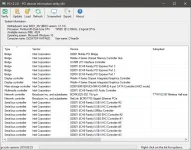

Z-Info (Repack & Portable) is a set of four programs for analyzing the hardware of your PC.
CPU-Z is a utility that will provide you with the most detailed information about the processor, memory, cache and motherboard installed in the system. The program has a small size, convenient display of information about components and supports almost all types of processors and motherboards.
GPU-Z is a handy program with which you get the most of all kinds of information about the video card and its graphics processor. The application will help you find out which video card model you have, determine the connection interface, determine which GPU it is based on (BIOS version, chip revision number, frequency in 2D, 3D and overclocking modes, information on DirectX support and other useful information). In addition, the program provides information about the video memory (type, size, bus width).
PCI-Z - the utility is designed to detect unknown devices that are connected via the PCI, PCI-E or PCI-X bus. The utility will display the device type, manufacturer, serial name, as well as information about the installed driver and its correct or not configuration. If the device is not detected by the system, then PCI-Z will identify it by identifier using the built-in database with an extensive description of various devices. The database is automatically or manually updated, according to the developers, the addition of new devices to the list occurs daily. Further, having identified the device, you can easily find the required driver through the PCI-Z context menu and bring the previously undefined device into working state.The program also allows you to export a list of devices with a description to a file * .TXT, * .CSV or * .jSON formats.
SSD-Zis a utility for SSD owners that can easily find out the firmware version of their SSD, serial number, manufacturing technology used, controller details, capacities, SMART scores, TRIM status, temperature and supported interfaces, capacity and operating time from the moment of switching on. Also in the program there is a Benchmark function, which makes it possible to test the disc. In addition, the program can recognize traditional HDD and optical drives.
Features Repack Z-Info:
1. Combined installation of programs or unpacking of portable (portable app format) versions in one distribution kit
2. As part of the assembly: CPU-Z 1.95.0 (ru) /1.95.0 (en), GPU-Z 2.38.0 (ru) / GPU-Z 2.38.0 (en), PCI-Z 2.0 ( en), SSD-Z 16.09.09b (en)
3. Optional installation as one of the build programs, and all at once
4. Optional installation of English or Russian versions of programs (CPU-Z / Russification -ALEX- / and GPU-Z / Russification druc /)
5. Optional installation of installed programs in the Control Panel
System requirements: Windows XP / 7/8 / 8.1 / 10

You do not have permission to view the full content of this post. Log in or register now.