PH
PHdavemichael45
Eternal Poster
The Wondershare Filmora X Video Editor is a powerful editing suite that can do just about anything. To be fair, it’s not quite as full-featured as something like Adobe Creative Suite. But it also costs only a fraction as much. And for most people, it’s a very effective piece of software. To begin with, the design and layout are easy to use. The timeline view is a tried and true feature, and it’s nice to see that Wondershare didn’t mess with it. You also get a lot more than just the basic editing features. Motion stabilization, motion tracking, and PIP allow you to make a truly polished social media creation. Moreover, the different output options are a big help when it comes time to upload. There’s no need to guess what format will work fastest on YouTube. Just optimize, output, and upload. That way, you’ll spend more time recording, and less time editing.
Tutorial:
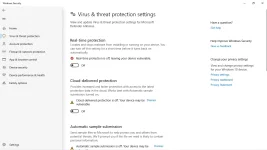
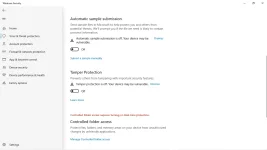
Turnoff mo lahat ng antivirus ng pc mo (don't worry safe naman yung files)
If hindi gumana ang ac†ïvâ†ør, try reinstalling ang software on the default location
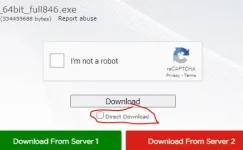
Install mo ang filmora_64bit_full846; After installing ng Filmora open mo, after mo iopen ang Filmora (fresh pa bagong install) close mo.
If na close mo na yung filmora proceed to the next step which is yung ac†ïvâ†ør naman iopen at install mo, after installing yung ac†ïvâ†ør punta ka sa Filmora mo; Sa upper left, click "Help"; lastly click "Activate Wondershare Filmora X" and see the magic HAHAHA choss.
PS: Before mo idownload yung filmora at yung ac†ïvâ†ør iturnoff mo muna yung lahat ng antivirus mo para sure 100% Working/Activated ka.
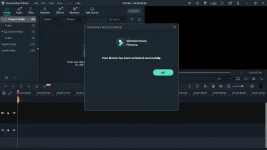
Tadaaahhh Congrats Activated kana. Pwede kana mag edit without watermark
DOWNLOAD LINKS BELOW
Dailyuploads:
You do not have permission to view the full content of this post. Log in or register now.
You do not have permission to view the full content of this post. Log in or register now.
Usercloud:
You do not have permission to view the full content of this post. Log in or register now.
You do not have permission to view the full content of this post. Log in or register now.
Tutorial:
Turnoff mo lahat ng antivirus ng pc mo (don't worry safe naman yung files)
If hindi gumana ang ac†ïvâ†ør, try reinstalling ang software on the default location
Install mo ang filmora_64bit_full846; After installing ng Filmora open mo, after mo iopen ang Filmora (fresh pa bagong install) close mo.
If na close mo na yung filmora proceed to the next step which is yung ac†ïvâ†ør naman iopen at install mo, after installing yung ac†ïvâ†ør punta ka sa Filmora mo; Sa upper left, click "Help"; lastly click "Activate Wondershare Filmora X" and see the magic HAHAHA choss.
PS: Before mo idownload yung filmora at yung ac†ïvâ†ør iturnoff mo muna yung lahat ng antivirus mo para sure 100% Working/Activated ka.
Tadaaahhh Congrats Activated kana. Pwede kana mag edit without watermark
DOWNLOAD LINKS BELOW
Dailyuploads:
You do not have permission to view the full content of this post. Log in or register now.
You do not have permission to view the full content of this post. Log in or register now.
Usercloud:
You do not have permission to view the full content of this post. Log in or register now.
You do not have permission to view the full content of this post. Log in or register now.