PH
PH
What is Infinite Color?
Infinite Color is an answer to a problem I've had for over 10 years. How can I make intricate and advanced color grading accessible to all, fun to use, fast to create, and easy to navigate? How can I help people steer every image to the destination that is truly influenced by their own personal preferences and brings out the photo's utmost potential? How can I connect the colors creatives want out of their image and easily bring it to life?
This is Infinite Color.
This product was dreamed up by me and developed in conjunction with legendary You do not have permission to view the full content of this post.
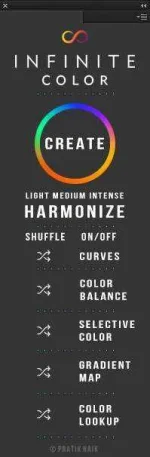
Log in or register now.over the course of many months. In short, it's a panel that works in Photoshop (Creative Cloud). It's a smart color grading tool that expertly randomizes a set of adjustment layers to create a unique look to your images. In length, it's a lot more than that. Be sure and see the video below to explore what it truly is about.

INTRODUCTION
This video is an introductory look into what it is, and how to use it. The first half of the video is me talking about the reason why it was created and who it's for. The second half is an overview of every feature!
View attachment Introducing Infinite Color - The Photoshop Color Grading Panel.mp4
View attachment Introducing Infinite Color - The Photoshop Color Grading Panel.mp4
Key Features
PURPOSE
It was created to make color grading fun, easy, but most importantly, produce intricately beautiful results. People usually don't know what they want, but they do know what they like when they see it. This tool will help guide you in seeing the color possibilities your image has, so it can guide you into deciding on what you really like in the fastest possible time.CUSTOMIZABLE RANDOMIZATION
It works just like a slot machine, hit create and watch it generate a unique look with the adjustment layers you choose. The layers stay in-tact, so you can also re-shuffle individual layers in case you find something you almost like but may want to tweak. It's completely customizable!LOOK LIKE NO ONE ELSE
The colors you generate will be yours and yours alone, with an infinite number of color possibilities, what you create will always be unique!GET ADVANCED AND STACK COLOR GROUPS
You can stack multiple groups of colors together so once you generate one layer stack, you can continue and generate more to create a highly intricate look!SAVE HOURS
When asked, professionals told us that Infinite Color not only gets them a beautiful result, but it saves them so much time.INTENSITY
No matter if your tastes in color are minor or prefer an aggressive look, the level of control will appeal to the most particular of palettes. The light, medium, and intense modes account for different tonal ranges.SMART SETTINGS
Once you set an opacity of the folder of colors it generates, it stays there no matter how many looks you create.If you don't like a specific look, we've scripted it so that you can easily hit Undo to go back to the previous look you created.
PROFESSIONAL GRADE RESULTS
We've made sure the parameters of each adjustment layer work cohesively together so the results are pleasing. I've ensured first hand that the potential of colors replicate a rich palette. Working professionals in every genre use this to create stunning filmic or cinematic looks!HARMONIZE - INSTANTLY COLOR TONE
The Harmonize feature generates a harmonious set of colors for your highlights, shadows, and midtones based on what it deems most pleasing from the image. Once generated, you can select which colors you want in each tonal region!Trying out the extension for a bit
View attachment Infinite Color Extension Test.mp4
DOWNLOAD LINKS
You do not have permission to view the full content of this post. Log in or register now.
You do not have permission to view the full content of this post. Log in or register now.
You do not have permission to view the full content of this post. Log in or register now.