🔒 Closed Save webpages as PDF files

Status
Not open for further replies.

_iosora

Elite

1. Find the page you want to download

Example, tong article na to:
You do not have permission to view the full content of this post. Log in or register now.

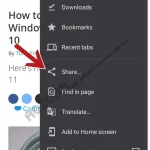
2. Press the 'Share' button in the overflow menu

20211019_232125.webp
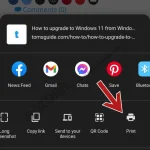
20211019_232108.webp


3. Select the 'Print' button
20211019_232234.webp


4. Change the printer to 'Save as PDF' and then press the save/print button.
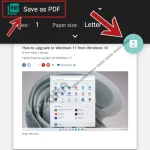
20211019_233304.webp


5. Choose Location to save the PDF and finally press save.
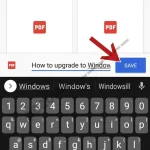
20211019_232401.webp


Other Cool Tricks
You do not have permission to view the full content of this post. Log in or register now.
 
Status
Not open for further replies.

About this Thread

  • 3
    Replies
  • 525
    Views
  • 3
    Participants
Last reply from:
FritzRac

Online now

Members online
1,091
Guests online
1,286
Total visitors
2,377

Forum statistics

Threads
2,274,309
Posts
28,954,979
Members
1,234,184
Latest member
conandizon
Back
Top