 PH
PH-
Welcome to PHCorner Forums! Sign up for free to unlock full access and exclusive privileges, including:
- Asking questions about computer and mobile issues
- Discovering internet tips for your mobile network and computer
You are using an out of date browser. It may not display this or other websites correctly.
You should upgrade or use an alternative browser.
You should upgrade or use an alternative browser.
🔒 Closed Help po :(
- Thread starter Mikzy
- Start date
- Status
- Not open for further replies.
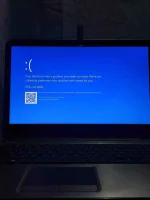
try ko mag update sir and minsan kasi may maririnig ako na parang nag sstop ung hard drive then kusa sya mag rerestart hindi kaya sa hdd na to sir?It is possible that the computer has outdated hardware drivers, or a rogue or faulty hardware driver is causing the MEMORY_MANAGEMENT stop code. Check for drivers that need to update, or update all hardware drivers at once.
--softwarekeep.com
donteatmeat
Forum Expert
MEMORY_MANAGEMENT
common cause : faulty RAM (kapapalit mo lang? baka naman hindi brand new ang nabili mo?)
pwede ding GPU Card (desktop/ sa laptop madalang lang ito)
common cause : faulty RAM (kapapalit mo lang? baka naman hindi brand new ang nabili mo?)
pwede ding GPU Card (desktop/ sa laptop madalang lang ito)
Software issues,
Corrupt OS? / OS files
HDD
yun din tingin ko sir e, since hindi ako ang nagpa format at install ng os neto and nagpalit ng ram pero nakakapagtaka kasi may maririnig ako na parang nag sstop ung hard drive then kusa sya mag rerestart kaya naguguluhan ako baka sa hdd lang.MEMORY_MANAGEMENT
common cause : faulty RAM (kapapalit mo lang? baka naman hindi brand new ang nabili mo?)
pwede ding GPU Card (desktop/ sa laptop madalang lang ito)
donteatmeat
Forum Expert
pag may naririnig ka sa hdd.. backup files and replace mo na yan.. bilang nalang mga araw niyan..yun din tingin ko sir e, since hindi ako ang nagpa format at install ng os neto and nagpalit ng ram pero nakakapagtaka kasi may maririnig ako na parang nag sstop ung hard drive then kusa sya mag rerestart kaya naguguluhan ako baka sa hdd lang.
change to SSD. para mabilis mag boot.,
grabe ka sir pinakaba mo ko hahahapag may naririnig ka sa hdd.. backup files and replace mo na yan.. bilang nalang mga araw niyan..
change to SSD. para mabilis mag boot.,
ganon nalang siguro bilan ko nalang ng ssd to salamat sir!
- Status
- Not open for further replies.
Similar threads
-
❓ Help Help po !!!! My account got häçked Facebook and steam
- Started by bujoy20
- Replies: 12
-
❓ Help Ka-PHC help po paano maconfigure Headless setup Wyse Mini PC 5070
- Started by hinokitaki
- Replies: 2
-
-
-
About this Thread
-
6Replies
-
568Views
-
3Participants
Last reply from:
Mikzy
Mikzy
New Topics
-
Ask lang kung magkakano System Unit ko
- Started by ScyberMhaster
- Replies: 1
- ❓ Computer Discussion & Support
-
Nag sisignal loss ang monitor pero buhay pa ang cpu
- Started by HaruKi00005
- Replies: 9
- ❓ Computer Discussion & Support
-
𝐓𝐮𝐫𝐧𝐢𝐭𝐢𝐧 BYPASSED BY CLEVER
- Started by H4nsie234
- Replies: 0
- ❓ Computer Discussion & Support
-
Screen Flickering Issue
- Started by chenez68
- Replies: 5
- ❓ Computer Discussion & Support
-
LF rent po TSM or unlock tool
- Started by Z3N0
- Replies: 0
- ❓ Computer Discussion & Support
-
Suggest laptop 30-33k budget
- Started by PHC_Shion
- Replies: 1
- ❓ Computer Discussion & Support
-
Using Codex CLI for Coding Efficiently
- Started by missterry
- Replies: 2
- ❓ Computer Discussion & Support
-
Pasabit Autocad Invites
- Started by Kryptonite18
- Replies: 0
- ❓ Computer Discussion & Support
-
FB ban and cant create new
- Started by VedfacR
- Replies: 3
- ❓ Computer Discussion & Support
-
Suggest VA job websitrs na legit
- Started by mitchmp
- Replies: 1
- ❓ Computer Discussion & Support
Trending Topics
Online now
- Members online
- 974
- Guests online
- 4,769
- Total visitors
- 5,743