 PH
PH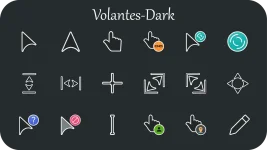
VOLANTES DARK MOUSE CURSORS FOR WINDOWS
To install the cursors :
=> Download zip file
=> Unzip it and you will find two folders named "Volantes_Dark" and "Volantes_Dark_Mini"
=> Navigate inside the Volantes_Dark folder for Regular version and Volantes_Dark_Mini folder for Mini version
=> Inside the folder you will find an Install.inf</b> file
=> Right click on the Install.inf file and select install
=> Now open Control Panel > Mouse > Pointers and select "Volantes Dark" or "Volantes Dark Mini" from the drop down menu depending on the version you installed
You do not have permission to view the full content of this post. Log in or register now.
117.22 KB