 PH
PH-
Welcome to PHCorner Forums! Sign up for free to unlock full access and exclusive privileges, including:
- Asking questions about computer and mobile issues
- Discovering internet tips for your mobile network and computer
You are using an out of date browser. It may not display this or other websites correctly.
You should upgrade or use an alternative browser.
You should upgrade or use an alternative browser.
🔒 Closed CHERRY MOBILE FLARE J1
- Thread starter adrijan
- Start date
- Status
- Not open for further replies.
Princess Siren
Honorary Poster
Cherry mobile flare j1 v2 sinu may backup ng twrp or cwm o philz pa link nmn at ng stock rom
hersheybby05
Journeyman
Guys ?? Same Problem Here.
NagFlash Ako Ng SuperSU.zip Tapos Nakalimutan Ko MagClean Dalvic. O Wipe. Ayun NagHang Sa Logo. PatuLong Guys..
NagFlash Ako Ng SuperSU.zip Tapos Nakalimutan Ko MagClean Dalvic. O Wipe. Ayun NagHang Sa Logo. PatuLong Guys..
reyha4ever
Fanatic
cm flare j1 stock rom v3 link You do not have permission to view the full content of this post.
Log in or register now.
procedure:
Flashing Stock Rom To Android Smartphone
Install Spreadtrum Driver
Flash Pac file Stock Rom
pki try nalang guys sana maka tulong.. feedback if not working..
procedure:
Flashing Stock Rom To Android Smartphone
Install Spreadtrum Driver
- First download You do not have permission to view the full content of this post. Log in or register now. the complete driver for Spreadtrum.
- After download, extract anywhere in your computer, then select system type if 32-bit or 64-bit.
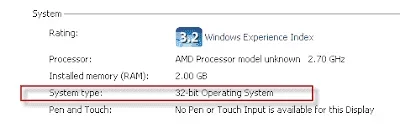
- To know your system type, go to control panel click on System and Security then click System. or simply right click on Computer and click Properties. you will see like this. mine is 32 bit (also known as x86-bit).
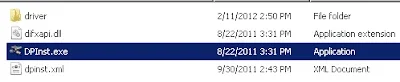
- After you knew your system type, open your extracted SCI-android-usb-driver-jungo-v4 folder, then choose a folder weather it is x86(32) or x64, then run DPInst.exe. Just click next until it finish installing.
Flash Pac file Stock Rom
- Download the You do not have permission to view the full content of this post. Log in or register now. latest version, or You do not have permission to view the full content of this post. Log in or register now. lower version. Then extract to your desired location.
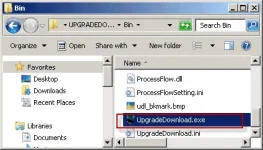
- Open your extracted files and run ResearchDownload.exe, For lower version open Bin folder and run UpgradeDownload.exe.
NOTE: UpgradeDownload and ResearchDownload is the same, UpgradeDownload is just the name of the lower version but they are both SPD Upgrade tool.
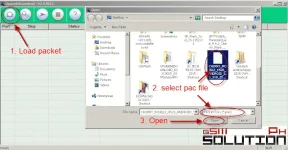
- In this instruction I will use UpgradeDownload and a Use Cherry Mobile Pac file as a sample. In UpgradeDownload window, click on single gear icon to Load Packet and browse for pac file(firmware/stock rom) you downloaded then click open. follow this screenshot.
- Loading a pac file may took long depend on file size. After loading a pac file, now ready to start flashing, You can also click on Settings on two gear icon if you want to unchecked some part of firmware like EraseRuntimeNV, This will not work on lower version. I recommend that leave it unchanged if you don't have any idea.
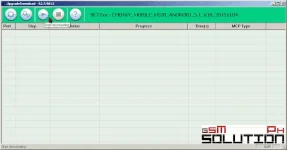
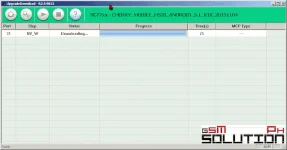
- Turn off first your phone, remove battery (if removable) then bring it back. In ResearchDownload/UpgradeDownload Click on Start Downloading, then in your phone press Volume up and Volume down then connect USB cable. If you see a a progress bar, then it means that it is successfully connected. if not, then try step 5 again.
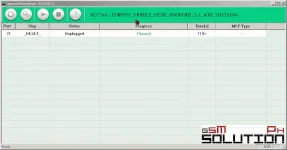
- Wait until you see a Passed in progress, that means, you installed a new stock rom successfully.
pki try nalang guys sana maka tulong.. feedback if not working..
reyha4ever
Fanatic
pahelp naman po paano po ba i flash yung pac file ng flare j1 needhelp po please
cm flare j1 stock rom v3 link You do not have permission to view the full content of this post. Log in or register now.
procedure:
Flashing Stock Rom To Android Smartphone
Install Spreadtrum Driver
NOTE: Before proceeding, make sure that your android smartphone should have atleast 30 to 50 percent of battery to perform flashing.
- First download You do not have permission to view the full content of this post. Log in or register now. the complete driver for Spreadtrum.
- After download, extract anywhere in your computer, then select system type if 32-bit or 64-bit.
- To know your system type, go to control panel click on System and Security then click System. or simply right click on Computer and click Properties. you will see like this. mine is 32 bit (also known as x86-bit).
You do not have permission to view the full content of this post. Log in or register now.- After you knew your system type, open your extracted SCI-android-usb-driver-jungo-v4 folder, then choose a folder weather it is x86(32) or x64, then run DPInst.exe. Just click next until it finish installing.
You do not have permission to view the full content of this post. Log in or register now.
Flash Pac file Stock Rom
After you flash the firmware, you can now turn on your phone, take note that first time start up may took long. but if it tooks more than 15 minutes then I suggest to perform a hard reset. you can search a procedure in google. "
- Download the You do not have permission to view the full content of this post. Log in or register now. latest version, or You do not have permission to view the full content of this post. Log in or register now. lower version. Then extract to your desired location.
- Open your extracted files and run ResearchDownload.exe, For lower version open Bin folder and run UpgradeDownload.exe.
NOTE: UpgradeDownload and ResearchDownload is the same, UpgradeDownload is just the name of the lower version but they are both SPD Upgrade tool.
You do not have permission to view the full content of this post. Log in or register now.- In this instruction I will use UpgradeDownload and a Use Cherry Mobile Pac file as a sample. In UpgradeDownload window, click on single gear icon to Load Packet and browse for pac file(firmware/stock rom) you downloaded then click open. follow this screenshot.
You do not have permission to view the full content of this post. Log in or register now.- Loading a pac file may took long depend on file size. After loading a pac file, now ready to start flashing, You can also click on Settings on two gear icon if you want to unchecked some part of firmware like EraseRuntimeNV, This will not work on lower version. I recommend that leave it unchanged if you don't have any idea.
You do not have permission to view the full content of this post. Log in or register now.- Turn off first your phone, remove battery (if removable) then bring it back. In ResearchDownload/UpgradeDownload Click on Start Downloading, then in your phone press Volume up and Volume down then connect USB cable. If you see a a progress bar, then it means that it is successfully connected. if not, then try step 5 again.
You do not have permission to view the full content of this post. Log in or register now.- Wait until you see a Passed in progress, that means, you installed a new stock rom successfully.
You do not have permission to view the full content of this post. Log in or register now.
pki try nalang guys sana maka tulong.. feedback if not working..
RaijinSuan
Enthusiast
meron po kayong flare j1s b na firmware?
thanks in advance...
thanks in advance...
reyha4ever
Fanatic
try mo po to kaso hindi ko tested yung rom pero yung site tested ko..Boss May sa ME Vibe po kyu stock rom. cm9u .tnx sa tulong po
Black_jack1933
Enthusiast
Tnx boss
mechelle01
Leecher
pano po ma fix ang touch .plz help
reyha4ever
Fanatic
flash mo yung v.3 na stock rom para walang problema sa touch.pano po ma fix ang touch .plz help
mechelle01
Leecher
salamat
link po plz ..
link po plz ..
reyha4ever
Fanatic
nasa taas yung link.. basa nalng po pag-may time para maraming learning.. ^^salamat
link po plz ..
mechelle01
Leecher
ty po na download ko na po
gumana .salamat ng marami .
proven talaga ....
gumana .salamat ng marami .
proven talaga ....
mechelle01
Leecher
meron po ba kayung pussyfap sa cherry mobile me pop?
- Status
- Not open for further replies.
About this Thread
-
54Replies
-
15KViews
-
33Participants
Last reply from:
mechelle01
mechelle01
New Topics
-
[11/10/26] - A.N.TOOL v4.6 [Life time Free]
- Started by vivek1
- Replies: 0
- 📖 Android Guides, Recoveries, ROMs
-
[12/10/26] - KG Killer Tool V3.8.0 Cr@cked
- Started by vivek1
- Replies: 0
- 📖 Android Guides, Recoveries, ROMs
-
[11/10/26] - TSM-Tool PRO Edition Cr@cked
- Started by vivek1
- Replies: 6
- 📖 Android Guides, Recoveries, ROMs
-
Top 5 Best Android Phones in the market today
- Started by francis3
- Replies: 10
- 📖 Android Guides, Recoveries, ROMs
-
S10 Plus custom rom
- Started by Zhao_Da_Great
- Replies: 0
- 📖 Android Guides, Recoveries, ROMs
-
Reset and forgot google help
- Started by markienza
- Replies: 2
- 📖 Android Guides, Recoveries, ROMs
-
Payment was not approved
- Started by kcee23
- Replies: 1
- 📖 Android Guides, Recoveries, ROMs
-
Help how to unlock my samsung sgh-a927
- Started by hitsumiki
- Replies: 2
- 📖 Android Guides, Recoveries, ROMs
Trending Topics
Online now
- Members online
- 1,164
- Guests online
- 7,402
- Total visitors
- 8,566