๐Ÿ”’ Closed Basic HTML

Status
Not open for further replies.

Palmeras

Forum Guru
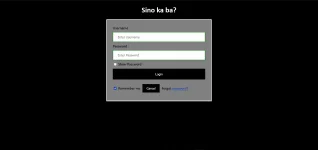
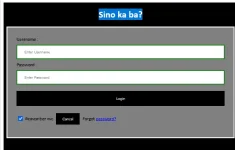
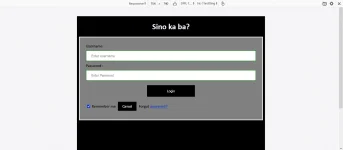
yo paps tanong ko lang paano magiging white 'tong "Sino ka ba?"

pati rin pala yung sa password yung text muna tas magiging asterisk yung tinype if possible ba yon?
1632711101245.png


wala po ako alam sa HTML hahahahaha

Maraming salamat sa tutulong
Code:
<!DOCTYPE html>
<html>
<head>
<meta name="viewport" content="width=device-width, initial-scale=1">
<title> Login Page </title>
<style>
Body {
  font-family: Calibri, Helvetica, sans-serif;
  background-color: black;
}
button {
       background-color: #000000;
       width: 100%;
        color: white;
        padding: 15px;
        margin: 10px 0px;
        border: none;
        cursor: pointer;
         }
 form {
        border: 3px solid #f1f1f1;
    }
 input[type=text], input[type=password] {
        width: 100%;
        margin: 8px 0;
        padding: 12px 20px;
        display: inline-block;
        border: 2px solid green;
        box-sizing: border-box;
    }
 button:hover {
        opacity: 0.7;
    }
  .cancelbtn {
        width: auto;
        padding: 10px 18px;
        margin: 10px 5px;
    }
     
 
 .container {
        padding: 25px;
        background-color: grey;
    }
</style>
</head>
<body>
    <center> <h1> Sino ka ba? </h1> </center>

    <form>
        <div class="container">
            <label>Username : </label>
            <input type="text" placeholder="Enter Username" name="username" required>
            <label>Password : </label>
            <input type="password" placeholder="Enter Password" name="password" required>
            <button type="submit">Login</button>
            <input type="checkbox" checked="checked"> Remember me
            <button type="button" class="cancelbtn"> Cancel</button>
            Forgot <a href="#"> password? </a>
        </div>
    </form>  
</body>  
</html>
 
Kung gusto mo palitan background,

<h1 style="background-color: white;"> Sino ka ba? </h1>

Huwag kang gumamit ng center tag deprecated na yan. try mo to:
<h1 style="background-color: white; text-align: center;"> Sino ka ba? </h1>
 
Try mo ito

Replace mo yung
<h1> Sino ka ba? </h1>

maging

<h1 style="color:white;">Sino ka ba?</h1>
Thanks paps
Kung gusto mo palitan background,

<h1 style="background-color: white;"> Sino ka ba? </h1>

Huwag kang gumamit ng center tag deprecated na yan. try mo to:
<h1 style="background-color: white; text-align: center;"> Sino ka ba? </h1>
Salamat papsi gets gets
 
May dinagdag ka atang mga style, paste mo nga lahat ng code mo kasi ok naman sakin.

9.webp


HTML:
<!DOCTYPE html>
<html>
<head>
<meta name="viewport" content="width=device-width, initial-scale=1">
<title> Login Page </title>
<style>
Body {
  font-family: Calibri, Helvetica, sans-serif;
  background-color: black;
}
button {
       background-color: #000000;
        color: white;
        padding: 15px;
        margin: 10px 0px;
        border: none;
        cursor: pointer;
         }
 form {
        border: 3px solid #f1f1f1;
    }
 input[type=text], input[type=password] {
        width: 100%;
        margin: 8px 0;
        padding: 12px 20px;
        display: inline-block;
        border: 2px solid green;
        box-sizing: border-box;
    }
 button:hover {
        opacity: 0.7;
    }
  .cancelbtn {
        width: auto;
        padding: 10px 18px;
        margin: 10px 5px;
    }
   
 
 .container {
        padding: 25px;
        background-color: grey;
    }

 .container > button:nth-child(5) {
      display: block;
      margin-inline: auto;
      padding-inline: 5rem;
  }
 
</style>
</head>
<body>
    <center> <h1 style="color: white;"> Sino ka ba? </h1> </center>

    <form>
        <div class="container">
            <label>Username : </label>
            <input type="text" placeholder="Enter Username" name="username" required>
            <label>Password : </label>
            <input type="password" placeholder="Enter Password" name="password" required>
            <button type="submit">Login</button>
            <input type="checkbox" checked="checked"> Remember me
            <button type="button" class="cancelbtn"> Cancel</button>
            Forgot <a href="#"> password? </a>
        </div>
    </form>
</body>
</html>
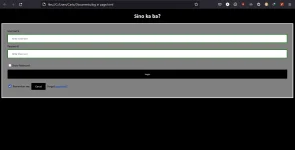
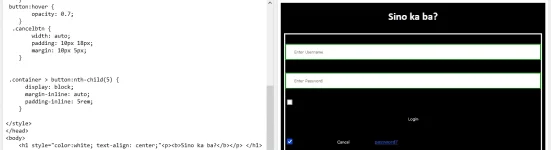
Kinopy ko lang yung code mo then inalis yunf width:100% sa button, then dinagdag yung style sa login button para macenter.
 
May dinagdag ka atang mga style, paste mo nga lahat ng code mo kasi ok naman sakin.

View attachment 1637374


HTML:
<!DOCTYPE html>
<html>
<head>
<meta name="viewport" content="width=device-width, initial-scale=1">
<title> Login Page </title>
<style>
Body {
  font-family: Calibri, Helvetica, sans-serif;
  background-color: black;
}
button {
       background-color: #000000;
        color: white;
        padding: 15px;
        margin: 10px 0px;
        border: none;
        cursor: pointer;
         }
 form {
        border: 3px solid #f1f1f1;
    }
 input[type=text], input[type=password] {
        width: 100%;
        margin: 8px 0;
        padding: 12px 20px;
        display: inline-block;
        border: 2px solid green;
        box-sizing: border-box;
    }
 button:hover {
        opacity: 0.7;
    }
  .cancelbtn {
        width: auto;
        padding: 10px 18px;
        margin: 10px 5px;
    }
  
 
 .container {
        padding: 25px;
        background-color: grey;
    }

 .container > button:nth-child(5) {
      display: block;
      margin-inline: auto;
      padding-inline: 5rem;
  }
 
</style>
</head>
<body>
    <center> <h1 style="color: white;"> Sino ka ba? </h1> </center>

    <form>
        <div class="container">
            <label>Username : </label>
            <input type="text" placeholder="Enter Username" name="username" required>
            <label>Password : </label>
            <input type="password" placeholder="Enter Password" name="password" required>
            <button type="submit">Login</button>
            <input type="checkbox" checked="checked"> Remember me
            <button type="button" class="cancelbtn"> Cancel</button>
            Forgot <a href="#"> password? </a>
        </div>
    </form>
</body>
</html>
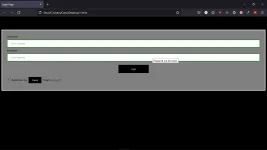
Kinopy ko lang yung code mo then inalis yunf width:100% sa button, then dinagdag yung style sa login button para macenter.
1632722128724.webp


ganito pa rin sir eh pero hayaan na hindi naman ako IT student hahahah salamat poooo
 
Bakit ano ba talaga yung gusto mo na maging final output? Sabi icenter yung login button, madali lang naman iadjust lahat yan eh, saka yung sa h1 palitan mo ng ganito <h1 style="color: white;"> Sino ka ba? </h1> para makita
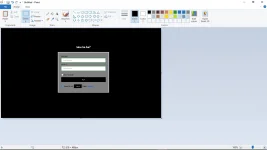
yung bg po black then yung gray na box na may white outline eh nasa pinakagitna na square shape

ganito sir
1632722608494.webp
 
yung bg po black then yung gray na box na may white outline eh nasa pinakagitna na square shape

ganito sir
View attachment 1637819
Code:
<!DOCTYPE html>
<html>
<head>
<meta name="viewport" content="width=device-width, initial-scale=1">
<title> Login Page </title>
<style>
Body {
  font-family: Calibri, Helvetica, sans-serif;
  background-color: black;
}
button {
       background-color: #000000;
       width: 100%;
        color: white;
        padding: 15px;
        margin: 10px 0px;
        border: none;
        cursor: pointer;
         }
 form {
        border: 3px solid #f1f1f1;
        width: 350px;
        margin: auto;
    }
 input[type=text], input[type=password] {
        width: 100%;
        margin: 8px 0;
        padding: 12px 20px;
        display: inline-block;
        border: 2px solid green;
        box-sizing: border-box;
    }
 button:hover {
        opacity: 0.7;
    }
  .cancelbtn {
        width: auto;
        padding: 10px 18px;
        margin: 10px 5px;
    }
    
 
 .container {
        padding: 25px;
        background-color: grey;
        width: 300px;
        margin: auto;
    }
</style>
</head>
<body>
    <center> <h1> Sino ka ba? </h1> </center>

    <form>
        <div class="container">
            <label>Username : </label>
            <input type="text" placeholder="Enter Username" name="username" required>
            <label>Password : </label>
            <input type="password" placeholder="Enter Password" name="password" required>
            <button type="submit">Login</button>
            <input type="checkbox" checked="checked"> Remember me
            <button type="button" class="cancelbtn"> Cancel</button>
            Forgot <a href="#"> password? </a>
        </div>
    </form> 
</body> 
</html>
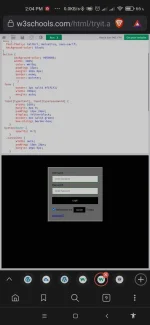
Output:
Screenshot_2021-09-27-14-04-43-974_com.brave.browser.webp
 
yung bg po black then yung gray na box na may white outline eh nasa pinakagitna na square shape

ganito sir
View attachment 1637819
11.webp


HTML:
<!DOCTYPE html>
<html>
<head>
<meta name="viewport" content="width=device-width, initial-scale=1">
<title> Login Page </title>
<style>
Body {
  font-family: Calibri, Helvetica, sans-serif;
  background-color: black;
}
button {
       background-color: #000000;
        color: white;
        padding: 15px;
        margin: 10px 0px;
        border: none;
        cursor: pointer;
         }
 form {
        
    }
 input[type=text], input[type=password] {
        width: 100%;
        margin: 8px 0;
        padding: 12px 20px;
        display: inline-block;
        border: 2px solid green;
        box-sizing: border-box;
    }
 button:hover {
        opacity: 0.7;
    }
  .cancelbtn {
        width: auto;
        padding: 10px 18px;
        margin: 10px 5px;
    }
    
 
 .container {
        width:400px;
        max-width: 100%;
        padding: 25px;
        background-color: grey;
        border: 3px solid #f1f1f1;
        margin-inline: auto;
    }

 .container > button:nth-child(6) {
      display: block;
      width: 100%;
  }


</style>
</head>
<body>
    <center> <h1 style="color: white;"> Sino ka ba? </h1> </center>

    <form>
        <div class="container">
            <label>Username : </label>
            <input type="text" placeholder="Enter Username" name="username" required>
            <label>Password : </label>
            <input type="password" placeholder="Enter Password" name="password" required>
            <input type="checkbox"> Show Password
            <button type="submit">Login</button>
            <input type="checkbox" checked="checked"> Remember me
            <button type="button" class="cancelbtn"> Cancel</button>
            Forgot <a href="#"> password? </a>
        </div>
    </form> 
</body> 
</html>
 
Status
Not open for further replies.

About this Thread

  • 36
    Replies
  • 2K
    Views
  • 8
    Participants
Last reply from:
phdevnjb

Online now

Members online
1,050
Guests online
1,014
Total visitors
2,064

Forum statistics

Threads
2,277,032
Posts
28,973,829
Members
1,229,693
Latest member
riogab
Back
Top