🔒 Closed PC APP / Microsoft Office LTSC Professional Plus 2021 (ACTIVATED)

Status
Not open for further replies.

Fluppy

Fanatic
ms office 2021.png2021.png2.png4.png6.png

CTTO:
*****sHash.com

File SIze:

4.9GB

Download:

You do not have permission to view the full content of this post. Log in or register now. (ACTIVATED)

Instruction:


HOW TO INSTALL

0. Disable your Windows defender or Antivirus. (Otherwise it'll cause problem during installation)
1. Download the MS Office.
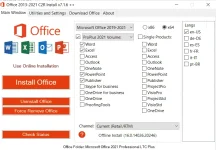
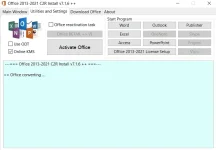
2. Run OInstall.exe and select which MS Office you want to install.. Ms Office 2016 or 2019 or 2021.
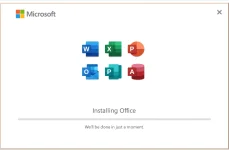
3. Click on Install Office
4. Give it sometime and it'll install.
5. Now, to activate the MS Office.. within OInstall, go to Utilities tab and click- Office RETAIL = VL button
6. It'll take sometime... have patience.
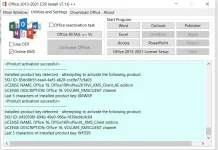
7. Now click on Activate Office
7. Wait for sometime.. it'll do its magic to activate office.
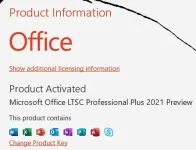
8. Boom! Product Activated.. Enjoy now.

-------------------------------------------------------------------------------------------

You can also use activation script to acivate the MS Office
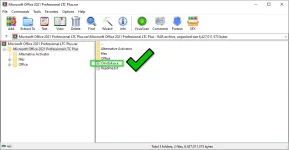
1. Go to Alternative Ac†ïvâ†ør and extract the zip file.
2. Run the ac†ïvâ†ør as admin.
3. Use it to activate your MS Office.


Code:
[/CODE][/CODE]
Code:
 
That is the file exactly how it looks like..but first you need to follow the instructions.
Instructions are clear listed above..try to follow what is said to do so..
*Try to extract the file first before opening it.
I don't need this actually. I just showed in my comment that there is in fact the OInstall.exe in the RAR archive. And I was able to download the RAR archive successfully intact even with my anti-virus (Windows Defender) enabled.

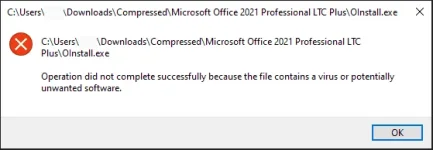
Sure, before running OInstall.exe, the anti-virus must be temporarily disabled because of this 👇:
virusalert.webp

But like I said, it's not my problem since I don't have to install this on my system anyway---I merely commented on Barbie20's post.
 
Status
Not open for further replies.

About this Thread

  • 97
    Replies
  • 3K
    Views
  • 52
    Participants
Last reply from:
Fluppy

Online now

Members online
472
Guests online
1,118
Total visitors
1,590

Forum statistics

Threads
2,289,501
Posts
29,058,850
Members
1,213,836
Latest member
nyrei
Back
Top