 PH
PHAnsufati12
Eternal Poster
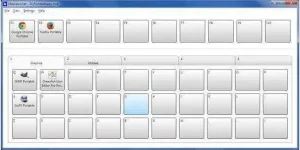
MaxLauncher 1.30.0 Multilingual
File Size : 1.8 Mb
MaxLauncher is designed to ease the work of each computer user, providing one-click access to favorite folders and frequently used files and documents. With its help, you can have all your shortcuts placed within a simple window, without cluttering the desktop or the taskbar.Quickly access your files and folders
Not only that your working area becomes more airy and organized, but the amount of time you need to run an application or open a folder is significantly reduced, improving workflow.
MaxLauncher displays a forthright interface where you can create up to ten shortcuts, assigning a button to each. Editing a new shortcut is done by choosing the designated option in the right-click menu or by simply dragging and dropping a program or a folder to one of the available buttons.
Set the position and size of the opened windows
Users can customize the name of the application and set additional execution arguments. Applications and folders can start minimized, maximized, hidden or in normal mode, with or without administrative privileges.
One interesting feature is that you can configure the position of the opened window and its size. On the downside, MaxLauncher only offers predefined options, not giving you the freedom to customize the window location and its size exactly as you wish.
Unclutter your desktop, while accessing files just as easy
With a few improvements here and there, MaxLauncher could really come in handy to any user, especially those who are working with a large number of applications at the same time. It practically is a file and folder launcher, with accessible options and customizable looks. Kept on top of all the other opened programs, it can easily encase all the shortcut that make your desktop look crowded.
Features:
Ability to launch an item (i.e.. program, folder, or command) in two or three keystrokes
Favorites bar with 10 configurable buttons each corresponding to F1-F10 keys
Create up to ten tabs. Each tab consists of 30 configurable buttons for a total of 300 configurable buttons for each file (*.mld). Each tab corresponds to the number 1-0 and the buttons on each tab correspond to the letters/symbols below the number keys
Data is contained in one text file (*.mld) in XML format
Multiple files (*.mld) can be created to further group items (e.g.. work, home, project1, etc.). Simply assign a *.mld file to a button to load.
Drag and drop support
Support for international keyboard layouts
Configurable hotkey to launch the program
Option to change a program's initial window size and location
Ability to run multiple instances
Ability to run in portable mode(e.g.. on a usb stick or external hard drive)
Supports custom themes
Runs on 32 and 64-bit versions
Custom window size (v 0.3.0.0)
Custom application icon (v 0.4.0.0)
Read-only mode
Multi-launch (0.7.0.0)
User customizable themes