 PH
PHdoctorPain042301
Journeyman
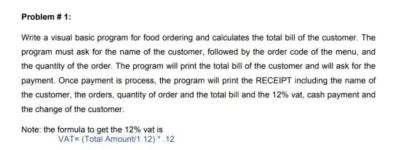
Good evening phc ..
baka naman po may maka pansin at nais tumulong d ko kasi maharap mag hanap ng codes eh wala kasi yung loptop ko ..salamat po

-----MENU------
[1] Sinigang  - ₱ 50.00
[2] Adobo     - ₱ 40.00
[3] Kaldereta - ₱ 70.00

Input menu order number > 2
How many you want to order? > 100

-----YOUR RECEIPT-----
Customer Name: zack
Ordered Item: Adobo
Ordered Price: ₱ 40
Total Amount: ₱ 4,000
VAT 12%: 428.57
----------------------peso_sign = u"\u20B1"
customer_name = input('Input your name first: ')
def calculate_VAT(total_amount):
return round(float(total_amount) / 1.12 * .12, 2)
def printMenu():
print('\n-----MENU------\n'
f'[1] Sinigang - {peso_sign} 50.00\n'
f'[2] Adobo - {peso_sign} 40.00\n'
f'[3] Kaldereta - {peso_sign} 70.00\n'
)
while True:
printMenu()
selected_menu = int(input('Input menu order number > '))
total_menu = input('How many you want to order? > ')
match selected_menu:
case 1:
menu_item = 'Sinigang'
menu_price = 50
case 2:
menu_item = 'Adobo'
menu_price = 40
case 3:
menu_item = 'Kaldereta'
menu_price = 70
total_amount = int(menu_price) * int(total_menu)
print(
'\n-----YOUR RECEIPT-----\n'
f'Customer Name: {customer_name}\n'
f'Ordered Item: {menu_item}\n'
f'Ordered Price: {peso_sign} {menu_price}\n'
f'Total Amount: {peso_sign} {total_amount:,}\n'
f'VAT 12%: {calculate_VAT(total_amount)}\n'
'----------------------\n'
)
select_again = input('Would you like to order another menu? > ')
if select_again.lower() != 'y':
break
print()
Di mo need iconvert. Pag-aralan mo lang yung logic niya.Mahirap i convert boss nakaka lito mga functions
Pano to paps?Parang ganito concept. Pero makakaya mo to itranslate to VB
Code:-----MENU------ [1] Sinigang - ₱ 50.00 [2] Adobo - ₱ 40.00 [3] Kaldereta - ₱ 70.00 Input menu order number > 2 How many you want to order? > 100 -----YOUR RECEIPT----- Customer Name: zack Ordered Item: Adobo Ordered Price: ₱ 40 Total Amount: ₱ 4,000 VAT 12%: 428.57 ----------------------
Ipagpatuloy mo para sa multiple ordered items.
For single item order lang to
Python:peso_sign = u"\u20B1" customer_name = input('Input your name first: ') def calculate_VAT(total_amount): return round(float(total_amount) / 1.12 * .12, 2) def printMenu(): print('\n-----MENU------\n' f'[1] Sinigang - {peso_sign} 50.00\n' f'[2] Adobo - {peso_sign} 40.00\n' f'[3] Kaldereta - {peso_sign} 70.00\n' ) while True: printMenu() selected_menu = int(input('Input menu order number > ')) total_menu = input('How many you want to order? > ') match selected_menu: case 1: menu_item = 'Sinigang' menu_price = 50 case 2: menu_item = 'Adobo' menu_price = 40 case 3: menu_item = 'Kaldereta' menu_price = 70 total_amount = int(menu_price) * int(total_menu) print( '\n-----YOUR RECEIPT-----\n' f'Customer Name: {customer_name}\n' f'Ordered Item: {menu_item}\n' f'Ordered Price: {peso_sign} {menu_price}\n' f'Total Amount: {peso_sign} {total_amount:,}\n' f'VAT 12%: {calculate_VAT(total_amount)}\n' '----------------------\n' ) select_again = input('Would you like to order another menu? > ') if select_again.lower() != 'y': break print()
About sa question niya niyan.Pano to paps?
Wala kasi pc or laptop