 PH
PH-
Welcome to PHCorner Forums! Sign up for free to unlock full access and exclusive privileges, including:
- Asking questions about computer and mobile issues
- Discovering internet tips for your mobile network and computer
You are using an out of date browser. It may not display this or other websites correctly.
You should upgrade or use an alternative browser.
You should upgrade or use an alternative browser.
🔒 Closed HELP GALAXY S3 DOCOMO
- Thread starter oniv20
- Start date
- Status
- Not open for further replies.
Pag na palitan ba unlock na siya?Code lang yan diba. Ang cp mismo palitan mo muna ng ibang custom rom. Japanese version pa ata yan.
You do not have permission to view the full content of this post.
Log in or register now.
Dead link ung mga filesYou do not have permission to view the full content of this post. Log in or register now.
download ka na lang ng octopus na crack ayos yan kahit wala ka nang box
You do not have permission to view the full content of this post. Log in or register now.
You do not have permission to view the full content of this post. Log in or register now.
salamat sir.. meron ka po stock rom nito pang flash galaxy s3 SC-06D NTT DOCOMOdownload ka na lang ng octopus na ©râck ayos yan kahit wala ka nang box
You do not have permission to view the full content of this post. Log in or register now.
Ayaw gumana need ata mag downgrade ng os need ata rooted ang phonedownload ka na lang ng octopus na ©râck ayos yan kahit wala ka nang box
You do not have permission to view the full content of this post. Log in or register now.
check mo if supported nya meron yan auto root at direct unlock di ko na kasi na check if supported nya yung sc-06Dsalamat sir.. meron ka po stock rom nito pang flash galaxy s3 SC-06D NTT DOCOMO
Ayaw gumana need ata mag downgrade ng os need ata rooted ang phone
Oo sir andun ung unit model kaso kapag unlock ko dapat rooted ung phone.. Hirap naman iroot kasi mataas na daw ung version need ata downgrade..check mo if supported nya meron yan auto root at direct unlock di ko na kasi na check if supported nya yung sc-06D
How to Root Galaxy S3 SC-06D Running Android 4.1.2 Jelly Bean through Odin:Oo sir andun ung unit model kaso kapag unlock ko dapat rooted ung phone.. Hirap naman iroot kasi mataas na daw ung version need ata downgrade..
- Download CF-Auto-Root for Galaxy S3 06D and extract the Zip file: You do not have permission to view the full content of this post. Log in or register now.
- Download Odin 3.07 and extract the Zip file: You do not have permission to view the full content of this post. Log in or register now.
- Now, Switch off your phone and boot Galaxy S3 06D into Download Mode by pressing and holding the Volume Down+Home+Power buttons together (long press until the boot screen appear), now press Volume Up key to proceed to Download Mode.
- Run the Odin3 v3.07.exe file as an administrator (Right click on the .exe file and click on Run as administrator)
- Now connect your Galaxy S3 06D to your computer via USB cable
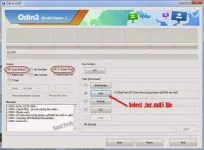
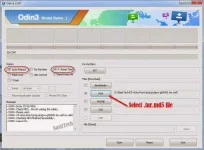
- In Odin3 screen, you should see a COM Port number like “0:[COM7]” at ID:COM section and “Added!” text at the message box. This means your device has been detected by Odin3.
- Make sure that, only the “Auto Reboot” and “F. Reset Time” options are checked.
- Now, click on the PDA button and select the CF-Auto-Root-d2dcm-d2om-sc06d.tar.md5 file.
- Finally, click on the Start button to begin the rooting process, wait few moments.
- Once completed, you would see “PASS!” message in ID:COM port having green background
- Your phone should automatically reboot after completion
- You can now disconnect your phone from computer
- Finish
na gawa ko na to ayaw naman ma root wala na labas na superuser... anu kaya best way para ma root?How to Root Galaxy S3 SC-06D Running Android 4.1.2 Jelly Bean through Odin:
- See more at: http://nasirtech.phc.onl/#forbidden...y-s3-sc-06d-running.html#sthash.aN1HycUI.dpuf
- Download CF-Auto-Root for Galaxy S3 06D and extract the Zip file: You do not have permission to view the full content of this post. Log in or register now.
- Download Odin 3.07 and extract the Zip file: You do not have permission to view the full content of this post. Log in or register now.
- Now, Switch off your phone and boot Galaxy S3 06D into Download Mode by pressing and holding the Volume Down+Home+Power buttons together (long press until the boot screen appear), now press Volume Up key to proceed to Download Mode.
- Run the Odin3 v3.07.exe file as an administrator (Right click on the .exe file and click on Run as administrator)
- Now connect your Galaxy S3 06D to your computer via USB cable
- In Odin3 screen, you should see a COM Port number like “0:[COM7]” at ID:COM section and “Added!” text at the message box. This means your device has been detected by Odin3.
- Make sure that, only the “Auto Reboot” and “F. Reset Time” options are checked.
- Now, click on the PDA button and select the CF-Auto-Root-d2dcm-d2om-sc06d.tar.md5 file.
- Finally, click on the Start button to begin the rooting process, wait few moments.
- Once completed, you would see “PASS!” message in ID:COM port having green background
- Your phone should automatically reboot after completion
- You can now disconnect your phone from computer
- Finish
di naman talaga naka built in ang su dun sir need mo mag dl ng su para mag grant kung successfull pagkaka flash at wala naman problema root po yan need mo lang imanual download ang super userna gawa ko na to ayaw naman ma root wala na labas na superuser... anu kaya best way para ma root?
sir ito naman ang problema lagi ito ang na labas "di naman talaga naka built in ang su dun sir need mo mag dl ng su para mag grant kung successfull pagkaka flash at wala naman problema root po yan need mo lang imanual download ang super user
Proper android device not found. Make shure that "USB debug" option on the device is turned on.
Phone unlocking failed" naka check naman sa cp ung debug...
read info mo sirsir ito naman ang problema lagi ito ang na labas "
Proper android device not found. Make shure that "USB debug" option on the device is turned on.
Phone unlocking failed" naka check naman sa cp ung debug...
nagawa ko na sir read info bago ko click ung unlock tapos ayon na lumabas..read info mo sir
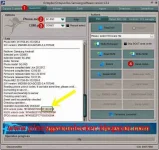
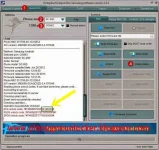
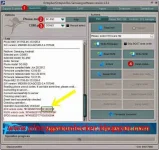
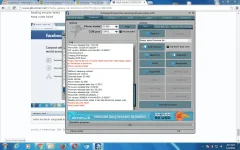
Welcome to Cracked By Gautam Samsung software version 1.6.5natry mo ba sir yung read info then read code paki indicate nga po yung log nya
-----------------------------------------------------------------------------------
To connect SC-06D phone you have to perform the following steps:
1. Disconnect USB cable from phone.
2. Go to Menu->Settings->Applications->Development.
3. Turn on "USB Debugging" option.
4. When message is appear press "Yes".
5. Go to dial window.
6. Enter "*#7284#" number.
7. Set "UART" radio button to "PDA" value.
8. Go to "Qualcomm USB Settings".
9. Select "DM+Modem+ADB".
10. Press Home button.
11. Go to dial window.
12. Enter "*#9090#" number.
13. Set "Diag config" to "UART" value.
14. Restart phone.
15. Press "Read Info" in software.
TTaskMessageDialog requires themes to be enabled
-----------------------------------------------------------------------------------
To connect SC-06D phone you have to perform the following steps:
1. Disconnect USB cable from phone.
2. Go to Menu->Settings->Applications->Development.
3. Turn on "USB Debugging" option.
4. When message is appear press "Yes".
5. Go to dial window.
6. Enter "*#7284#" number.
7. Set "UART" radio button to "PDA" value.
8. Go to "Qualcomm USB Settings".
9. Select "DM+Modem+ADB".
10. Press Home button.
11. Go to dial window.
12. Enter "*#9090#" number.
13. Set "Diag config" to "UART" value.
14. Restart phone.
15. Press "Read Info" in software.
-----------------------------------------------------------------------------------
Platform: Samsung Android
Selected port: COM12
Selected model: SC-06D
Reading info, please wait...
Proper android device not found. Make shure that "USB debug" option
on the device is turned on.
-----------------------------------------------------------------------------------
Platform: Samsung Android
Selected port: COM12
Selected model: SC-06D
Mode: Normal
Phone model: SC-06D
Firmware compiled date: May 15 2013
Firmware compiled time: 01:00:00
Firmware released date: Nov 28 2013
Firmware released time: 18:24:46
Phone IMEI: 353595-05-292254-1
SW version: M8960A-AAAANAZM-1.0.062017
-----------------------------------------------------------------------------------
Platform: Samsung Android
Selected port: COM12
Selected model: SC-06D
Mode: Normal
Phone model: SC-06D
Firmware compiled date: May 15 2013
Firmware compiled time: 01:00:00
Firmware released date: Nov 28 2013
Firmware released time: 18:24:46
Phone IMEI: 353595-05-292254-1
SW version: M8960A-AAAANAZM-1.0.062017
Unlocking phone...
Creating NVM backup
Reading NVM done!
Proper android device not found. Make shure that "USB debug" option
on the device is turned on.
Phone unlocking failed
-----------------------------------------------------------------------------------
Platform: Samsung Android
Selected port: COM12
Selected model: SC-06D
Mode: Normal
Phone model: SC-06D
Firmware compiled date: May 15 2013
Firmware compiled time: 01:00:00
Firmware released date: Nov 28 2013
Firmware released time: 18:24:46
Phone IMEI: 353595-05-292254-1
SW version: M8960A-AAAANAZM-1.0.062017
-----------------------------------------------------------------------------------
Platform: Samsung Android
Selected port: COM12
Selected model: SC-06D
Port is busy
Mode: Emergency
Unlock for SC-06D phone in emergency mode can’t be done
-----------------------------------------------------------------------------------
Platform: Samsung Android
Selected port: COM12
Selected model: SC-06D
Mode: Normal
Phone model: SC-06D
Firmware compiled date: May 15 2013
Firmware compiled time: 01:00:00
Firmware released date: Nov 28 2013
Firmware released time: 18:24:46
Phone IMEI: 353595-05-292254-1
SW version: M8960A-AAAANAZM-1.0.062017
-----------------------------------------------------------------------------------
Platform: Samsung Android
Selected port: COM12
Selected model: SC-06D
Mode: Normal
Phone model: SC-06D
Firmware compiled date: May 15 2013
Firmware compiled time: 01:00:00
Firmware released date: Nov 28 2013
Firmware released time: 18:24:46
Phone IMEI: 353595-05-292254-1
SW version: M8960A-AAAANAZM-1.0.062017
-----------------------------------------------------------------------------------
Platform: Samsung Android
Selected port: COM13
Selected model: SC-06D
Port is busy
Phone was not found on the selected port!
-----------------------------------------------------------------------------------
Platform: Samsung Android
Selected port: COM3
Selected model: SC-06D
Mode: Normal
Phone was not found on the selected port!
-----------------------------------------------------------------------------------
Platform: Samsung Android
Selected port: COM12
Selected model: SC-06D
Mode: Normal
Phone model: SC-06D
Firmware compiled date: May 15 2013
Firmware compiled time: 01:00:00
Firmware released date: Nov 28 2013
Firmware released time: 18:24:46
Phone IMEI: 353595-05-292254-1
SW version: M8960A-AAAANAZM-1.0.062017
-----------------------------------------------------------------------------------
Platform: Samsung Android
Selected port: COM12
Selected model: SC-06D
Mode: Normal
Phone model: SC-06D
Firmware compiled date: May 15 2013
Firmware compiled time: 01:00:00
Firmware released date: Nov 28 2013
Firmware released time: 18:24:46
Phone IMEI: 353595-05-292254-1
SW version: M8960A-AAAANAZM-1.0.062017
Unlocking phone...
Creating NVM backup
Reading NVM done!
Proper android device not found. Make shure that "USB debug" option
on the device is turned on.
Phone unlocking failed
natry mo ba sir yung read info then read code paki indicate nga po yung log nya
Attachments
lordbone24
Honorary Poster
happy new year!!!
Sir naka check naman ung usb debugg sa sa cp.. Tsaka dapat ba may sim?doon aman sa direct unlock make sure nakabukas ang screen sir baka need confirmation sa usb debugging a mimong unit nyo sir
- Status
- Not open for further replies.
About this Thread
-
22Replies
-
5KViews
-
4Participants
Last reply from:
Unknown user
Unknown user
New Topics
-
Parent po ako frp unlock tool na pwede sa oppo A6x
- Started by finndel
- Replies: 0
- 📖 Android Guides, Recoveries, ROMs
-
Pa rent po frp tool for oppo A6x
- Started by finndel
- Replies: 0
- 📖 Android Guides, Recoveries, ROMs
-
Old tcl smart tv walang tv guard at ps
- Started by grief
- Replies: 0
- 📖 Android Guides, Recoveries, ROMs
-
Parent po frp tool unlock tool for oppo A6x
- Started by finndel
- Replies: 1
- 📖 Android Guides, Recoveries, ROMs
-
Legion Y70 2026 CN to Global
- Started by --Chaeyoung--
- Replies: 4
- 📖 Android Guides, Recoveries, ROMs
-
Help NBA on Android 16
- Started by Mgcesson05
- Replies: 0
- 📖 Android Guides, Recoveries, ROMs
-
[HELP]MXQ PRO MASKROM
- Started by mikehacker182
- Replies: 0
- 📖 Android Guides, Recoveries, ROMs
-
Custom rom for android 16
- Started by I3eIV
- Replies: 4
- 📖 Android Guides, Recoveries, ROMs
-
Can anyone help me?
- Started by Sweetiefriend
- Replies: 0
- 📖 Android Guides, Recoveries, ROMs
Trending Topics
Online now
- Members online
- 1,044
- Guests online
- 2,822
- Total visitors
- 3,866