 PH
PHmay socials po ba siya? kahit paturo nalang ng methodTry mo kaya pa flash kay Master LENAR gamit luci web interface.
-
Welcome to PHCorner Forums! Sign up for free to unlock full access and exclusive privileges, including:
- Asking questions about computer and mobile issues
- Discovering internet tips for your mobile network and computer
You are using an out of date browser. It may not display this or other websites correctly.
You should upgrade or use an alternative browser.
You should upgrade or use an alternative browser.
PLDT Boosteven R281 (Band Locking)
- Thread starter L E N A R
- Start date
- Status
- Not open for further replies.
Meron yan alam na ni Master LENAR yan. Try mo tanungin baka compatible ito.meron kasi sa kapitbahay namin kahit yun nalang muna dukutin kaso yun nga lang, walang clear method pano ireflash
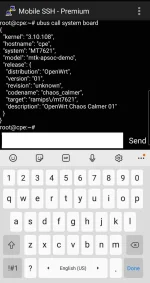
Attachments
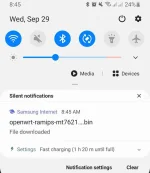
hintayin ko nalangMeron yan alam na ni Master LENAR yan. Try mo tanungin baka compatible ito.View attachment 1643000
Important Cguro yung para sa chipset model number mga Lods na mt7621
Image Files
These are the image files for the ramips/mt7621 target. Check that the sha256sum of the file you downloaded matches the sha256sum below.
Shortened image file names below have the same prefix: openwrt-21.02.0-rc1-ramips-mt7621-...
Mt7621 Bin files
mt7621-squashfs-sysupgrade.bin
You do not have permission to view the full content of this post. Log in or register now.
You do not have permission to view the full content of this post. Log in or register now.
MT7621 KERNEL. BIN
You do not have permission to view the full content of this post. Log in or register now.
You do not have permission to view the full content of this post. Log in or register now.
Sources
You do not have permission to view the full content of this post. Log in or register now.
You do not have permission to view the full content of this post. Log in or register now.
Image Files
These are the image files for the ramips/mt7621 target. Check that the sha256sum of the file you downloaded matches the sha256sum below.
Shortened image file names below have the same prefix: openwrt-21.02.0-rc1-ramips-mt7621-...
Mt7621 Bin files
mt7621-squashfs-sysupgrade.bin
You do not have permission to view the full content of this post. Log in or register now.
You do not have permission to view the full content of this post. Log in or register now.
MT7621 KERNEL. BIN
You do not have permission to view the full content of this post. Log in or register now.
You do not have permission to view the full content of this post. Log in or register now.
Sources
You do not have permission to view the full content of this post. Log in or register now.
You do not have permission to view the full content of this post. Log in or register now.
LuCI essentials
Introduction
While OpenWrt can be managed completely using SSH and the terminal, the LuCI WebUI makes many administration tasks easier. The OpenWrt full releases, such as the current 18.06.x series, ship with the LuCI WebUI installed. But for lower-memory devices, such as those with 4MBytes Flash and/or 32MBytes of RAM, the full install may fail because of lacking sufficient Flash memory so you will have to build your own image with LuCI included. More info on this can be obtained here.
Instructions
1. Basic installation
Install the required packages.
opkg update
opkg install luci
Now you can open LuCI interface.
2. Providing encryption
Install the required packages.
opkg update
opkg install luci-ssl
/etc/init.d/uhttpd restart
Reload LuCI interface and verify that you are using HTTPS.
3. Native language support
LuCI uses English by default. You can search and install additional packages for native language support.
opkg update
opkg list luci-i18n-\*
opkg install luci-i18n-hungarian
You can also install multiple language packs and switch between them in the LuCI settings.
LuCI is being actively translated into many languages by volunteers.
4. Additional web applications
Search and install luci-app-* packages if you want to configure services via LuCI.
opkg update
opkg list luci-app-\*
5. Alternative ports
Use alternative ports:
HTTP - 8080/TCP
HTTPS - 8443/TCP
uci -q delete uhttpd.main.listen_http
uci add_list uhttpd.main.listen_http="0.0.0.0:8080"
uci add_list uhttpd.main.listen_http="[::]:8080"
uci -q delete uhttpd.main.listen_https
uci add_list uhttpd.main.listen_https="0.0.0.0:8443"
uci add_list uhttpd.main.listen_https="[::]:8443"
uci commit uhttpd
/etc/init.d/uhttpd restart
Sources
You do not have permission to view the full content of this post. Log in or register now.
Introduction
While OpenWrt can be managed completely using SSH and the terminal, the LuCI WebUI makes many administration tasks easier. The OpenWrt full releases, such as the current 18.06.x series, ship with the LuCI WebUI installed. But for lower-memory devices, such as those with 4MBytes Flash and/or 32MBytes of RAM, the full install may fail because of lacking sufficient Flash memory so you will have to build your own image with LuCI included. More info on this can be obtained here.
Instructions
1. Basic installation
Install the required packages.
opkg update
opkg install luci
Now you can open LuCI interface.
2. Providing encryption
Install the required packages.
opkg update
opkg install luci-ssl
/etc/init.d/uhttpd restart
Reload LuCI interface and verify that you are using HTTPS.
3. Native language support
LuCI uses English by default. You can search and install additional packages for native language support.
opkg update
opkg list luci-i18n-\*
opkg install luci-i18n-hungarian
You can also install multiple language packs and switch between them in the LuCI settings.
LuCI is being actively translated into many languages by volunteers.
4. Additional web applications
Search and install luci-app-* packages if you want to configure services via LuCI.
opkg update
opkg list luci-app-\*
5. Alternative ports
Use alternative ports:
HTTP - 8080/TCP
HTTPS - 8443/TCP
uci -q delete uhttpd.main.listen_http
uci add_list uhttpd.main.listen_http="0.0.0.0:8080"
uci add_list uhttpd.main.listen_http="[::]:8080"
uci -q delete uhttpd.main.listen_https
uci add_list uhttpd.main.listen_https="0.0.0.0:8443"
uci add_list uhttpd.main.listen_https="[::]:8443"
uci commit uhttpd
/etc/init.d/uhttpd restart
Sources
You do not have permission to view the full content of this post. Log in or register now.
Lods, Hawk
Mukhang yung Bin files na nadownload mo ay para sa edimax wifi router na may chipset din na MT7621, pero mukhang universal
Check dto sa link
You do not have permission to view the full content of this post. Log in or register now.
Mukhang yung Bin files na nadownload mo ay para sa edimax wifi router na may chipset din na MT7621, pero mukhang universal
Check dto sa link
You do not have permission to view the full content of this post. Log in or register now.
Installing OpenWrt via TFTP
You do not have permission to view the full content of this post. Log in or register now.
Kaya pala maraming mtd files, ang R281 may mga Layers 1 to 7 etc....
You do not have permission to view the full content of this post. Log in or register now.
Kaya pala maraming mtd files, ang R281 may mga Layers 1 to 7 etc....
Attachments
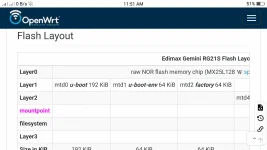
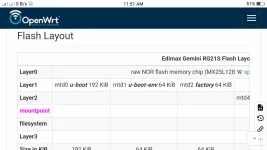
Wala kasing openwrt modem natin kaya try lang baka gumana.Installing OpenWrt via TFTP
You do not have permission to view the full content of this post. Log in or register now.
Kaya pala maraming mtd files, ang R281 may mga Layers 1 to 7 etc....
Wala kasing openwrt modem natin kaya try lang baka gumana.
Ok Bro, inde cguro working yung Copy Overwrite din yung lahat ng mga mtd files. Malamang ma brick r281
Yung mtd files pag naback up, inde ba yun nagiging. Bin files


Baka abutin ng pasko, Lods. Parang mas maganda buy ng bago, yung naka old firmware pa. Pwede tanggal muna Sim, tapos gawin yung old ways sa unlocking v4 baseband 2, pagkatapos ang final na gagawin, block auto updates. Mas madali gawin sa old firmwares
Sa New firmware na gamit natin, version 4.2 baseband 2.2 bandlocking lang talaga pwede at blocking auto updates.
Pero kung may new way mga masters. Pasalmat nalang tau


Mag uupdate na naman pldt nito basta may bagong unlocking method
Mag uupdate na naman pldt nito basta may bagong unlocking method
Nadukot mo na firmware mo, Lods.
Parang wala naman updates, limited supplies na smart sa r281
Kakadating lang ngayong araw ang r281 ko lodsNadukot mo na firmware mo, Lods.
Parang wala naman updates, limited supplies na smart sa r281
Palapag ako tuts lods para madukot ko yung firmware
Kakadating lang ngayong araw ang r281 ko lods
Palapag ako tuts lods para madukot ko yung firmware
Open naman lahat ports nyan Lods, Telnet SSH
Balita sa mga naka dukot ng old firmware?
Lods hawk, kaw mag guide kay Lods Ghost. Para madukot firmware sya yung batch ni Edward
Balita sa mga naka dukot ng old firmware?
Master Hawk, Patulong c Lods Ghost sa pag run .sh file sa bash console. D ko rin masundan sa pc mode, Bale yung Tutz ni Master Eugene dto, baka pwede gawa din kau Video tutz sa Pc/notebook. Cp mode lang kac nasundan, hehe
Can you make a dump full firmware for router on 192.168.1.1
and full firmware of lte modem on 192.168.8.1?
This is scripts to make it:
You do not have permission to view the full content of this post. Log in or register now.
unzip it
run in bash console
mtdbk_router.sh when ssh on 192.168.1.1 is available
and mtdbk_lte_modem.sh when router connected via usb and ssh 192.168.8.1 is available
It may be a little difficult to do for you the first time, write here to help you.
As a result, you should get two archives:
mtd_backup_cp.tgz
mtd_backup_ap.tgz
It will be very good if you send them to me.
Based on them, I can create openline firmware and instructions on how to flash our routers with any firmware version
so pag command AT+ZNLOCKBAND ang gamit ko and I want back to auto just enable lang lahat ng band so pano? manual input ko each band command to enable lahat?Kapag gumamit ka ng AT+ZNLOCKBAND kailangan mo rin enable lahat ng Band.
AT+ZNLOCKBAND=1,0,38008000055,0 - 1,3,5,7,28,40,41,42so pag command AT+ZNLOCKBAND ang gamit ko and I want back to auto just enable lang lahat ng band so pano? manual input ko each band command to enable lahat?
- Status
- Not open for further replies.
About this Thread
-
5KReplies
-
439KViews
-
368Participants
Last reply from:
-Synntaxx
-Synntaxx
New Topics
-
PLDT FiberHome HG6245D Brazilian Firmware
- Started by weah05
- Replies: 1
- 📡 Broadband, Modem, & Networking
-
-
Admin at password para sa ZTE model ZXHN F679D
- Started by TOpKILL
- Replies: 1
- 📡 Broadband, Modem, & Networking
-
FREE RAIN 101 UNLOCKER FW BUGOK 101
- Started by donamicvelazkiz
- Replies: 0
- 📡 Broadband, Modem, & Networking
-
[FREE] [APK] Rain101 Unlocker + BUGOK101 CFW [SUPER EZ]
- Started by bugok101
- Replies: 43
- 📡 Broadband, Modem, & Networking
-
Youtube No Ads DNS
- Started by cleverian
- Replies: 14
- 📡 Broadband, Modem, & Networking
-
Public DNS Tutorial
- Started by VCODE
- Replies: 14
- 📡 Broadband, Modem, & Networking
-
Open line Globe at home 101 5G, it's reasonable price?
- Started by G O Z A R U
- Replies: 13
- 📡 Broadband, Modem, & Networking
Trending Topics
-
-
-
-
-
Rain101 (Anti TTL) Bypass Datamaxx 5GUnli / Sayall 5G Unli ( No Connection )
- Shuuuuuuuun
Replies: 69 -
-
-
-
Online now
- Members online
- 1,204
- Guests online
- 7,148
- Total visitors
- 8,352