 PH
PH-
Welcome to PHCorner Forums! Sign up for free to unlock full access and exclusive privileges, including:
- Asking questions about computer and mobile issues
- Discovering internet tips for your mobile network and computer
You are using an out of date browser. It may not display this or other websites correctly.
You should upgrade or use an alternative browser.
You should upgrade or use an alternative browser.
🔒 Closed Pahelp valorant directx 11
- Thread starter yungmarka
- Start date
- Status
- Not open for further replies.
Man with No Name
Elite
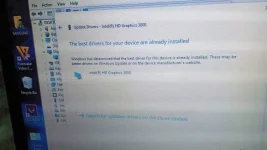
You can install it via Device Manager also.sir pasensya na po new user ako medyo magulo saken tong tut tnx po
1. Extract the contents of the cab file to a folder. Put that folder on the Desktop.
2. Open Device Manager then locate your Display Adapter (Intel(R) HD Graphics 3000) and right click on it then select "Update driver".
3. Select "Browse my computer for drivers".
4. Click Browse button and navigate to the folder on the Desktop (the one created in step 1). Click OK then Next.
5. Wait for the installation or whatever the result will be.
tnx poYou can install it via Device Manager also.
1. Extract the contents of the cab file to a folder. Put that folder on the Desktop.
2. Open Device Manager then locate your Display Adapter (Intel(R) HD Graphics 3000) and right click on it then select "Update driver".
3. Select "Browse my computer for drivers".
4. Click Browse button and navigate to the folder on the Desktop (the one created in step 1). Click OK then Next.
5. Wait for the installation or whatever the result will be.
salamat papsDagdag mo to nakalimutan ko e copy
DISM /Online /Add-Package /PackagePath:"C:\Users\SAMSUNG>\Desktop\........ .cab
ganyan po dapat not po lahat ah lagay mo nalang kulang
Youtube ka nalang di ko na alam HAHAHApuro directx lang po ginagawa ko wala na iba diko alam ung vscredist
oo nga paps ganon din sa youtube haha wala din naganaY⊕ùTùbé ka nalang di ko na alam HAHA
Man with No Name
Elite
Download this and extract the contents to a folder. Then open/run "DXSETUP.exe".
You do not have permission to view the full content of this post. Log in or register now.
iLoveYouMiriam
Honorary Poster
Wards
Epicskeller
Eternal Poster
Yung integrated graphics card mo is hindi niya supported drectx 11. Ganon din sakin. Luma cpu ng system unit ko kaya need ko bumili ng gpu hahahaha.
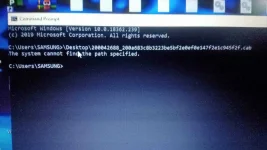
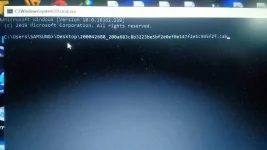
will try thisInstall it using Command Prompt.
1. Save the downloaded cab file on your desktop.
2. Open elevated Command Prompt.
3. Type this command:
example: DISM /Online /Add-Package /PackagePath:"C:\Users\your User Name\Desktop\200042688_200a683c8b3223be5bf2e0ef0e147f2e1c945f2f.cab
4. Hit Enter and wait for installation to finish.
5. Restart your computer (if needed).
El Rancho Corned Beef
Elite
Di po supported DX11 ang Intel Hd3000 na graphics hanggang 10.1 lang
- Status
- Not open for further replies.
About this Thread
-
40Replies
-
1KViews
-
9Participants
Last reply from:
Dranrus
Dranrus
New Topics
-
Halo Campaign Evolved Premium Edition MULTi13-ElAmigos
- Started by Villain-In-Glasses
- Replies: 0
- 🖥️ PC Gaming
-
All Will Fall MULTi12-ElAmigos
- Started by Villain-In-Glasses
- Replies: 0
- 🖥️ PC Gaming
-
Guilty Gear STRIVE Deluxe Edition MULTi9-ElAmigos
- Started by Villain-In-Glasses
- Replies: 0
- 🖥️ PC Gaming
-
The Outer Worlds Spacers Choice Edition MULTi11-ElAmigos
- Started by Villain-In-Glasses
- Replies: 1
- 🖥️ PC Gaming
-
PowerWash Simulator 2 v1.3.1.15
- Started by Edson101014
- Replies: 0
- 🖥️ PC Gaming
-
Graveyard Keeper 2 v1.006
- Started by Edson101014
- Replies: 0
- 🖥️ PC Gaming
-
007 First Light v1.2.2
- Started by Edson101014
- Replies: 0
- 🖥️ PC Gaming
-
The Muller-Powell Principle Directors Cut MULTi8-ElAmigos
- Started by Villain-In-Glasses
- Replies: 0
- 🖥️ PC Gaming
-
TRUSTED SITE FOR PRE-INSTALLED GAMES
- Started by SyntaxOP
- Replies: 3
- 🖥️ PC Gaming
-
Lawn Mowing Simulator 2 MULTi7-ElAmigos
- Started by Villain-In-Glasses
- Replies: 2
- 🖥️ PC Gaming
Trending Topics
Online now
- Members online
- 1,175
- Guests online
- 2,294
- Total visitors
- 3,469