 PH
PHPHC-PROXYPIRATE
Contributor
This is my full tutorial for the beginners  .
.
1st.) Open this website to create your free 30Days Vip Singapore Server here .
.
lionssh.com

2nd.) On The Upper Right Corner Click The Menu Tab .
.
And Choose For Ssh Ssl + Websocket.
Note: Only Singapore Server Is The Only One That Working In Websocket .
.
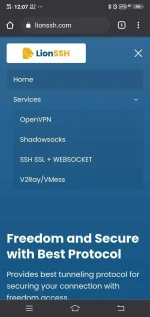
3rd.) As You Can See The Singapore Server .
.
Know Click Select Server and Choose For 30Days.
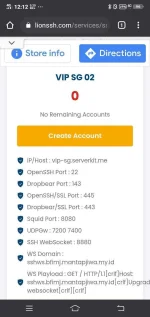
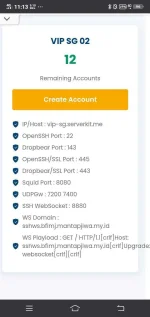
4th.) Scroll down till you see the Vip Sg Server.
Note: Sometimes this is full because this is very fast server and sometimes many of the users doing some îllégâl activities and this server will be turned to 0 remaining accounts .
.
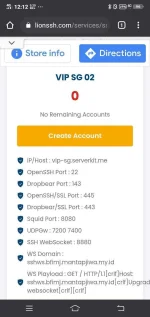
5th.) Click Create account and then fill the username and password for the account creation.
6th.) Now if you finish creating your free 30Days Vip Sg Account and paste your account in your notepad .
.
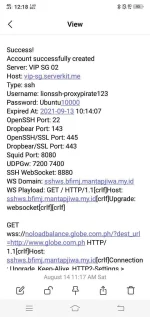
7th.) Copy the account details and then paste it into HTTP injector or any kind of vpn that contain ssh + remote proxy.
The Set Up Look Like This Based On The Picture.
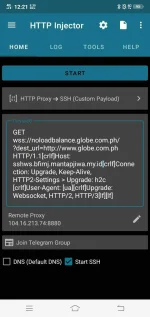
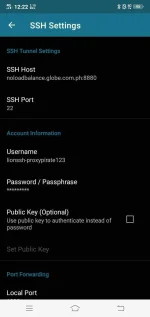
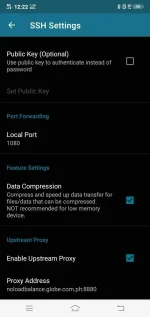
8th.) Done Success Connected Do Anything What You Want
 .
.
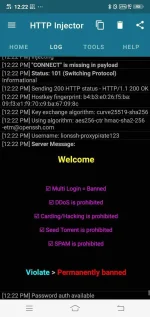
30Days Vip Singapore Server Here. With Payload Set Up Inside  .
.
Success!
Account successfully created
Server: VIP SG 02
Host: vip-sg.serverkit.me
Type: ssh
Username: lionssh-proxypirate123
Password: Ubuntu10000
Expired At: 2021-09-13 10:14:07
OpenSSH Port: 22
Dropbear Port: 143
OpenSSH/SSL Port: 445
Dropbear/SSL Port: 443
Squid Port: 8080
UDPGw: 7200 7400
SSH WebSocket: 8880
WS Domain: sshws.bfimj.mantapjiwa.my.id
WS Playload: GET / HTTP/1.1[crlf]Host: sshws.bfimj.mantapjiwa.my.id[crlf]Upgrade: websocket[crlf][crlf]
GET wss://noloadbalance.globe.com.ph/?dest_url=You do not have permission to view the full content of this post. Log in or register now. HTTP/1.1[crlf]Host: sshws.bfimj.mantapjiwa.my.id[crlf]Connection: Upgrade, Keep-Alive, HTTP2-Settings > Upgrade: h2c [crlf]User-Agent: [ua][crlf]Upgrade: Websocket, HTTP/2, HTTP/3[lf][lf]
Please Follow Me For More Updates.
Follow Me: PHC- PROXYPIRATE
.1st.) Open this website to create your free 30Days Vip Singapore Server here
.lionssh.com
2nd.) On The Upper Right Corner Click The Menu Tab
.And Choose For Ssh Ssl + Websocket
.Note: Only Singapore Server Is The Only One That Working In Websocket
.3rd.) As You Can See The Singapore Server
.Know Click Select Server and Choose For 30Days
.4th.) Scroll down till you see the Vip Sg Server
.Note: Sometimes this is full because this is very fast server and sometimes many of the users doing some îllégâl activities and this server will be turned to 0 remaining accounts
.5th.) Click Create account and then fill the username and password for the account creation
.6th.) Now if you finish creating your free 30Days Vip Sg Account and paste your account in your notepad
.7th.) Copy the account details and then paste it into HTTP injector or any kind of vpn that contain ssh + remote proxy
.The Set Up Look Like This Based On The Picture
.8th.) Done Success Connected Do Anything What You Want
.30Days Vip Singapore Server Here
. With Payload Set Up Inside .Success!
Account successfully created
Server: VIP SG 02
Host: vip-sg.serverkit.me
Type: ssh
Username: lionssh-proxypirate123
Password: Ubuntu10000
Expired At: 2021-09-13 10:14:07
OpenSSH Port: 22
Dropbear Port: 143
OpenSSH/SSL Port: 445
Dropbear/SSL Port: 443
Squid Port: 8080
UDPGw: 7200 7400
SSH WebSocket: 8880
WS Domain: sshws.bfimj.mantapjiwa.my.id
WS Playload: GET / HTTP/1.1[crlf]Host: sshws.bfimj.mantapjiwa.my.id[crlf]Upgrade: websocket[crlf][crlf]
GET wss://noloadbalance.globe.com.ph/?dest_url=You do not have permission to view the full content of this post. Log in or register now. HTTP/1.1[crlf]Host: sshws.bfimj.mantapjiwa.my.id[crlf]Connection: Upgrade, Keep-Alive, HTTP2-Settings > Upgrade: h2c [crlf]User-Agent: [ua][crlf]Upgrade: Websocket, HTTP/2, HTTP/3[lf][lf]
Please Follow Me For More Updates
.Follow Me:
PHC- PROXYPIRATE  ✌.
✌.

 .
.

