 PH
PH-
Welcome to PHCorner Forums! Sign up for free to unlock full access and exclusive privileges, including:
- Asking questions about computer and mobile issues
- Discovering internet tips for your mobile network and computer
You are using an out of date browser. It may not display this or other websites correctly.
You should upgrade or use an alternative browser.
You should upgrade or use an alternative browser.
🔒 Closed Watermark in Windows 8.1
- Thread starter AmehGoOoO
- Start date
- Status
- Not open for further replies.
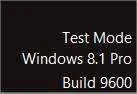
1. Open an elevated command prompt.
2. In the elevated command prompt, copy and paste the command below and press Enter
bcdedit.exe -set TESTSIGNING OFF
NOTE:
If you get the "The value is protected by Secure Boot policy and cannot be modified or deleted." error, then it mean that you must disable Secure Boot first, do this tutorial again, then enable Secure Boot when finished.
3. Close the elevated command prompt.
4. Restart the computer to apply.
2. In the elevated command prompt, copy and paste the command below and press Enter
bcdedit.exe -set TESTSIGNING OFF
NOTE:
If you get the "The value is protected by Secure Boot policy and cannot be modified or deleted." error, then it mean that you must disable Secure Boot first, do this tutorial again, then enable Secure Boot when finished.
3. Close the elevated command prompt.
4. Restart the computer to apply.
boss nawawala po ang audio pag naka command po ng ganyan sa cmd.. naka bootcamp lang kasi ako..1. Open an elevated command prompt.
2. In the elevated command prompt, copy and paste the command below and press Enter
bcdedit.exe -set TESTSIGNING OFF
NOTE:
If you get the "The value is protected by Secure Boot policy and cannot be modified or deleted." error, then it mean that you must disable Secure Boot first, do this tutorial again, then enable Secure Boot when finished.
3. Close the elevated command prompt.
4. Restart the computer to apply.
boss nawawala po ang audio pag naka command po ng ganyan sa cmd.. naka bootcamp lang kasi ako..
The task is to update the device driver using the driver from Cirrus Logic which can be found at
You do not have permission to view the full content of this post. Log in or register now. Select "WinVista" version on this page or use this link to download the zip that contains the drivers at You do not have permission to view the full content of this post. Log in or register now..
First unzip the drivers to a file folder of your choice that you will need to remember as you will need to point to it later, e.g. c:\users\yourname\Cirrus_Logic
Next find the audio device in device manager. Can use Search Settings "device", select "update device drivers" or "device manager" and find "Sound, Video, and Game Controllers". Under this item, you should see a High Definition Audio device that is working properly., Right Click on it and select "Update Driver Software", then "Browse My Computer for driver software", then navigate to or paste the folder path into the location window. Click Next, and it will start looking for drivers in that folder/path.
It should find the drivers and complete the installation and when it is done your sound device should now be named "Cirrus Logic". Be patient at this step, it can take a few minutes.
Must reboot computer at this point and then sound through speakers or audio jack should be working!

- Status
- Not open for further replies.
Similar threads
-
❓ Help Looking for Inventory and Accounting Program in Windows!
- Started by chaosyahwah
- Replies: 6
-
About this Thread
-
4Replies
-
351Views
-
2Participants
Last reply from:
AmehGoOoO
AmehGoOoO
New Topics
-
Request : 2027 calendars with Holidays
- Started by the_jinx
- Replies: 0
- ❓ Computer Discussion & Support
-
Dapat ba akong maalarma dito? Nagback-up na paunti-unti ako.
- Started by Jeii
- Replies: 0
- ❓ Computer Discussion & Support
-
Realtek audio missing in device manager
- Started by PHC-MERCURIAL
- Replies: 4
- ❓ Computer Discussion & Support
-
Suggest OS para sa budget pc yung lightweight.
- Started by YourR3ze
- Replies: 2
- ❓ Computer Discussion & Support
-
Microsoft copilot personal
- Started by WEIRJD
- Replies: 0
- ❓ Computer Discussion & Support
-
Lock profile or browser?
- Started by heyhey
- Replies: 7
- ❓ Computer Discussion & Support
-
Light/Gaming OS for 4 year old laptop
- Started by Genesis Storm
- Replies: 10
- ❓ Computer Discussion & Support
-
HWID SPOOFER HELP!
- Started by Balisain
- Replies: 0
- ❓ Computer Discussion & Support
-
LIGHTROOM APP PC
- Started by WHOOISDIYAAM
- Replies: 1
- ❓ Computer Discussion & Support
-
Active Directory tutorial
- Started by Allergies
- Replies: 1
- ❓ Computer Discussion & Support
Trending Topics
Online now
- Members online
- 682
- Guests online
- 3,035
- Total visitors
- 3,717