 PH
PHZhao_Da_Great
Elite
1. Go To: You do not have permission to view the full content of this post.
Log in or register now.
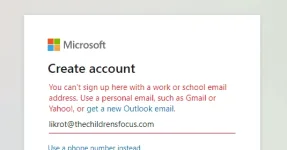
2. Create a temporary email ENSURE IT IS USING @thechildrensfocusom
3. Go To Microsoft Website You do not have permission to view the full content of this post. Log in or register now.
4. Enter Your Generated email address and hit sign up (If it's already in use generate a new email).
5. Go through the sign up process
You can use fake information or even your own if you feel like it, once done you will receive verification code on XKX where you had created the temp email. Copy that verification code and verify it.
6. Click Start and Then Skip
7. Click on Start after filling the form. On the next page click skip.
8. Press Next, It will ask for more information. Here you have to put more information so that you can access your account in any case you lose it or forget the password. I recommend enabling/setting up both options just to be safe. Click finish and enjoy!
Now just click finish and enjoy Microsoft Services like Office 365!
credits: Omar
2. Create a temporary email ENSURE IT IS USING @thechildrensfocusom
3. Go To Microsoft Website You do not have permission to view the full content of this post. Log in or register now.
4. Enter Your Generated email address and hit sign up (If it's already in use generate a new email).
5. Go through the sign up process
You can use fake information or even your own if you feel like it, once done you will receive verification code on XKX where you had created the temp email. Copy that verification code and verify it.
6. Click Start and Then Skip
7. Click on Start after filling the form. On the next page click skip.
8. Press Next, It will ask for more information. Here you have to put more information so that you can access your account in any case you lose it or forget the password. I recommend enabling/setting up both options just to be safe. Click finish and enjoy!
Now just click finish and enjoy Microsoft Services like Office 365!
credits: Omar
 pero salamat sa pagshare ts