 PH
PHmax_cute24
Honorary Poster
Good Day mga ka phc,
Have you tried ba nitong procedure to set sd card as Internal Storage in your Android phone?
******†*********†*********†******
Please find help from some professional.
Please note that all already use adoptable storage microsd card, can not read anymore with external device then Android smartphone who done this process, because the MicroSD card is encrypted and only readable with this phone. That is why we should forget to unplug or remove this memory card to transfer some files.
***
I did try it with my 128gb micro SD.
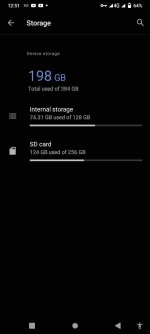
Ctto: You do not have permission to view the full content of this post. Log in or register now.
Have you tried ba nitong procedure to set sd card as Internal Storage in your Android phone?
******†*********†*********†******
Please find help from some professional.
- Please make sure the Android battery is not empty or at least 50% capacity left.
- Make sure our Computer already known our Android by using command : adb devices
- Continue type : adb shell sm list-disks
- Continue type : adb shell sm list-volumes all (we will see disk-ID which will use at no.6 steps – eg: 179,64)
- Continue type : adb shell sm set-force-adoptable true
- Continue type : adb shell sm partition disk:179,64 private (wait several minutes depend on smartphone and sd card)- *** here, I used 179,128 private with my 128gb sd.
- Continue type : adb shell sm set-force-adoptable false
- Continue type : adb shell sm list-volumes all
- After no.8 finish, then Reboot / Restart our Android phone
- After finish reboot, then continue choose Setting > Storage > sd card > (find menu) Migrate data
Please note that all already use adoptable storage microsd card, can not read anymore with external device then Android smartphone who done this process, because the MicroSD card is encrypted and only readable with this phone. That is why we should forget to unplug or remove this memory card to transfer some files.
***
I did try it with my 128gb micro SD.
Ctto: You do not have permission to view the full content of this post. Log in or register now.