 PH
PHHi mga ka PHC.
Could somebody kind enough to share the superadmin credentials (username and password) for Globe's Fiberhome GPON ONU HG6245D - RP2715 Modem/Router for me to unlock the Connection Type. I'm gonna try to configure this device to MODEM mode just like what I did with my previous ZTE modem/router when I was in DSL plan.
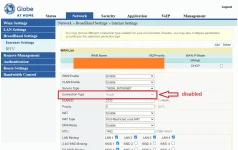
For the record, almost all bundled modem/routers of Globe are not that featured-packed devices which make them inefficient in terms of personalized configurations. Therefore, I bought myself a separate Router - a more sophisticated one (Asus Router) that could handle and facilitate the advanced networking and security configs that suit my needs. I was able to successfully carry this out in ZTE modem/router for the Homebroadband DSL plan but for the Fiber plan modem/routers like GPON ONU I cannot go through because the Connection Type is disabled, as shown below. No idea yet if this intention is possible in GPON ONU modem/routers. Below screenshot is using credentials (admin / 3UJUh2VemEfUtesEchEC2d2e).
Scanning same topic on the web prompted me some promising passwords for the superadmin but the modem/router is under PLDT.
Baka naman merong nakakaalam dyan na willing e share ito, I really appreciate it much.
Could somebody kind enough to share the superadmin credentials (username and password) for Globe's Fiberhome GPON ONU HG6245D - RP2715 Modem/Router for me to unlock the Connection Type. I'm gonna try to configure this device to MODEM mode just like what I did with my previous ZTE modem/router when I was in DSL plan.
For the record, almost all bundled modem/routers of Globe are not that featured-packed devices which make them inefficient in terms of personalized configurations. Therefore, I bought myself a separate Router - a more sophisticated one (Asus Router) that could handle and facilitate the advanced networking and security configs that suit my needs. I was able to successfully carry this out in ZTE modem/router for the Homebroadband DSL plan but for the Fiber plan modem/routers like GPON ONU I cannot go through because the Connection Type is disabled, as shown below. No idea yet if this intention is possible in GPON ONU modem/routers. Below screenshot is using credentials (admin / 3UJUh2VemEfUtesEchEC2d2e).
Scanning same topic on the web prompted me some promising passwords for the superadmin but the modem/router is under PLDT.
Baka naman merong nakakaalam dyan na willing e share ito, I really appreciate it much.