 PH
PHPatulong naman mga lods, nag install na ko ng You do not have permission to view the full content of this post.
Log in or register now. tas lumabas na may update na sa to win11 tas sinundan ko na rin tong process na to (nasa baba) pero ayaw pa rin mainstall. Ganun pa rin, may TMP ako 1.2 nga lang sya.
Press Win + R to open Run. Type Regedit and press Enter.
2. Now, paste the HKEY_LOCAL_MACHINE\SYSTEM\Setup in the address bar or manually go to the Setup folder.
3. Here, right-click and create a new key called LabConfig.
4. In LabConfig key, create two new DWORDs with the values below:
-R3 3200g
- A320-k mobo
-8gb ram 2666
-240ssd
-1tera hdd
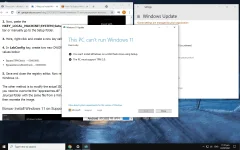
Press Win + R to open Run. Type Regedit and press Enter.
2. Now, paste the HKEY_LOCAL_MACHINE\SYSTEM\Setup in the address bar or manually go to the Setup folder.
3. Here, right-click and create a new key called LabConfig.
4. In LabConfig key, create two new DWORDs with the values below:
- BypassTPMCheck – 00000001
- BypassSecureBootCheck – 00000001
-R3 3200g
- A320-k mobo
-8gb ram 2666
-240ssd
-1tera hdd