 PH
PHHomescreens guide.
How to use backup files :-
-First download Nova launcher and Kwgt ( Pro )
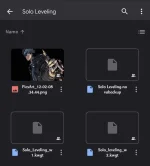
-Download the provided backup files.
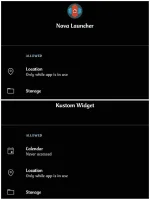
-Give necessary permission to Kwgt and Nova launcher.
-Restore Backup Files in Nova at Backup and Import settings.
-Then place the widgets of that setup.
-Change the homescreen grid size according to your device.
-Apply Wallpaper and Icon pack.
Dito sa Step by step .
-First download Nova launcher and Kwgt.
-Download the provided backup files.
-Give necessary permission to Kwgt and Nova launcher.
-Restore Backup Files in Nova at Backup and Import settings.
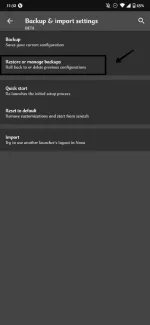
From backup and imports select restore backups.
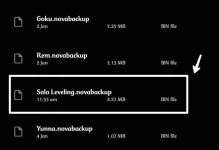
Select the backup file of the setup
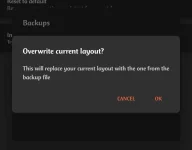
And Apply.
-Then place the widgets of that setup.
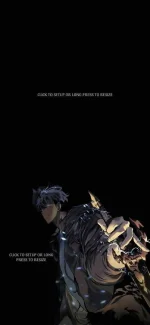
Setup the widgets
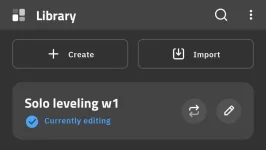
Click the import and select the downloaded widgets.
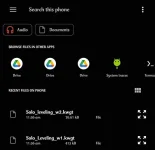
Select the widgets and they get added to the import section
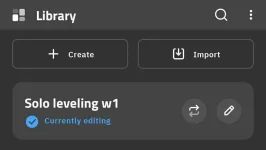
Select the widget from the currently editing
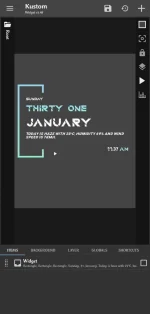
And click save repeat the same for the next widgets
-Change the homescreen grid size according to your device.
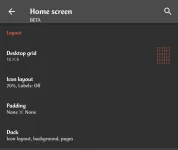
Change the desktop grid according to your device size in nova homescreen section.
Apply Wallpaper and Icon pack.
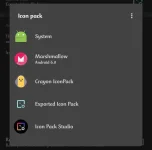
Choose the given icon pack or the preferred icon pack or icon pack of choice from look and feel section. ( Icon packs need to be downloaded from play store )
And the final look.

Update ko later yung links
KWGT PRO
https://phcorner.org/threads/kwgt-kustom-widget-maker-v3-52b102215-final-pro-apk.1121000/
Nova Launcher
https://phcorner.org/threads/nova-launcher-v7-0-31-beta-prime-mod-extra-apk.1121004/
Solo Leveling Android Setup
https://phcorner.org/threads/solo-leveling-android-setup-theme.1120983/
Credits sa Wn.
How to use backup files :-
-First download Nova launcher and Kwgt ( Pro )
-Download the provided backup files.
-Give necessary permission to Kwgt and Nova launcher.
-Restore Backup Files in Nova at Backup and Import settings.
-Then place the widgets of that setup.
-Change the homescreen grid size according to your device.
-Apply Wallpaper and Icon pack.
Dito sa Step by step .
-First download Nova launcher and Kwgt.
-Download the provided backup files.
-Give necessary permission to Kwgt and Nova launcher.
-Restore Backup Files in Nova at Backup and Import settings.
From backup and imports select restore backups.
Select the backup file of the setup
And Apply.
-Then place the widgets of that setup.
Setup the widgets
Click the import and select the downloaded widgets.
Select the widgets and they get added to the import section
Select the widget from the currently editing
And click save repeat the same for the next widgets
-Change the homescreen grid size according to your device.
Change the desktop grid according to your device size in nova homescreen section.
Apply Wallpaper and Icon pack.
Choose the given icon pack or the preferred icon pack or icon pack of choice from look and feel section. ( Icon packs need to be downloaded from play store )
And the final look.
Update ko later yung links
KWGT PRO
https://phcorner.org/threads/kwgt-kustom-widget-maker-v3-52b102215-final-pro-apk.1121000/
Nova Launcher
https://phcorner.org/threads/nova-launcher-v7-0-31-beta-prime-mod-extra-apk.1121004/
Solo Leveling Android Setup
https://phcorner.org/threads/solo-leveling-android-setup-theme.1120983/
Credits sa Wn.
