 PH
PHarsenal1205
Rarely opens PHC


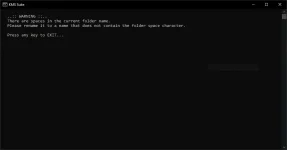
when activating your windows or ms office using KMS2038 or KMS SUITE 2038 and this happens even your in run as administrator, this trick or häçk will solve your problem!
Kahit iniba mo na ang folder location at ganun parin ang lumabas:
Code:
..:: WARNING ::..
   There are spaces in the current folder name.
   Please rename it to a name that does not contain the folder space character.

   Press any key to EXIT...
Eto ang gawin ninyo:
Dapat naka exit o hindi tumatakbo yung KMS2038.
Right click KMS SUITE 2038 bat file. Then select EDIT.
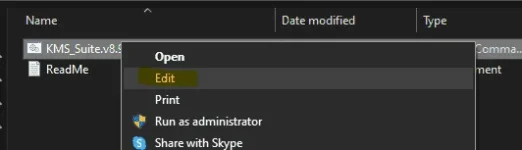
Lalabas ang notepad. ito ang nasa loob ng KMS2038. Kita nyo naman yung error message nanduon siya.
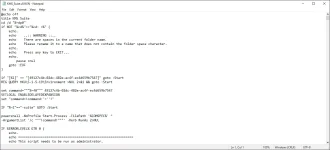
Tanggalin nyo ang mga naka BLUE sa KMS SUITE notepad. Then delete nyo ang:
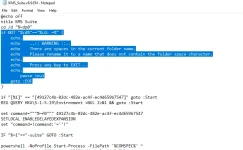
Code:
if NOT "%cd%"=="%cd: =%" (
    echo.
    echo    ..:: WARNING ::..
    echo    There are spaces in the current folder name.
    echo    Please rename it to a name that does not contain the folder space character.
    echo.
    echo    Press any key to EXIT...
    echo.
    pause >nul
    goto :EOF
ganito dapat iyan.
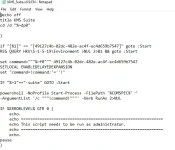
Tapos isave nyo yung notepad. Wag save as.
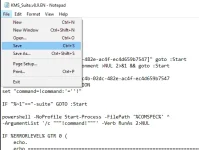
Try nyong paganahin yung KMS 2038. DAPAT RUN AS ADMINISTRATOR!
KMS2038 DEMONSTRATION:
View attachment bandicam 2021-07-02 11-44-21-956.mp4
Ganun lang. mairun nyo na kahit saan nakalagay ang KMS2038 na walang reklamo daw na maraming spaces daw yung folder. naitest ko na before at naactivate naman ang Windows at Office ko.
#sharingiscaring
 ung isang laptop dito sa office laging nag pop up ung license nat genuine