PH
PHBAD_KING_PH OFFICIAL
Forum Master
So nagbabalik ulit ako sa panibago nanaman kaalaman haha 
Share ko lang tong pang Unl*ck/Flash/Repair/Backup.
For Samsung Only! mga kaPHCorner
SamsungToolPro 29.5 wtt Loader&Keygen
You do not have permission to view the full content of this post. Log in or register now. now
P*ssW*rd: PHC-BADKING0808
How to Install Z3X Samsung Tool Pro 29.5 with Loader & Cr*ck
Step by Step

1. Download & unzip the Samsung tool to your computer.
2. Open the folder and run SamsungToolpro_29.5.exe
3. Install the tool by clicking on Next.
4. Tap Install Finish.
5. Close the tool .
6. Now unzip the Z3x Loader file and paste the loader file into the installation folder for 'Samsung Tool Pro '.
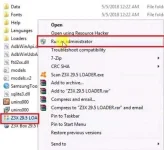
7. Run the Z3x Loader 29.5.exe with Administrator permission.
8. Click Hardware ID and Copy . Dont close the loader.
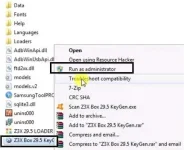
9. Now Run the Z3x Loader Keygen.exe .
10. Unzip the Z3x Keygen file and run Z3x 29.5 keygen.exe
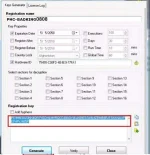
11.Enter your name in the Registration Name field
12. Tick on the HWID tab and
13.Paste the Hardware ID there.
14. Click Generate.
15. Copy the generated key and paste it into the Z3x Samsung tool pro program.
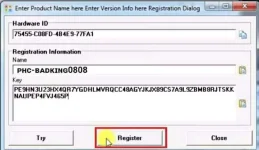
16. Paste the HWID.
17. Type Registrar Name and click on Register
18. Thats it! Now you can use the tool for multi-purposes.
Credit: SamsungTool
Isang malaking 'ThankYou' lang happy na ako. God Bless You all and Keep Safe everyone. ??
-PHC-BADKING0808
-PH Badking
#share
#software
#MobiLangSakalam

Share ko lang tong pang Unl*ck/Flash/Repair/Backup.
For Samsung Only!
mga kaPHCornerSamsungToolPro 29.5 wtt Loader&Keygen
You do not have permission to view the full content of this post. Log in or register now. now
P*ssW*rd: PHC-BADKING0808
How to Install Z3X Samsung Tool Pro 29.5 with Loader & Cr*ck
Step by Step
1. Download & unzip the Samsung tool to your computer.
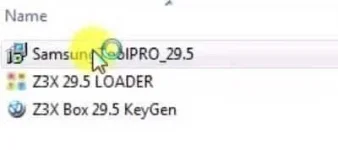
2. Open the folder and run SamsungToolpro_29.5.exe
3. Install the tool by clicking on Next.
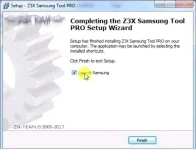
4. Tap Install
Finish.5. Close the tool .
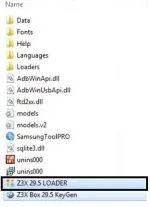
6. Now unzip the Z3x Loader file and paste the loader file into the installation folder for 'Samsung Tool Pro '.
7. Run the Z3x Loader 29.5.exe with Administrator permission.
8. Click Hardware ID and Copy . Dont close the loader.
9. Now Run the Z3x Loader Keygen.exe .
10. Unzip the Z3x Keygen file and run Z3x 29.5 keygen.exe
11.Enter your name in the Registration Name field
12. Tick on the HWID tab and
13.Paste the Hardware ID there.
14. Click Generate.
15. Copy the generated key and paste it into the Z3x Samsung tool pro program.
16. Paste the HWID.
17. Type Registrar Name and click on Register
18. Thats it! Now you can use the tool for multi-purposes.
Credit: SamsungTool
Isang malaking 'ThankYou' lang happy na ako.
God Bless You all and Keep Safe everyone. ??-PHC-BADKING0808
-PH Badking
#share
#software
#MobiLangSakalam