PH
PH90hz on MIUI
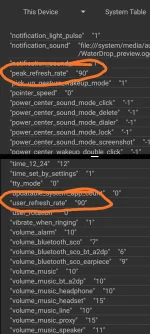
-Download Setedit on Playstore
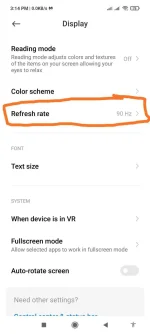
-Set your refresh rate to 120hz
-open setedit app
-Find user_refresh_rate (usually can be found at the bottom) then change 120 to 90.
-save
If may magisk(Rooted). Try this.
-First Go To Refresh Rate Options
-Now Set To 120Hz
-Then Turn Off And On Your Mobile Screen
-Then Set To 90hz
-Now Go To Home Screen
-Then Go To Recent Menu And Close Setting
-And Boom
-To Check 90Hz Is Working Or Not Use Fps Meter
In Refresh Rate Section It Show 120Hz So Just Ignore It.
Link here:
You do not have permission to view the full content of this post. Log in or register now.
Ctto
-Download Setedit on Playstore
-Set your refresh rate to 120hz
-open setedit app
-Find user_refresh_rate (usually can be found at the bottom) then change 120 to 90.
-save
If may magisk(Rooted). Try this.
-First Go To Refresh Rate Options
-Now Set To 120Hz
-Then Turn Off And On Your Mobile Screen
-Then Set To 90hz
-Now Go To Home Screen
-Then Go To Recent Menu And Close Setting
-And Boom
-To Check 90Hz Is Working Or Not Use Fps Meter
In Refresh Rate Section It Show 120Hz So Just Ignore It.
Link here:
You do not have permission to view the full content of this post. Log in or register now.
Spoiler contents are visible only to Established Members.
Ctto