PH
PHRequirements:
Windows 10 (32-bit) / Windows 10 (64-bit
Your Phone is an advanced mobile phone tool that allows Windows 10 users to quickly establish a secure wireless connection to their Android smartphone and gain access to a wide array of its features. While many other apps of this style have focused on simple photo and file-sharing tools, this application created directly by You do not have permission to view the full content of this post. Log in or register now. enables the home or work desktop and laptop PCs to tap directly into this popular mobile OS and directly access on their PC more advanced services such as their entire notification feed, SMS messaging, making You do not have permission to view the full content of this post. Log in or register now., sharing content and more.
Sadly, even though Microsoft has promised many of these features when they originally unveiled the app, some of them are still missing and many users from around the world are eagerly waiting for future updates that will enhance their way of controlling Android devices directly from their PC desktop surface.
Make and receive calls from your PC
Receive and manage your phone’s notifications
Access your phone's apps from your PC
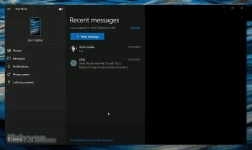
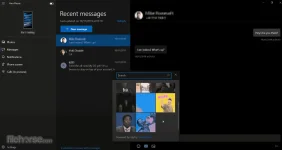
Read and reply to your You do not have permission to view the full content of this post. Log in or register now. from your PC and use your keyboard
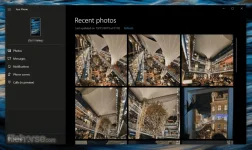
Instant access to your most recent photos
Drag files between your PC and phone
Since this app is created by Microsoft only for use on Windows 10, Your Phone app is distributed online exclusively on Microsoft Store. To install it on desktop or laptop PC, users simply have to go to the app’s official Microsoft Store page either in the web browser or built-in Store app and click on the large Get button. The entire process of downloading almost 300 MB large files and installation will then be handled by the OS. To get the app up and running, the Android phone needs to install the same application from the Play Store, and then a short handshaking procedure with synchronizing two devices and unlock access to your data.
The data sharing is available only when the mobile phone is on the same Wi-Fi network as the Windows 10 PC, and the Android application is compatible only with the select list of popular You do not have permission to view the full content of this post. Log in or register now. devices (at this moment, that’s mostly Samsung models). This compatibility list is growing with each passing month and will hopefully become fully open for all users of Android devices.
In its current state, Your Phone desktop app can manage effortless photo access and You do not have permission to view the full content of this post. Log in or register now. between mobile phones and PC office suite. The SMS, voice call, and notification sharing are still not unlocked, making the app functionality more in line with other similar apps, including the official macOS companion app for iPhone users. Your Phone is 100% FREE and can be used without restrictions by any users of fully updated Windows 10 (May 2019 Update or newer).
Download link:
You do not have permission to view the full content of this post. Log in or register now.
Windows 10 (32-bit) / Windows 10 (64-bit
Your Phone is an advanced mobile phone tool that allows Windows 10 users to quickly establish a secure wireless connection to their Android smartphone and gain access to a wide array of its features. While many other apps of this style have focused on simple photo and file-sharing tools, this application created directly by You do not have permission to view the full content of this post. Log in or register now. enables the home or work desktop and laptop PCs to tap directly into this popular mobile OS and directly access on their PC more advanced services such as their entire notification feed, SMS messaging, making You do not have permission to view the full content of this post. Log in or register now., sharing content and more.
Sadly, even though Microsoft has promised many of these features when they originally unveiled the app, some of them are still missing and many users from around the world are eagerly waiting for future updates that will enhance their way of controlling Android devices directly from their PC desktop surface.
Make and receive calls from your PC
Receive and manage your phone’s notifications
Access your phone's apps from your PC
Read and reply to your You do not have permission to view the full content of this post. Log in or register now. from your PC and use your keyboard
Instant access to your most recent photos
Drag files between your PC and phone
Since this app is created by Microsoft only for use on Windows 10, Your Phone app is distributed online exclusively on Microsoft Store. To install it on desktop or laptop PC, users simply have to go to the app’s official Microsoft Store page either in the web browser or built-in Store app and click on the large Get button. The entire process of downloading almost 300 MB large files and installation will then be handled by the OS. To get the app up and running, the Android phone needs to install the same application from the Play Store, and then a short handshaking procedure with synchronizing two devices and unlock access to your data.
The data sharing is available only when the mobile phone is on the same Wi-Fi network as the Windows 10 PC, and the Android application is compatible only with the select list of popular You do not have permission to view the full content of this post. Log in or register now. devices (at this moment, that’s mostly Samsung models). This compatibility list is growing with each passing month and will hopefully become fully open for all users of Android devices.
In its current state, Your Phone desktop app can manage effortless photo access and You do not have permission to view the full content of this post. Log in or register now. between mobile phones and PC office suite. The SMS, voice call, and notification sharing are still not unlocked, making the app functionality more in line with other similar apps, including the official macOS companion app for iPhone users. Your Phone is 100% FREE and can be used without restrictions by any users of fully updated Windows 10 (May 2019 Update or newer).
Download link:
You do not have permission to view the full content of this post. Log in or register now.