PH
PHMan with No Name
Forum Guru
Para sa mga mahilig mag-download lalo na ng mga BIG files gaya ng mga ISO images (installer) and other delicate/sensitive files. Masisiguro natin na clean/umaltered/uncorrupted (i.e. walang "palaman") ang mga na-download natin kapag maikumpara at mapag-MATCH natin ang hash ng na-download nating file doon sa original source (if the hashes are provided, of course).

HashTab
You do not have permission to view the full content of this post.
Log in or register now.| You do not have permission to view the full content of this post.
Log in or register now.
Algorithms
Calculate and display hash values from over two dozen popular hashing algorithms like MD5, SHA1, SHA2, RipeMD, HAVAL and Whirlpool.

Easy
The hash comparison tool supports drag and drop, copy and paste and even has a built-in browse option.

Assurance
The perfect way to validate the integrity of a file download. Or use it to quickly compare local files and compute hashes for use in other programs.

Native
Purposely designed to feel like a native feature of Windows. Simply select any file, go to properties, and use the new “File Hashes” tab.
Supports: Windows Vista and higher.
32-bit and 64-bit
Supports: Windows Vista and higher.
32-bit and 64-bit
 SAMPLE
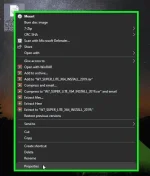
SAMPLE STEP 1: Right click on the file then select "Properties"
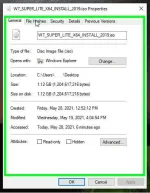
STEP 2: Click on "Files Hashes" tab
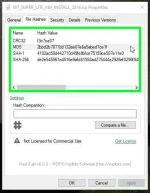
STEP 3: Hash values will be calculated automatically