 PH
PH-
Welcome to PHCorner Forums! Sign up for free to unlock full access and exclusive privileges, including:
- Asking questions about computer and mobile issues
- Discovering internet tips for your mobile network and computer
You are using an out of date browser. It may not display this or other websites correctly.
You should upgrade or use an alternative browser.
You should upgrade or use an alternative browser.
❓ Help Developer options
- Thread starter senyorita
- Start date
- Status
- Not open for further replies.
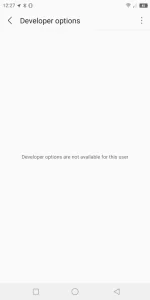
 di na din gumana yung force home puro back na lang nagana

 Home and Switch buttons don't work. They light up and vibrate when I tap them but they do nothing.
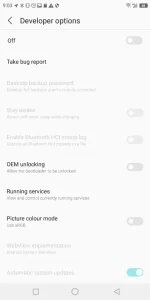
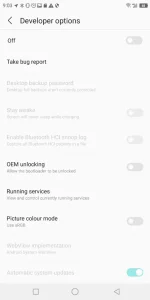
 nakita ko lang. prob nito is home and recent button not working. and that developer not availble for this user
Here's the fix,:
1) Download Nova Launcher & set it as default to replace TouchWiz.
2) Long press on the home screen.
3) Choose Widgets.
4) At the top, under Nova Launcher, scroll to the right & press & hold on Activities and place it somewhere empty on the home screen.
5) Scroll down to Setup Wizard. I saw 2 Setup Wizard options.
6) Under the first Setup Wizard option, I opened it & scrolled down to the 3rd choice which said ".SetupWizardTestActivity". It might be in a different spot for you, but look at the small writing, that's how I saw this one.
7) Select that to create the widget shortcut.
8) Open it. Apparently you're supposed to have a menu to go through and just click through "Next", but there wasn't one for me.
The screen just flashed and then next thing you know, everything works!
Here's the fix,:
1) Download Nova Launcher & set it as default to replace TouchWiz.
2) Long press on the home screen.
3) Choose Widgets.
4) At the top, under Nova Launcher, scroll to the right & press & hold on Activities and place it somewhere empty on the home screen.
5) Scroll down to Setup Wizard. I saw 2 Setup Wizard options.
6) Under the first Setup Wizard option, I opened it & scrolled down to the 3rd choice which said ".SetupWizardTestActivity". It might be in a different spot for you, but look at the small writing, that's how I saw this one.
7) Select that to create the widget shortcut.
8) Open it. Apparently you're supposed to have a menu to go through and just click through "Next", but there wasn't one for me.
The screen just flashed and then next thing you know, everything works!



- Status
- Not open for further replies.
Similar threads
-
-
📋 Employment Wordpress Developer Elementor Builder and E-Commerce
- Started by Labugon101
- Replies: 0
-
❓ Help Pa guide po gusto ko po maging Web Developer/programmer
- Started by Kurama13
- Replies: 6
-
👨🏫 Tutorial Reddit Developer Funds 2026: Hindi Airdrop, Pero Official na Puwedeng Kumita ang Devs
- Started by simplyjepox
- Replies: 3
-
📦 Android App Help password developer option
- Started by safedie
- Replies: 1
About this Thread
-
24Replies
-
947Views
-
9Participants
Last reply from:
ri_aus
ri_aus
New Topics
-
CHAT GPT FOR FREE METHOD
- Started by Nigell09
- Replies: 2
- 💬 Chitchat
-
Meron ba éùt yung di magagamit ang data mo?
- Started by Syver
- Replies: 0
- 💬 Chitchat
-
How po mag work yung Netflix direct link for mobile?
- Started by VvCvLvvEy
- Replies: 2
- 💬 Chitchat
-
Ano mas ok maribank o maya
- Started by Pokiko Black
- Replies: 3
- 💬 Chitchat
-
Si Cardinal Tagle ang Nagmimisa Ngayon sa Vatican Kapalit ni Pope Leo
- Started by GoatPhomator666
- Replies: 1
- 💬 Chitchat
-
500 lang induction cooker made in japan
- Started by benjthegreat
- Replies: 0
- 💬 Chitchat
-
FS ml account quit na
- Started by serene321
- Replies: 0
- 💬 Chitchat
-
Cheapest Loan Ph
- Started by jazzon
- Replies: 1
- 💬 Chitchat
-
Globe at home postpaid modem
- Started by beudbdka
- Replies: 0
- 💬 Chitchat
-
PA HELP PO SA MGA MARUNONG SA TECH
- Started by Mina65
- Replies: 4
- 💬 Chitchat
Trending Topics
Online now
- Members online
- 1,194
- Guests online
- 8,558
- Total visitors
- 9,752