🔒 Closed Force VoLTE for making calls?

Status
Not open for further replies.
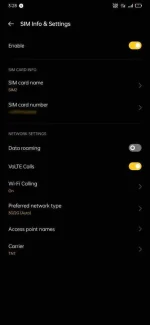
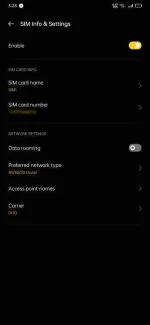
Hello mga ka-PHC! Ask ko lang kung may paraan ba para ma enable ang VoLTE dito sa OPPO F11 Pro ko. I can't make both outgoing and ingoing calls kasi e. Walang VoLTE option sa settings pero sa Samsung A20 ng pinsan ko meron kaya nakakatawag sya. Yung TNT ko meron naman.

TNT:
PicsArt_05-09-03.31.07.webp


DITO:
PicsArt_05-09-03.30.18.webp


Na try ko na din pala pagpalitin ng SIM slot pero ganun pa rin. Any solution for this? Sayang load e. Salamat.
 
Depende ata yan sa sim mo at tower na nasa inio. Kung capable ang handset tapos sa tower or sim mo ay hindi pa capable, di rin magagamit ang VoLTE feature nian.

Pero base sa ss mo, DITO sim yang walang VoLTE. 😅 Baka defective ung sim? 🤔😂
 
I think di sya capable sa phone ko kasi VoLTE supported naman device ko. Tinry ko din kasi SIM ko sa phone ng pinsan ko. VoLTE sya. Baka kapag lumawak pa coverage ng DITO maging okay din to. Hahaha.
 
[XX='PHC - yowzed, c: 1182417, m: 225064'][/XX] baka kung wala pa sa list ng capable phones ng DITO ung phone na gamit eh di mo talaga magagamit sir. Baka nadedetect nila kung ano model ng phone. 🤔
 
[XX='J A X T O N E 2 3, c: 1182434, m: 978753'][/XX] if ever need bumili ng bago kapag compatible na e di bili na lamg. Hehe. No choice kasi e.
 
[XX='PHC - yowzed, c: 1182442, m: 225064'][/XX] Wag na lods. Antayin na lang na mailagay sa list ang phone mo. Pag nasa list na yan baka oks na yan.
 
Depende sa device ang VoLTE, mostly Xiaomi phones ay meron nito, code lang ang ita-type sa dialler para lumabas. Ganun din lang ginawa ko sa Poco M3👍😍
 
Nakita ko na po. Wala sa list ang phone ko.
Pre, try the other method to enable VoLTE, in that case your device is Oppo F11 Pro, or any MediaTek based hardware, Open the “Engineering Mode”.

This is an important for DITO subscribers must enable VoLTE to access outgoing calls, receiving calls and their emergency.

How to access Engineer Mode?
Choices:
• Install Device Info HW on Google Play. Search it for yourself.
→ Open Device Info HW, and find the Engineering menu to open directly in just few clicks.
• Or install Activity Launcher, MTK Engineering Mode (or something like that if you have idea to launch hidden settings on your device for advances users).
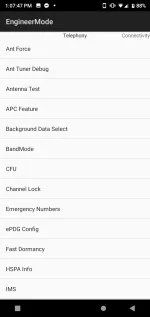
• Or enter the number in your native dialer ★#★#3646633#★#★ (some device may work but just give it a try)

This will see like this:
#attachment 1
Screenshot_20221104-130748.webp

#1 Engineering Mode Main screen on stock Android

This attachment above must have “Telephony” section, such as BandMode, IMS, Misc Feature Config and Network Selecting. If none of these, the Engineer mode is fake, nor your device does not have Engineer mode pre-installed to the system, so blame your device manufacturer for this, like Xiaomi or Samsung something not have Engineer mode on Mediatek based devices.

How to force-enable VoLTE in Engineering settings (Engineering Mode) on any MediaTek device?

1. Follow the instructions above provided of how to access the Engineering menu.
2. Select IMS, and choose your SIM is mounted to.
3. In the “VOLTE Setting” section, select the “CMW500 settings” that change from default. And then hit SET button.
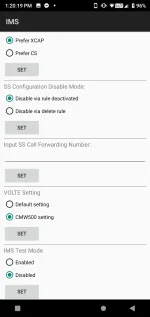
Screenshot_20221104-132020.webp


As you can see, the VoLTE, 📞HD in the status bar is now shown.

To test the DITO calls, dial 185 to see if it is working. (This is also works with HD or Non-HD icon on the left of the timer)
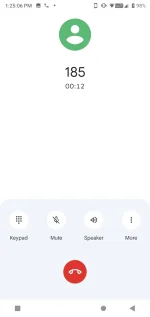


Screenshot_20221104-132507.webp

Yeah, you get some of the idea for that. I'm out.
 
Status
Not open for further replies.

About this Thread

  • 19
    Replies
  • 4K
    Views
  • 12
    Participants
Last reply from:
morbChest

Online now

Members online
895
Guests online
721
Total visitors
1,616

Forum statistics

Threads
2,275,563
Posts
28,964,107
Members
1,231,866
Latest member
terrorspeed
Back
Top