PH
PHRequirements:
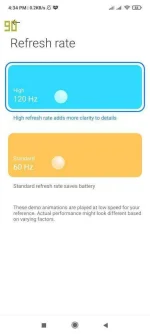
* Android smartphone with 120 Hz Screen Refresh Rate or above (devices that adapt 60 Hz only SR rate are not qualified to proceed for this step)
Disclaimer: I will not held responsible for devices been bricked if the other settings not mentioned in steps below has been modified or deleted.
Steps:
1. Download SetEdit app on Google Playstore, with a blue-cog icon and red background.
2. After it has been downloaded and installed, open the app.
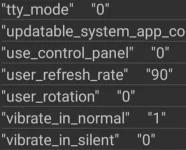
3. After opening SetEdit, you can see line of codes, search this line: "user_refresh_rate", and tap this line of code. (the code has been set alphabetically)
4. The setting pops up, for editing its value, tap EDIT VALUE.
5. Change the value to 90, then save changes, and exit the app.
Monitoring Screen Refresh Rate (2 Options):
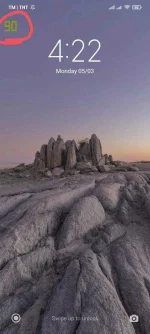
Option 1 - By accessing the Developer Options and search Show Refresh Rate or search it via settings search at the top bar.
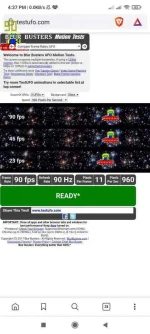
Option 2 - Accessing the website: You do not have permission to view the full content of this post. Log in or register now.
Screenshots below (using POCO F3)
* Android smartphone with 120 Hz Screen Refresh Rate or above (devices that adapt 60 Hz only SR rate are not qualified to proceed for this step)
Disclaimer: I will not held responsible for devices been bricked if the other settings not mentioned in steps below has been modified or deleted.
Steps:
1. Download SetEdit app on Google Playstore, with a blue-cog icon and red background.
2. After it has been downloaded and installed, open the app.
3. After opening SetEdit, you can see line of codes, search this line: "user_refresh_rate", and tap this line of code. (the code has been set alphabetically)
4. The setting pops up, for editing its value, tap EDIT VALUE.
5. Change the value to 90, then save changes, and exit the app.
Monitoring Screen Refresh Rate (2 Options):
Option 1 - By accessing the Developer Options and search Show Refresh Rate or search it via settings search at the top bar.
Option 2 - Accessing the website: You do not have permission to view the full content of this post. Log in or register now.
Screenshots below (using POCO F3)