❓ Help Visual basic 6.0 database

Status
Not open for further replies.

jaytots921

Forum Veteran
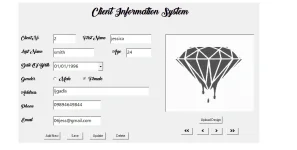
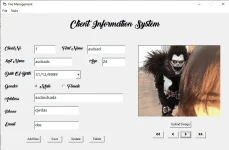
mga boss baka my makatulong skin dyan about sa pag insert ng data sa database using visual basic ano po bang problema dto sa code ko? lumalabas kasi is type mismatch
pag ng add ako dun s database ko sana mtulungan nyo ko mga lods 🙏
[CODE title="visual basic 6.0 access database"]If rec.State = 1 Then rec.Close
rec.Open "Insert into ClientTBL values('" + txtclient.Text + "','" + txtfirstname.Text + "','" + txtlastname.Text + "','" + txtage.Text + "','" + DTPicker1.Value + "','" + Option1.Value + "','" + Option2.Value + "','" + txtadd.Text + "','" + txtphone.Text + "','" + txtemail.Text + "','" + Image1.Picture + "')", con, 3, 2[/CODE]
 
[XX='jaytots921, c: 1160665, m: 612367'][/XX] try mo palitan DTPicker1.Value into Format(DTPicker1.Value, DTPicker1.CustomFormat)

yung options value is dapat ba Male or Female lang and value?

[CODE highlight="7"]If Option1.Value = True Then
Gender = "Male"
Else
Gender = "Female"
End If
DOB = DTPicker1.Value into Format(DTPicker1.Value, DTPicker1.CustomFormat)
image = "blank_lang_muna"
rec.Open "Insert into ClientTBL(ClientNo,FirstName,LastName,Age,DOB,Gender,Address,Phone,Email,Photo) values('" + txtclient.Text + "','" + txtfirstname.Text + "','" + txtlastname.Text + "','" + txtage.Text + "','" + DOB + "','" + Gender + "','" + txtadd.Text + "','" + txtphone.Text + "','" + txtemail.Text + "','" + image + "')", con, 3, 2[/CODE]
 
[CODE title="visual basic 6.0 access database" highlight="1,163"]Dim con As New ADODB.Connection
Dim rs As New ADODB.Recordset
Dim str As String
Dim confirm As Integer


Private Sub addnew_Click()
rs.addnew
clear
txtclient.SetFocus

End Sub
Sub clear()
txtclient.Text = ""
txtfirstname.Text = ""
txtlastname.Text = ""
txtage.Text = ""
DTPicker1.Value = "01/01/0001"
Option1.Value = False
Option2.Value = False
txtadd.Text = ""
txtphone.Text = ""
txtemail.Text = ""
Image1.Picture = LoadPicture("")

End Sub

Private Sub deletebtn_Click()
If MsgBox("Are you sure you want to delete this Record?", vbOKCancel + vbQuestion, "Deleting") = vbOK Then
If rec.State = 1 Then rec.Close
rec.Open "Delete from ClientTBL where ClientNo like'" + txtclient.Text + "'", con, 3, 2
If rec.State = 1 Then rec.Close
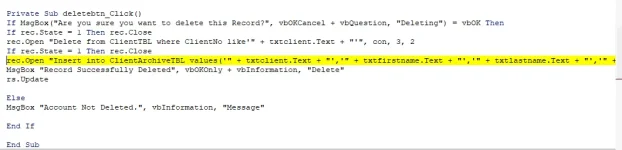
rec.Open "Insert into ClientArchiveTBL values('" + txtclient.Text + "','" + txtfirstname.Text + "','" + txtlastname.Text + "','" + txtage.Text + "','" + DTPicker1.Value + "','" + Option1.Value + "','" + Option2.Value + "','" + txtadd.Text + "','" + txtphone.Text + "','" + txtemail.Text + "','" + Image1.Picture + "')", con, 3, 2
MsgBox "Record Successfully Deleted", vbOKOnly + vbInformation, "Delete"
rs.Update

Else
MsgBox "Account Not Deleted.", vbInformation, "Message"

End If

End Sub

Private Sub firstbtn_Click()
rs.MoveFirst
display

End Sub

Private Sub Form_Load()
con.Open "provider = microsoft.jet.OLEDB.4.0;data source=" & App.Path & "/REJAY.mdb"
rs.Open "Select * from ClientTBL", con, adOpenDynamic, adLockPessimistic
display

End Sub


Private Sub lastbtn_Click()
rs.MoveLast
display

End Sub

Private Sub mnuExit_Click()
Dim msg As String
Dim Cancel As Integer
Cancel = 1
msg = MsgBox("Are you sure you want to Close the System?", vbYesNo + vbCritical, "Confirm Exit")
If msg = vbYes Then
frmmain.Hide
Unload frmlogin
End If

End Sub

Private Sub mnuLogout_Click()
frmmain.Hide
Load frmlogin
frmlogin.Show
frmlogin.clear
frmlogin.Refresh
frmlogin.txtuser.SetFocus

End Sub

Private Sub mnuUserManagement_Click()
frmmain.Hide
Load frmuserman
frmuserman.Show
frmuserman.Refresh

End Sub

Private Sub nextbtn_Click()
rs.MoveNext
If Not rs.EOF Then
display
Else
rs.MoveFirst
display
End If

End Sub

Private Sub previousbtn_Click()
rs.MovePrevious
If rs.BOF Then
rs.MoveLast
display
Else
display
End If

End Sub

Private Sub savebtn_Click()
rs.Fields("ClientNo").Value = txtclient.Text
rs.Fields("FirstName").Value = txtfirstname.Text
rs.Fields("LastName").Value = txtlastname.Text
rs.Fields("Age").Value = txtage.Text
rs.Fields("DOB").Value = DTPicker1.Value
If Option1.Value = True Then
rs.Fields("Gender") = Option1.Caption
Else
rs.Fields("Gender") = Option2.Caption
End If
rs.Fields("Address").Value = txtadd.Text
rs.Fields("Phone").Value = txtphone.Text
rs.Fields("Email").Value = txtemail.Text
rs.Fields("Photo").Value = str
MsgBox "Data is saved successfully ..!!!", vbInformation
rs.Update

End Sub

Private Sub uploadbtn_Click()
CommonDialog1.ShowOpen
CommonDialog1.Filter = "Jpeg|*.jpg"
str = CommonDialog1.FileName
Image1.Picture = LoadPicture(str)

End Sub
Sub display()

txtclient.Text = rs!ClientNo
txtfirstname.Text = rs!FirstName
txtlastname.Text = rs!LastName
txtage.Text = rs!Age
DTPicker1.Value = rs!DOB
If rs!Gender = "Male" Then
Option1.Value = True
Else
Option2.Value = True
End If
txtadd.Text = rs!Address
txtphone.Text = rs!Phone
txtemail.Text = rs!Email
Image1.Picture = LoadPicture(rs!Photo)


End Sub
[/CODE]
 
[CODE title="visual basic 6.0 access database" highlight="1,163"]Dim con As New ADODB.Connection
Dim rs As New ADODB.Recordset
Dim str As String
Dim confirm As Integer


Private Sub addnew_Click()
rs.addnew
clear
txtclient.SetFocus

End Sub
Sub clear()
txtclient.Text = ""
txtfirstname.Text = ""
txtlastname.Text = ""
txtage.Text = ""
DTPicker1.Value = "01/01/0001"
Option1.Value = False
Option2.Value = False
txtadd.Text = ""
txtphone.Text = ""
txtemail.Text = ""
Image1.Picture = LoadPicture("")

End Sub

Private Sub deletebtn_Click()
If MsgBox("Are you sure you want to delete this Record?", vbOKCancel + vbQuestion, "Deleting") = vbOK Then
If rec.State = 1 Then rec.Close
rec.Open "Delete from ClientTBL where ClientNo like'" + txtclient.Text + "'", con, 3, 2
If rec.State = 1 Then rec.Close
rec.Open "Insert into ClientArchiveTBL values('" + txtclient.Text + "','" + txtfirstname.Text + "','" + txtlastname.Text + "','" + txtage.Text + "','" + DTPicker1.Value + "','" + Option1.Value + "','" + Option2.Value + "','" + txtadd.Text + "','" + txtphone.Text + "','" + txtemail.Text + "','" + Image1.Picture + "')", con, 3, 2
MsgBox "Record Successfully Deleted", vbOKOnly + vbInformation, "Delete"
rs.Update

Else
MsgBox "Account Not Deleted.", vbInformation, "Message"

End If

End Sub

Private Sub firstbtn_Click()
rs.MoveFirst
display

End Sub

Private Sub Form_Load()
con.Open "provider = microsoft.jet.OLEDB.4.0;data source=" & App.Path & "/REJAY.mdb"
rs.Open "Select * from ClientTBL", con, adOpenDynamic, adLockPessimistic
display

End Sub


Private Sub lastbtn_Click()
rs.MoveLast
display

End Sub

Private Sub mnuExit_Click()
Dim msg As String
Dim Cancel As Integer
Cancel = 1
msg = MsgBox("Are you sure you want to Close the System?", vbYesNo + vbCritical, "Confirm Exit")
If msg = vbYes Then
frmmain.Hide
Unload frmlogin
End If

End Sub

Private Sub mnuLogout_Click()
frmmain.Hide
Load frmlogin
frmlogin.Show
frmlogin.clear
frmlogin.Refresh
frmlogin.txtuser.SetFocus

End Sub

Private Sub mnuUserManagement_Click()
frmmain.Hide
Load frmuserman
frmuserman.Show
frmuserman.Refresh

End Sub

Private Sub nextbtn_Click()
rs.MoveNext
If Not rs.EOF Then
display
Else
rs.MoveFirst
display
End If

End Sub

Private Sub previousbtn_Click()
rs.MovePrevious
If rs.BOF Then
rs.MoveLast
display
Else
display
End If

End Sub

Private Sub savebtn_Click()
rs.Fields("ClientNo").Value = txtclient.Text
rs.Fields("FirstName").Value = txtfirstname.Text
rs.Fields("LastName").Value = txtlastname.Text
rs.Fields("Age").Value = txtage.Text
rs.Fields("DOB").Value = DTPicker1.Value
If Option1.Value = True Then
rs.Fields("Gender") = Option1.Caption
Else
rs.Fields("Gender") = Option2.Caption
End If
rs.Fields("Address").Value = txtadd.Text
rs.Fields("Phone").Value = txtphone.Text
rs.Fields("Email").Value = txtemail.Text
rs.Fields("Photo").Value = str
MsgBox "Data is saved successfully ..!!!", vbInformation
rs.Update

End Sub

Private Sub uploadbtn_Click()
CommonDialog1.ShowOpen
CommonDialog1.Filter = "Jpeg|*.jpg"
str = CommonDialog1.FileName
Image1.Picture = LoadPicture(str)

End Sub
Sub display()

txtclient.Text = rs!ClientNo
txtfirstname.Text = rs!FirstName
txtlastname.Text = rs!LastName
txtage.Text = rs!Age
DTPicker1.Value = rs!DOB
If rs!Gender = "Male" Then
Option1.Value = True
Else
Option2.Value = True
End If
txtadd.Text = rs!Address
txtphone.Text = rs!Phone
txtemail.Text = rs!Email
Image1.Picture = LoadPicture(rs!Photo)


End Sub
[/CODE]
I am sorry, way back highschool pa yung VB6 ko. hehehe

pero anyways I assume you are inserting data to SQL.

Try mo muna palitan yung Image1.Picture into "none" if mag error pa ba. If hindi nag error Change mo yung Image1.Picture as image location nya something
Code:
App.Path & "\pic1.jpg"

Try if this works, try mo check if ang column header sa SQL table mo is same size:

Clientfirst_namelast_nameageDOBmalefemaleaddressphoneemailimage

anyways yung "','" + Option1.Value + "','" + Option2.Value mo should be Gender sa table mo and not male or female?
 

Attachments

  • sample1.webp
    sample1.webp
    33.4 KB · Views: 35
  • sample2.webp
    sample2.webp
    47.5 KB · Views: 36
  • sample3.webp
    sample3.webp
    30.8 KB · Views: 37
  • sample4.webp
    sample4.webp
    7.8 KB · Views: 36
  • sample5.webp
    sample5.webp
    4.9 KB · Views: 33
As suggested earlier replaced the highlighted line to this

Code:
If Option1.Value = True Then
Gender = "Male"
Else
Gender = "Female"
End If
DOB = DTPicker1.Value into Format(DTPicker1.Value, DTPicker1.CustomFormat)
image = "blank_lang_muna"
rec.Open "Insert into ClientArchiveTBL(ClientNo,FirstName,LastName,Age,DOB,Gender,Address,Phone,Email,Photo) values('" & txtclient.Text & "','" &txtfirstname.Text & "','" & txtlastname.Text & "','" & txtage.Text &"','" + DOB &"','" & Gender & "','" & txtadd.Text & "','" & txtphone.Text & "','" & txtemail.Text & "','" & image & "')", con, 3, 2
 
opo yan po kasi npili kong langauage mas mgnda dw po kasi mg umpisa s manual eh kaya dyan mna po ko pg nmaster kopo yan saka po ko mg tatry matuto ng iba gsto ko rn po sna un java hehe
 
Status
Not open for further replies.

Similar threads

About this Thread

  • 36
    Replies
  • 1K
    Views
  • 4
    Participants
Last reply from:
PHC-Xes

Trending Topics

Online now

Members online
945
Guests online
1,746
Total visitors
2,691

Forum statistics

Threads
2,274,190
Posts
28,954,119
Members
1,234,131
Latest member
TheRavenDraven
Back
Top