❓ Help Visual basic 6.0 database

Status
Not open for further replies.

jaytots921

Forum Veteran
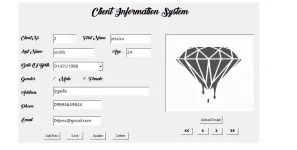
mga boss baka my makatulong skin dyan about sa pag insert ng data sa database using visual basic ano po bang problema dto sa code ko? lumalabas kasi is type mismatch
pag ng add ako dun s database ko sana mtulungan nyo ko mga lods 🙏
[CODE title="visual basic 6.0 access database"]If rec.State = 1 Then rec.Close
rec.Open "Insert into ClientTBL values('" + txtclient.Text + "','" + txtfirstname.Text + "','" + txtlastname.Text + "','" + txtage.Text + "','" + DTPicker1.Value + "','" + Option1.Value + "','" + Option2.Value + "','" + txtadd.Text + "','" + txtphone.Text + "','" + txtemail.Text + "','" + Image1.Picture + "')", con, 3, 2[/CODE]

 
Pa lagay ng full code mo lalo yung con. Tip: use yung code sa paglagay ng code para malinaw sa mata

1620017595959.webp
 
[CODE title="visual basic 6.0 access database" highlight="1,2,3"]If rec.State = 1 Then rec.Close
rec.Open "Insert into ClientTBL values('" + txtclient.Text + "','" + txtfirstname.Text + "','" + txtlastname.Text + "','" + txtage.Text + "','" + DTPicker1.Value + "','" + Option1.Value + "','" + Option2.Value + "','" + txtadd.Text + "','" + txtphone.Text + "','" + txtemail.Text + "','" + Image1.Picture + "')", con, 3, 2
MsgBox "Record Successfully Added", vbOKOnly + vbInformation, "Message"


Sub display()

txtclient.Text = rs!ClientNo
txtfirstname.Text = rs!FirstName
txtlastname.Text = rs!LastName
txtage.Text = rs!Age
DTPicker1.Value = rs!DOB
If rs!Gender = "Male" Then
Option1.Value = True
Else
Option2.Value = True
End If
txtadd.Text = rs!Address
txtphone.Text = rs!Phone
txtemail.Text = rs!Email
Image1.Picture = LoadPicture(rs!Photo)


End Sub


ng tatapye mismatch po sya pano po to i insert as values ung dtpicker? options ng gender tas ung image image po ginamit ko dyan di picture kasi d n sstretch ung picture maraming salamat sana matulungan nyo ko mga boss[/CODE]
 
I am sorry, way back highschool pa yung VB6 ko. hehehe

pero anyways I assume you are inserting data to SQL.

Try mo muna palitan yung Image1.Picture into "none" if mag error pa ba. If hindi nag error Change mo yung Image1.Picture as image location nya something
Code:
App.Path & "\pic1.jpg"

Try if this works, try mo check if ang column header sa SQL table mo is same size:

Clientfirst_namelast_nameageDOBmalefemaleaddressphoneemailimage

anyways yung "','" + Option1.Value + "','" + Option2.Value mo should be Gender sa table mo and not male or female?
 
ay di po ako gumamit ng table sa vsiaul basic hehe gnato lng po gsto ko sna itsura nya pg dinisplay pra m view ng maayus ung design ng mg papatattoo para po kasi sa shop ng mga tattoo artist yan hehe
I am sorry, way back highschool pa yung VB6 ko. hehehe

pero anyways I assume you are inserting data to SQL.

Try mo muna palitan yung Image1.Picture into "none" if mag error pa ba. If hindi nag error Change mo yung Image1.Picture as image location nya something
Code:
App.Path & "\pic1.jpg"

Try if this works, try mo check if ang column header sa SQL table mo is same size:

Clientfirst_namelast_nameageDOBmalefemaleaddressphoneemailimage

anyways yung "','" + Option1.Value + "','" + Option2.Value mo should be Gender sa table mo and not male or female?
 

Attachments

  • sample1.webp
    sample1.webp
    33.4 KB · Views: 39
Saan mo pala I-insert yung details? rec.Open "Insert into ClientTBL values('................. I-save mo ba yung details after nila mag submit? Saan ba i-sasave?
 
yes boss tawag nating sa clientTBL is table. If may access ka sa clientTBL pa screenshot kung ano yung column headers nya. or pa check if yung order ng headers is
ClientNoFirstNameLastNameAgeDOBGenderAddressPhoneEmailPhoto
 
Set mo muna yung Gender value the Insert mo yung values defining the table columns

Code:
If Option1.Value = True Then
Gender = "Male"
Else
Gender = "Female"
End If


rec.Open "Insert into ClientTBL(ClientNo,FirstName,LastName,Age,DOB,Gender,Address,Phone,Email,Photo) values('" + txtclient.Text + "','" + txtfirstname.Text + "','" + txtlastname.Text + "','" + txtage.Text + "','" + DTPicker1.Value + "','" + Gender + "','" + txtadd.Text + "','" + txtphone.Text + "','" + txtemail.Text + "','" + Image1.Picture + "')", con, 3, 2
 
[XX='jaytots921, c: 1160570, m: 612367'][/XX]
Code:
If rec.State = 1 Then rec.Close
If Option1.Value = True Then
Gender = "Male"
Else
Gender = "Female"
End If
rec.Open "Insert into ClientTBL(ClientNo,FirstName,LastName,Age,DOB,Gender,Address,Phone,Email,Photo) values('" + txtclient.Text + "','" + txtfirstname.Text + "','" + txtlastname.Text + "','" + txtage.Text + "','" + DTPicker1.Value + "','" + Gender + "','" + txtadd.Text + "','" + txtphone.Text + "','" + txtemail.Text + "','" + Image1.Picture + "')", con, 3, 2
MsgBox "Record Successfully Added", vbOKOnly + vbInformation, "Message"


Sub display()

txtclient.Text = rs!ClientNo
txtfirstname.Text = rs!FirstName
txtlastname.Text = rs!LastName
txtage.Text = rs!Age
DTPicker1.Value = rs!DOB
If rs!Gender = "Male" Then
Option1.Value = True
Else
Option2.Value = True
End If
txtadd.Text = rs!Address
txtphone.Text = rs!Phone
txtemail.Text = rs!Email
Image1.Picture = LoadPicture(rs!Photo)


End Sub
 
ayaw parin boss sige boss latag ko lahat sa totoo lng yan pina dedebug ko boss is for archive wala ko mahanap n ibang way kung pano i add s delete code ang archive n pag mag dedelete ka is papasok sa isa kong table ng ClientArchiveTBL at mg dedelete dun sa mismong clientTBL
 
nagawa ko po kasi yan dun s login user management ko ok naman n pg delete ko dun sa table main ppnta dun sa archive using insert values after nya mag delete dun mismo sa table but when i use it dun s main filemanagement ko which is my image and dtpicker at options ayaw type mismatch di ko alam ilatag s sentence ung dtpicker options at image😔😞
 
Status
Not open for further replies.

Similar threads

About this Thread

  • 36
    Replies
  • 1K
    Views
  • 4
    Participants
Last reply from:
PHC-Xes

Trending Topics

Online now

Members online
333
Guests online
1,086
Total visitors
1,419

Forum statistics

Threads
2,275,086
Posts
28,960,561
Members
1,233,587
Latest member
wakin019
Back
Top