PH
PHPara po sa mga hindi nakaka alam....
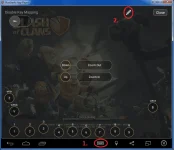
pwede po kayo mag set ng hotkey nio sa bluestacks
eto po ang steps:
1. open application you want to add hot key (eg. Clash of Clans)
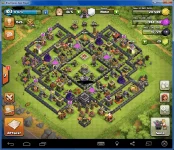
2. press the keyboard icon on your bluestacks.
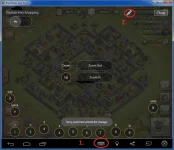
3. add tap key to your desired coordinate (sample image above)
4. make sure the "Disable key Mapping" is not in "Yes"
5. after you set all your desired keys close your bluestacks and execute the HD-Quit.exe on your bluestacks folder( so that your bluestacks is fully shutdown).
6. Re-open your buestacks and try if your hotkeys are working....
Those hotkeys are for clash of clans only, if you want to add to another game then do the same steps.
That's all thank you!!!!

pwede po kayo mag set ng hotkey nio sa bluestacks
eto po ang steps:
1. open application you want to add hot key (eg. Clash of Clans)
2. press the keyboard icon on your bluestacks.
3. add tap key to your desired coordinate (sample image above)
4. make sure the "Disable key Mapping" is not in "Yes"
5. after you set all your desired keys close your bluestacks and execute the HD-Quit.exe on your bluestacks folder( so that your bluestacks is fully shutdown).
6. Re-open your buestacks and try if your hotkeys are working....
Those hotkeys are for clash of clans only, if you want to add to another game then do the same steps.
That's all thank you!!!!