PH
PHResponsive ba ang touches ng screen mo? on paper ba ang specs ng TSR ng phone mo? totoo ba ang nasa advertisements ang TSR ng smartphone mo? dito mo malalaman ilang hertz ng Touch Sampling Rate of your Android smartphone.
What is Touch Sampling Rate?
read here: You do not have permission to view the full content of this post. Log in or register now.
Note: The good news is no need to ROOT your phone to access this utility,
Requirements: Android Smartphone, PC, USB cable (Smartphone to PC)
Step 1: Unlock Android Developer option by accessing Settings > About Phone > All Specs > Tap Ui Version 7 times to open the option. (MIUI version)
(Steps may vary on UI version / Android OS used.)
Step 2: Access the Developer Option by accessing Settings > Additional Settings > Developer Options. (MIUI version)
Step 3: Turn on USB debugging.
Step 4: Download and install Minimal ADB and Fastboot for PC (search nyo lang kay uncle google)
Step 5: After installing Minimal ADB and Fastboot, open the app.
Step 6: Connect your android smartphone to PC using usb cable.
Step 7: Type this commands below
adb devices (to refresh list of devices attached)
adb shell getevent -r -t -l (getevent o activities ng touch screen, showing tables at rate ng touch sample)
Step 8: After adb shell getevent -r -t -l , do a touch screen activity on your smartphone, pwede swipe your screen etc., magpa.pop up yan ng events ng ginagawa mong touch dito sa ADB in PC, makikita mo ang rating sa right side ng table, dyan mo makikita ang number of rate of TSR.
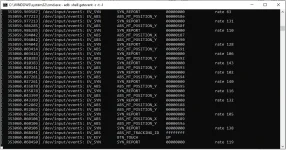
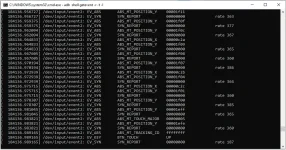
I have some screenshots for TSR of POCO M3 and POCO F3.
POCO M3 is capable of 120 Hz TSR (makikita mo sa right side ng table, about 120 Hz+
POCO F3 is capable of 360 Hz TSR (makikita mo sa right side ng table, about 360 Hz+, which is true sa ads na nilabas nila.)
What is Touch Sampling Rate?
read here: You do not have permission to view the full content of this post. Log in or register now.
Note: The good news is no need to ROOT your phone to access this utility,
Requirements: Android Smartphone, PC, USB cable (Smartphone to PC)
Step 1: Unlock Android Developer option by accessing Settings > About Phone > All Specs > Tap Ui Version 7 times to open the option. (MIUI version)
(Steps may vary on UI version / Android OS used.)
Step 2: Access the Developer Option by accessing Settings > Additional Settings > Developer Options. (MIUI version)
Step 3: Turn on USB debugging.
Step 4: Download and install Minimal ADB and Fastboot for PC (search nyo lang kay uncle google)
Step 5: After installing Minimal ADB and Fastboot, open the app.
Step 6: Connect your android smartphone to PC using usb cable.
Step 7: Type this commands below
adb devices (to refresh list of devices attached)
adb shell getevent -r -t -l (getevent o activities ng touch screen, showing tables at rate ng touch sample)
Step 8: After adb shell getevent -r -t -l , do a touch screen activity on your smartphone, pwede swipe your screen etc., magpa.pop up yan ng events ng ginagawa mong touch dito sa ADB in PC, makikita mo ang rating sa right side ng table, dyan mo makikita ang number of rate of TSR.
I have some screenshots for TSR of POCO M3 and POCO F3.
POCO M3 is capable of 120 Hz TSR (makikita mo sa right side ng table, about 120 Hz+
POCO F3 is capable of 360 Hz TSR (makikita mo sa right side ng table, about 360 Hz+, which is true sa ads na nilabas nila.)