🔗 Direct Link Platinum Karaoke Piano SD Card Content Volume 86

Status
Not open for further replies.
Siguro naman po may mga naka Platinum Piano dito eto pic
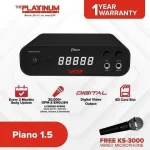
Piano1.5_2048x2048.jpg

Bago ko po iupload ang files may tanong po ako more than 10GB kase gusto ko lang makasigurado
Gagana kaya kung cocopyahin lang ang files sa mismong biniling SD papunta sa bagong SDcard? (Wala ako extra SD card di ko matest)
Kung pwede hindi ba bawal?
Unfair kase bibili SD card bawat volume pwede naman ata iupload na lang nila files kase ang mahal ng 900 bawat volume. (disadvantage lang walang hard copy ng new songlist)

FOR PLATINUM FLUTE AND PIANO ONLY!
Updated with download links:
You do not have permission to view the full content of this post. Log in or register now.
FEEDBACK IS A MUST!!!
 
Comment email po bago ko iaccept request para malaman ko susubok


86 to
Downloading lods. Pag natapos balitaan kita kung gumagana.

Update 1:
Original SD Card: 16gb (Volume 82)
New SD Card: 32gb
1. Renamed SD Card to "SD40_V86"
2. Copied full contents from gdrive v86 into SD Card including hidden system volume folder

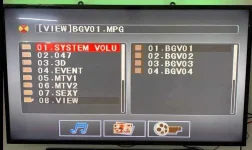
Failed loading sd-card in Platinum Piano. Possibly due to SDCard size difference? (photo below)

Next attempts:
1. Source a separate 16gb card and clone V82 data into it.
2. Write files from vol86 _okehdd into new 16gb card. Overwriting existing data within the folder.

Will keep you posted on next attempts.

Update1.webp
 
Downloading lods. Pag natapos balitaan kita kung gumagana.

Update 1:
Original SD Card: 16gb (Volume 82)
New SD Card: 32gb
1. Renamed SD Card to "SD40_V86"
2. Copied full contents from gdrive v86 into SD Card including hidden system volume folder

Failed loading sd-card in Platinum Piano. Possibly due to SDCard size difference? (photo below)

Next attempts:
1. Source a separate 16gb card and clone V82 data into it.
2. Write files from vol86 _okehdd into new 16gb card. Overwriting existing data within the folder.

Will keep you posted on next attempts.

View attachment 1777630
Negative ba?
 
Update 2:
1. Imaged my old Vol82 using winimage32.
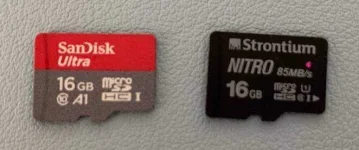
2. Written the vol 82 image into new 16gb SD Card (Strontium Nitro brand)
3. Again, it didn't load. same problem

Objective of Update 2 (if copying the old vol82 to another sdcard worked) was to overwrite the _okehdd files form vol86 thereby "adding" the new songs of vol86.
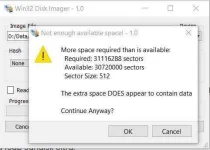
During copy form backed-up vol82 to new sd-card, it displayed warning. Possible that those few bytes are the key to unlocking this.

What's next:
1. Will try to look for another software that will perform 1 to 1 imaging of sdcard.
2. Will purchase a brand new / same brand 16gb Sandisk Ultra.

Will keep you guys posted (ayos na challenge to, hahahaha).

Update2.webp
Update2a.webp


Negative ba?
Di ko pa titigilan to. Abot kamay na eh
 
Update 2:
1. Imaged my old Vol82 using winimage32.
2. Written the vol 82 image into new 16gb SD Card (Strontium Nitro brand)
3. Again, it didn't load. same problem

Objective of Update 2 (if copying the old vol82 to another sdcard worked) was to overwrite the _okehdd files form vol86 thereby "adding" the new songs of vol86.
During copy form backed-up vol82 to new sd-card, it displayed warning. Possible that those few bytes are the key to unlocking this.

What's next:
1. Will try to look for another software that will perform 1 to 1 imaging of sdcard.
2. Will purchase a brand new / same brand 16gb Sandisk Ultra.

Will keep you guys posted (ayos na challenge to, hahahaha).

View attachment 1777846View attachment 1777847


Di ko pa titigilan to. Abot kamay na eh
sir pa add rin yung option na nasa serial number ng SD card yung code,/ na try ko sa volume serial number ayaw (clone copy with serial clone), sa manufacturer serial baka dun naka link yung media. kung sana may mga samples pa na working compare natin san cya na calculate. pero try ko rin mag block to block copy. DD-copy

pa try po ito sir (lalabas serial ng mga drives)

c:\wmic diskdrive get model,name,serialnumber
 
sir pa add rin yung option na nasa serial number ng SD card yung code,/ na try ko sa volume serial number ayaw (clone copy with serial clone), sa manufacturer serial baka dun naka link yung media. kung sana may mga samples pa na working compare natin san cya na calculate. pero try ko rin mag block to block copy. DD-copy

pa try po ito sir (lalabas serial ng mga drives)

c:\wmic diskdrive get model,name,serialnumber
Sige sir try ko. Nag low-leve copy na din ako gamit iba ibang tools ayaw pa din. Weekend bili ako ng parehong model ng SD Card. Pagtulungan natin to.
Nangangati na ako i-copy yung files derecho sa exiting volume 82.. kaso pag nasira yari ako kay misis. :D
 
Update 2:
1. Imaged my old Vol82 using winimage32.
2. Written the vol 82 image into new 16gb SD Card (Strontium Nitro brand)
3. Again, it didn't load. same problem

Objective of Update 2 (if copying the old vol82 to another sdcard worked) was to overwrite the _okehdd files form vol86 thereby "adding" the new songs of vol86.
During copy form backed-up vol82 to new sd-card, it displayed warning. Possible that those few bytes are the key to unlocking this.

What's next:
1. Will try to look for another software that will perform 1 to 1 imaging of sdcard.
2. Will purchase a brand new / same brand 16gb Sandisk Ultra.

Will keep you guys posted (ayos na challenge to, hahahaha).

View attachment 1777846View attachment 1777847


Di ko pa titigilan to. Abot kamay na eh
ganito mag feedback detailed na detailed haha
sige lang lodz

sir pa add rin yung option na nasa serial number ng SD card yung code,/ na try ko sa volume serial number ayaw (clone copy with serial clone), sa manufacturer serial baka dun naka link yung media. kung sana may mga samples pa na working compare natin san cya na calculate. pero try ko rin mag block to block copy. DD-copy

pa try po ito sir (lalabas serial ng mga drives)

c:\wmic diskdrive get model,name,serialnumber
eto output
Model Name SerialNumber
HFS512G39MND-3510A \\.\PHYSICALDRIVE0 FJ66N561511006O01
SDHC Card \\.\PHYSICALDRIVE1 058F63666485
 
negative tayu dito sir, may calculation / algorithm ung file, na need natin ma break. nag search ako sir, issue parin nila yan sa mga gps devices nila na need mag backup ng sd card.
 
haka lang pero eto ung pinaka safe at eto parin gamit ng mga manufacturer, sa serial ng SD card CID, (unique) gaya nung nalabas sa info ni sir PHYSICALDRIVE1 xxxx dyan naka program ung mismong files, yan yung nagamit nung na build po sila. not sure pa sino sa kanila ung holder ng code.
 
download ka songbook app ni platinum lods..tas piliin mu don f anung model player mu , kahit wala kang hard copy, andun na lahat
yung mga bagong labas lang po, yung mga releases di po sila kasama, pero yes po sa mga new karaoke player madami dun sa song book yung wala pero nandun sa App, na try po namin, or baka di lang nasama yung na print, wala si gary v sa booklet pero andun sa app at nag play naman po
 
haka lang pero eto ung pinaka safe at eto parin gamit ng mga manufacturer, sa serial ng SD card CID, (unique) gaya nung nalabas sa info ni sir PHYSICALDRIVE1 xxxx dyan naka program ung mismong files, yan yung nagamit nung na build po sila. not sure pa sino sa kanila ung holder ng code.
ang galing pala ayaw talaga nila ishare sa iba yung copy. May sariling app ata sila pang copy sa ibang sd card
 
Status
Not open for further replies.

About this Thread

  • 103
    Replies
  • 3K
    Views
  • 33
    Participants
Last reply from:
tzuyuchou18

Trending Topics

Online now

Members online
537
Guests online
1,418
Total visitors
1,955

Forum statistics

Threads
2,286,439
Posts
29,037,765
Members
1,217,951
Latest member
lolpops
Back
Top