 PH
PH
This blog will guide you on how to sell your cryptocurrency for fiats. The currency used is the Philippine Peso and Depositing Address will be on Gcash. This Blog tutorial is for PC users.
What is P2P
P2P is the Peer-to-Peer transaction of two users agreeing to exchange their different assets. In the case of Cryptocurrency P2P, they agree to exchange Cryptocurrency and Fiat.
There are no fees to pay on Binance for P2P Trading.
No account? Register on Gcash and Binance.


The Step-by-step
1.First, on the Homepage of Binance, Hover your mouse on "Buy Crypto" and choose P2P Trading.
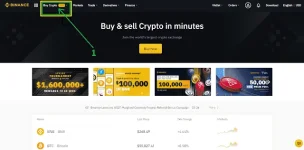
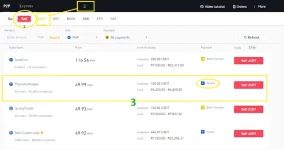
After you choose the P2P Trading, Follow the Photo below.
- From Buy Option, change to Sell.
- Choose the Cryptocurrency you have in your P2P wallet. Remember that before entering the P2P Trading, Transfer your cryptocurrency from Spot Wallet Account to P2P Wallet Account.
- Choose a buyer to sell your cryptocurrency. On choosing the buyer for your crypto;
a. Look at completion %, preferable percentage is 97% and up.
b. Choose Gcash as your depositing address, the buyer of your crypto will send fiat currency (Philippine Peso) to your Gcash as soon as you start trading on P2P.
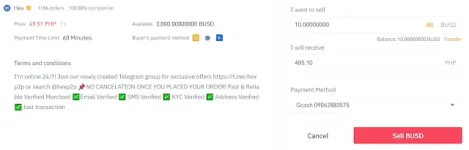
- The Next Step is to put the amount of your crypto you want to sell. The conversion rate will be automatically calculated as seen in the photo below.
- Next is to double-check your receiving account (GCASH) if the account is correct.
- Click the "Sell BUSD" if your crypto balance in P2P wallet is BUSD.
- After hitting the sell button, message the buyer and confirm your depositing address. Once the buyer reply. wait for the money he/she is sending to your account (Gcash).
- If you are using a mobile application click the upper right corner message icon and start chatting with the buyer.
- Do not click any button unless you already received the right price the buyer should send you on your account(Gcash).
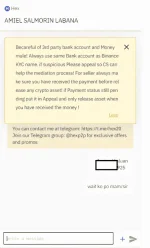
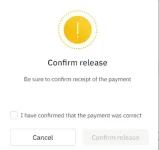
- Next is after you received money on your account(Gcash), the seller will click the ρáíd button and you can actively click the confirm release button.
- Remember that you should first receive the amount before clicking the "Confirm Release" button.
That's it. You successfully trade on P2P, Withdraw your cryptos for fiat. Minimum withdrawal/sell on P2P will be base on buyers' lower limit.