 PH
PHPhc - lAWiT
Forum Veteran
láρág KUNA PO TUTORIAL AT SABAY SABAY PO TAYO MAG HUNT NG BUGHOST! 
tools:
mobile phone
termux app
copy paste
ssl script
quickedit app
internet
instructions.
1) open termux type - pkg install sslscan
then enter
2) after ma install type - sslscan
then enter
3) pag may nakita kang sslscan na logo means ok na un
4) to allow storage type- termux-setup-storage
then enter allow nyo po storage
5)after ng mga steps na yan proceed kana open quick edit tapos per line lagay muna ung mga ip then save automcatic na un na 443 ang port
6) open termux locate the txt file ng ip list mo
cd - means open
ls - means ung laman
7) first type ls then enter makikita mo storage so proceed ksa paghahanap nung file saken -cd storage
to open the storage then enter
8) ung file ko naka save lang sa storage so pag nag ls ako dun makikita ko ung list.txt na ginawa ko
9) scanning na, to scan type - sslscan --no-check-certificate --no-ciphersuites --no-fallback --no-renegotiation --no-compression --no-heartbleed --no-check-certificate --no-sigs --no-heartbleed --no-groups --tlsall --targets=list.txt
10)pansinin nyo ung last part ng script ko ung list.txt dun is ung ip list ko... then click enter auto na yun na mag scan ng ip makikita mo kung enabled ung tls sa ip na un before ka mag scan dapat wala kang promo or load na internet. "enabled means working bughost for no load"
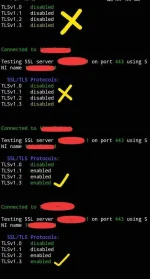
feedback lang po kung may tanung kayo willing po ako mag assist
tools:
mobile phone
termux app
copy paste
ssl script
quickedit app
internet
instructions.
1) open termux type - pkg install sslscan
then enter
2) after ma install type - sslscan
then enter
3) pag may nakita kang sslscan na logo means ok na un
4) to allow storage type- termux-setup-storage
then enter allow nyo po storage
5)after ng mga steps na yan proceed kana open quick edit tapos per line lagay muna ung mga ip then save automcatic na un na 443 ang port
6) open termux locate the txt file ng ip list mo
cd - means open
ls - means ung laman
7) first type ls then enter makikita mo storage so proceed ksa paghahanap nung file saken -cd storage
to open the storage then enter
8) ung file ko naka save lang sa storage so pag nag ls ako dun makikita ko ung list.txt na ginawa ko
9) scanning na, to scan type - sslscan --no-check-certificate --no-ciphersuites --no-fallback --no-renegotiation --no-compression --no-heartbleed --no-check-certificate --no-sigs --no-heartbleed --no-groups --tlsall --targets=list.txt
10)pansinin nyo ung last part ng script ko ung list.txt dun is ung ip list ko... then click enter auto na yun na mag scan ng ip makikita mo kung enabled ung tls sa ip na un before ka mag scan dapat wala kang promo or load na internet. "enabled means working bughost for no load"
feedback lang po kung may tanung kayo willing po ako mag assist

