 PH
PHNox Android App Player

---------------------------------------------------------------------------------------------------------------------
Nox APP Player is an emulator which allows you to run Android apps in a window on your PC desktop.
Installation was slow on our test PC, but straightforward enough. The only action we had to take was to agree to the installation of a USB driver, and after doing that, the program was ready to go.
On launch Nox APP Player fired up a virtual Android 4.4.2 tablet in a near-full-screen window. This only has one or two apps by default, but fortunately Play Store is included, so you can search for and install whatever you like in the usual way.
The program has reasonable gaming support, and allows you to play using a joystick, mouse, or the keyboard (map your preferred keys to make life easier). But other apps work just as well, and everything we tried ran without problems.
A toolbar to the right of the window provides options to simulate shaking your device, to set a virtual location, take a screenshot, install an APK from the host, and more.
Nox APP Player also has some useful settings, including options to change your screen resolution, and optimise performance by assigning more (or less) RAM/ CPU cores.
Version 2.5 brings:
1. New Feature: backup and restore main Nox instance data
2. New Feature: on/off button for root mode
3. Fixed startup errors with some processor and operating systems
4. Increased compatibility, stability and account security
5. Perfectly compatible with Angry Birds 2, Dungeon Striker and more.
---------------------------------------------------------------------------------------------------------------------
-System Requirements-
-------------------------------------------------------------------------------------------------------------------
Features :
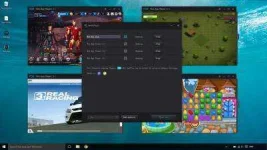
Multiple Tabs
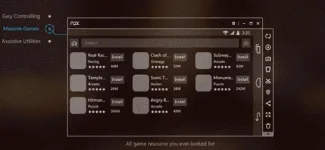
Play what you want!
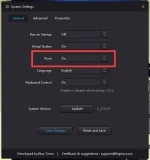
Easy ROOT access!
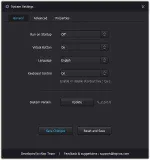
Very Customizable!
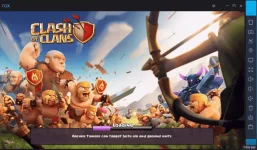
Recommended for Clash of Clans Users
And Many More.
------------------------------------------
Download Now!
You do not have permission to view the full content of this post. Log in or register now.
or
You do not have permission to view the full content of this post. Log in or register now.
Problems and Possible Solutions!
just click the issues that you probably encountered.
You do not have permission to view the full content of this post. Log in or register now.
You do not have permission to view the full content of this post. Log in or register now.
You do not have permission to view the full content of this post. Log in or register now.
You do not have permission to view the full content of this post. Log in or register now.
You do not have permission to view the full content of this post. Log in or register now.
You do not have permission to view the full content of this post. Log in or register now.
You do not have permission to view the full content of this post. Log in or register now.
You do not have permission to view the full content of this post. Log in or register now.
You do not have permission to view the full content of this post. Log in or register now.
You do not have permission to view the full content of this post. Log in or register now.
Just post your issues.. I'll just check it later ..
---------------------------------------------------------------------------------------------------------------------
Nox APP Player is an emulator which allows you to run Android apps in a window on your PC desktop.
Installation was slow on our test PC, but straightforward enough. The only action we had to take was to agree to the installation of a USB driver, and after doing that, the program was ready to go.
On launch Nox APP Player fired up a virtual Android 4.4.2 tablet in a near-full-screen window. This only has one or two apps by default, but fortunately Play Store is included, so you can search for and install whatever you like in the usual way.
The program has reasonable gaming support, and allows you to play using a joystick, mouse, or the keyboard (map your preferred keys to make life easier). But other apps work just as well, and everything we tried ran without problems.
A toolbar to the right of the window provides options to simulate shaking your device, to set a virtual location, take a screenshot, install an APK from the host, and more.
Nox APP Player also has some useful settings, including options to change your screen resolution, and optimise performance by assigning more (or less) RAM/ CPU cores.
Version 2.5 brings:
1. New Feature: backup and restore main Nox instance data
2. New Feature: on/off button for root mode
3. Fixed startup errors with some processor and operating systems
4. Increased compatibility, stability and account security
5. Perfectly compatible with Angry Birds 2, Dungeon Striker and more.
---------------------------------------------------------------------------------------------------------------------
-System Requirements-
- Windows XP(32) SP3/Windows Vista/Windows 7/Windows 8/Windows 10
- AMD or Intel CPU (with Virtualization Technology support preferred)
- At least 512MB RAM
- GPU with OpenGL 2.0+ support
- At least 1GB of free disk space under installation path (for saving the data of the apps you may install) and 300MB under system disk
-------------------------------------------------------------------------------------------------------------------
Features :
Multiple Tabs
Play what you want!
Easy ROOT access!
Very Customizable!
Recommended for Clash of Clans Users
And Many More.
------------------------------------------
Download Now!
You do not have permission to view the full content of this post. Log in or register now.
or
You do not have permission to view the full content of this post. Log in or register now.
Problems and Possible Solutions!
just click the issues that you probably encountered.
You do not have permission to view the full content of this post. Log in or register now.
You do not have permission to view the full content of this post. Log in or register now.
You do not have permission to view the full content of this post. Log in or register now.
You do not have permission to view the full content of this post. Log in or register now.
You do not have permission to view the full content of this post. Log in or register now.
You do not have permission to view the full content of this post. Log in or register now.
You do not have permission to view the full content of this post. Log in or register now.
You do not have permission to view the full content of this post. Log in or register now.
You do not have permission to view the full content of this post. Log in or register now.
You do not have permission to view the full content of this post. Log in or register now.
Just post your issues.. I'll just check it later ..

