 PH
PHPHC_Jayvee
nakatapos din sa research😂🤣
Una sa lahat syempre big creadits kay boss Bon-chan big respect master
so bago nyo to install dapat na install nyo na si v2ray follow nyo lang thread ni master bon https://phcorner.org/threads/instal...ocket-tls-using-cloudflare-cdn-setup.1020532/
so itong script na to pwede nyo na i manage yung yung inyong mga UUID
like adding and deleting UUID
supported nya na vps ay
Debian 9,10 and Ubuntu 16, 18 and 19
so installation ganito lang
Code:
cd /tmp && wget -q https://raw.githubusercontent.com/PHCitizen/v2ray-uuid-manager/main/install.sh && chmod +x install.sh && bash install.shthen pag i configure nyo na yung mga uuid run
phcv2raymanagerpara naman sa gusto ng flag version possible din po sya

so ganto po mga possible flags
- -a = mean add uuid
- -r = random
- -u UUID_HERE = mean po i add nya yung UUID na nilagay nyo after ng -u
- -e PLUS_NUMBER_OF_DAYS = auto delete UUID after given days
- -d = mean delete uuid
- -n NUMBER_HERE= delete uuid by number
- -u UUID_HERE= delete uuid by UUID
- -h = help
phcv2raymanager -a -r or kung may specific uuid kayo na gusto ganto phcv2raymanager -a -u MYUUID_HEREso kayo na bahala mag explore nyan
yung flag is kung gusto nyo lang naman
or gusto nyo menu style ganto
phcv2raymanagersample output
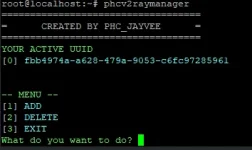
yun lang mga sir feedback if may problem or bug hahaha
follow nyo po tong mga mamaw
C 0 V 1 D
PHC-BlackRose_08
Wreck_less
suxishi
Kinji rareta
CyberCrusaderz
PHC_Jayvee
Keryu
Kryptic
kokoula
PHC-Exercise
PHC-Z--
1nc0gnitus
Min3
Chiinnn
moondhie

 sa magtrotropa


