PHC-TheGlock
Elite
10. you'll see a DNS management page. first long box is for subdomain/record name(like www or m); second selectbox is for record type (we will choosing 'A' for ipv4 record); third smallbox is TTL time, we will setting it to 3600 seconds; last fourth is for 'A' record value, probably a IP address. in my tutorial im using a Facebookspace IP address just for testing (31.13.95.36)
- I will configuring the root domain here, remain empty the first longbox.
- Idea is we need to actively configure the root domain to help cloudflare recognize our domain easily. Just put any dummy ip that responses any HTTP status code to test if our domain...
10. you'll see a DNS management page. first long box is for subdomain/record name(like www or m); second selectbox is for record type (we will choosing 'A' for ipv4 record); third smallbox is TTL time, we will setting it to 3600 seconds; last fourth is for 'A' record value, probably a IP address. in my tutorial im using a Facebookspace IP address just for testing (31.13.95.36)
- I will configuring the root domain here, remain empty the first longbox.
- Idea is we need to actively configure the root domain to help cloudflare recognize our domain easily. Just put any dummy ip that responses any HTTP status code to test if our domain can resolve ip address or not
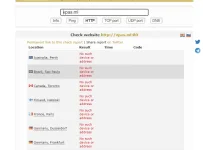
11. we will just wait until our domain is active on the internet (Feeenom DNS servers are too slow for newly registered domain) goto You do not have permission to view the full content of this post. Log in or register now. to check our domain, offline domain responses "No such device or address" error
Need niyo po masunod tong nasa comment ni Master phc-exertexcerpted from: https://phcorner.org/threads/1020514/