 PH
PHWARNING: Hindi 100% gagana agad sa iba. Minsan ayaw gumana pero mamaya gagana or minsan ayaw talaga. Nakadepende ang speed sa location, oras at kung crowded na masyado o hindi ang servers. WAG NA IDISCONNECT kung gumagana na sayo.
 NO DATA Issue Possible Solutions:
Alternate Links:
Download NapsternetV Here:
You do not have permission to view the full content of this post. Log in or register now.
How to use NapsternetV?
1. Open NapsternetV
2. Click + sign
3. Click import npv2 config file
4. Locate downloaded npv2 file and click to import
5. Select the imported file
6. Click the blue button with triangle inside.
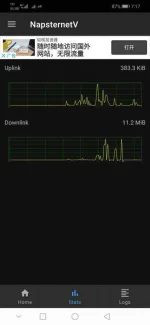
7. Click STATS to check if its working or try to browse.
=============================

Use NapsternetV
FULL SPEED SERVERS
v11.0 HK1 02-14_VashConfigs.npv2 You do not have permission to view the full content of this post. Log in or register now.
v11.0 HK2 02-14_VashConfigs.npv2 You do not have permission to view the full content of this post. Log in or register now.
v11.0 HK3 02-14_VashConfigs.npv2 You do not have permission to view the full content of this post. Log in or register now.
BACK UP SERVERS
v11.1 SG1 02-14_VashConfigs.npv2 You do not have permission to view the full content of this post. Log in or register now.
v11.2 CA 02-14_VashConfigs.npv2 You do not have permission to view the full content of this post. Log in or register now.
v11.3 USA1 02-14_VashConfigs.npv2 You do not have permission to view the full content of this post. Log in or register now.
v11.4 USA2 02-14_VashConfigs.npv2 You do not have permission to view the full content of this post. Log in or register now.
v11.5 NL1 02-14_VashConfigs.npv2 You do not have permission to view the full content of this post. Log in or register now.
v11.6 NL2 02-14_VashConfigs.npv2 You do not have permission to view the full content of this post. Log in or register now.
v11.7 SG2 02-14_VashConfigs.npv2 You do not have permission to view the full content of this post. Log in or register now.
v11.8 SG3 02-14_VashConfigs.npv2 You do not have permission to view the full content of this post. Log in or register now.
NO DATA Issue Possible Solutions:- Change APN
- On/Off air plane mode
- Restart NapsternetV App
- Try other servers/configs
- Clear data mo si NapsternetV app
- Go to phone SETTINGS -> CONNECTION & SHARING -> Turn off Private DNS
Alternate Links:
Spoiler contents are visible only to Established Members.
Download NapsternetV Here:
You do not have permission to view the full content of this post. Log in or register now.
How to use NapsternetV?
1. Open NapsternetV
2. Click + sign
3. Click import npv2 config file
4. Locate downloaded npv2 file and click to import
5. Select the imported file
6. Click the blue button with triangle inside.
7. Click STATS to check if its working or try to browse.
=============================

 enjoy!