🔒 Closed Enable Cloudflare DNS (1.1.1.1) in Android pie without apps

Status
Not open for further replies.

Dranrus

Forum Veteran

Configuring 1.1.1.1​


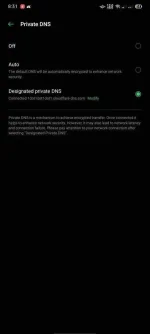
Android Pie only supports DNS over TLS. To enable this on your device:
  1. Go to Settings → Network & internet → Advanced → Private DNS.
  2. Select the Private DNS provider hostname option.
  3. Enter 1dot1dot1dot1.cloudflare-dns.com and hit Save.
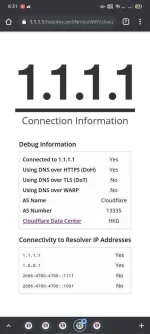
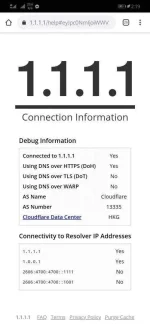
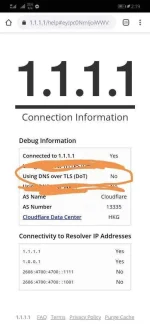
  4. Visit You do not have permission to view the full content of this post. Log in or register now. (or You do not have permission to view the full content of this post. Log in or register now.) to verify that “Using DNS over TLS (DoT)” shows as “Yes”.
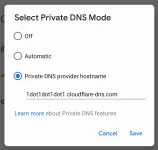
And you’re done!

Screenshot_20180807-102253-1.png


Not tested sa android 10, pero gagana yan as long as may private dns na settings
 
Bat kaya sakin pag ginamit ko to using vpn walang data binubuga.. pero pag ini-off meron data net.?
 
Naka no naman sakin ts
 

Attachments

  • Screenshot_20210209_141912_com.android.chrome.webp
    Screenshot_20210209_141912_com.android.chrome.webp
    38.2 KB · Views: 62
Screenshot_20210209_191304.webp

Mali yata ako ng pag kaintindi.. Sorry TS.. Btw salamat
 

Attachments

  • Screenshot_20210209_191504.webp
    Screenshot_20210209_191504.webp
    40.5 KB · Views: 67
Status
Not open for further replies.

About this Thread

  • 26
    Replies
  • 3K
    Views
  • 17
    Participants
Last reply from:
kamikazen

Online now

Members online
444
Guests online
1,658
Total visitors
2,102

Forum statistics

Threads
2,320,201
Posts
29,204,751
Members
1,180,552
Latest member
Logouttt11
Back
Top