PH
PHHi guys! this is my first post.
How to bypass ML downloading resources.
Required application.
*File sharing apps e.g. ShareIt
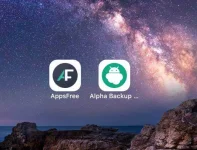
*Download Alpha back up pro. (ρáíd po siya). Download nyu sa Apps Free, para libre.
Gamit ang selpon na pagkukunan mo ng ml resources, dapat ang ML nya ay fully updated na.
-----BACKUP PROCESS-----
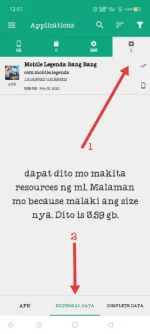
Step 1. Install mo alpha backup pro sa phone na may ML na updated.
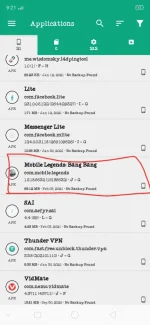
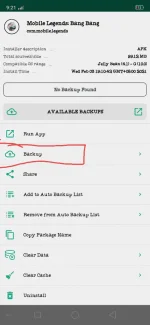
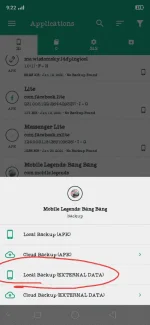
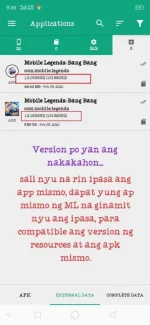
Step 2. Open the app, hanapin nyu ML sa list, then follow nyu lng nasa picture.
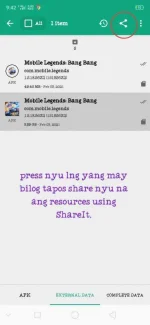
*wait nyu lang matapos ang process. Then pag na back up na. Share nyu nalang sa Phone nyu na pag e installan nyu ng ML. Tingnan sa picture kung paano e share.
-------RESTORE PROCESS-----
FINALLY, sa phone nyu na mismo.
Step 1. Install nyu rin ulit yung alpha back up pro. Hindi sya gagana pag e share lng kaya download kayu ulit. Pasensya lang kailangan
step 2. install nyu ml sa phone nyu, dapat pareho ang version ng ML sa phone pinagkukunan nyu ng resources. pasa nyu lang sa share it.
*wag nyu muna e open ang ml pagkatpos ma install.
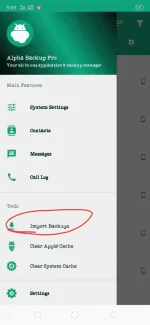
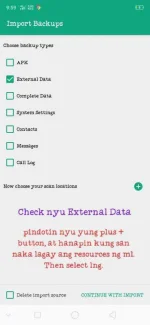
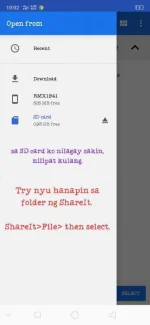
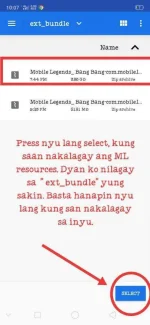
Step 3. Import nyu na resources/Import back up.
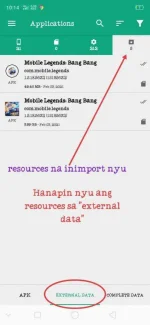
*tingnan sa picture ang ibang instructions ng pag import.
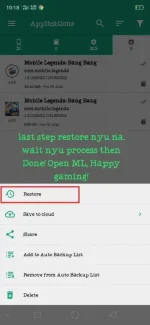
Final Step. Hanapin ang resources na enimport nyu. Then pres nyu lang tapos restore. Wait sa matapos ang process. DONE! happy gaming.
How to bypass ML downloading resources.
Required application.
*File sharing apps e.g. ShareIt
*Download Alpha back up pro. (ρáíd po siya). Download nyu sa Apps Free, para libre.
Gamit ang selpon na pagkukunan mo ng ml resources, dapat ang ML nya ay fully updated na.
-----BACKUP PROCESS-----
Step 1. Install mo alpha backup pro sa phone na may ML na updated.
Step 2. Open the app, hanapin nyu ML sa list, then follow nyu lng nasa picture.
*wait nyu lang matapos ang process. Then pag na back up na. Share nyu nalang sa Phone nyu na pag e installan nyu ng ML. Tingnan sa picture kung paano e share.
-------RESTORE PROCESS-----
FINALLY, sa phone nyu na mismo.
Step 1. Install nyu rin ulit yung alpha back up pro. Hindi sya gagana pag e share lng kaya download kayu ulit. Pasensya lang kailangan
step 2. install nyu ml sa phone nyu, dapat pareho ang version ng ML sa phone pinagkukunan nyu ng resources. pasa nyu lang sa share it.
*wag nyu muna e open ang ml pagkatpos ma install.
Step 3. Import nyu na resources/Import back up.
*tingnan sa picture ang ibang instructions ng pag import.
Final Step. Hanapin ang resources na enimport nyu. Then pres nyu lang tapos restore. Wait sa matapos ang process. DONE! happy gaming.
Attachments
-
 Screenshot_2021-02-03-21-21-28-99.webp46.3 KB · Views: 148
 -
 Screenshot_2021-02-03-21-22-15-22.webp32.9 KB · Views: 138
 -
 Screenshot_2021-02-03-21-22-49-42.webp46.1 KB · Views: 126
 -
 IMG_20210203_214142.webp56.1 KB · Views: 126
 -
 IMG_20210203_214546.webp38 KB · Views: 126
 -
 Screenshot_2021-02-03-21-59-15-76.webp45.9 KB · Views: 116
 -
 IMG_20210203_220201.webp38.2 KB · Views: 119
 -
 IMG_20210203_220622.webp26.2 KB · Views: 115
 -
 IMG_20210203_221058.webp48.1 KB · Views: 111
 -
 IMG_20210203_221742.webp43.1 KB · Views: 104
 -
 IMG_20210203_222017.webp39.2 KB · Views: 118
 -
 IMG_20210203_223330.webp81.7 KB · Views: 129

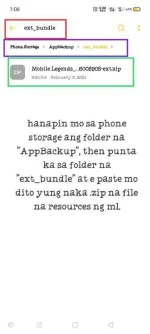
 then punta ka sa external data. Dyan nakalagay ang resources ng ml. Pindutin mo ang resources ng ml at pindutin mo yung "restore".