 PH
PH-
Welcome to PHCorner Forums! Sign up for free to unlock full access and exclusive privileges, including:
- Asking questions about computer and mobile issues
- Discovering internet tips for your mobile network and computer
You are using an out of date browser. It may not display this or other websites correctly.
You should upgrade or use an alternative browser.
You should upgrade or use an alternative browser.
🔒 Closed Installing v2ray vmess + websocket + TLS using Cloudflare CDN setup
- Thread starter Bon-chan
- Start date
- Status
- Not open for further replies.

ThreadRipper
Forum Guru
Boss pahelp hehe sa step no.6 - curl: (3) îllégâl characters found in URL
Ganyan po nalabas, create po ako new link?
Ganyan po nalabas, create po ako new link?
ThreadRipper
Forum Guru
 (( Isan oras natapos tapos, may mali talaga na di ko malaman ( port:10035 lang running. Di ako marunong mag kill nung mga servers nag rurun sa 443 at 80.
ThreadRipper
Forum Guru
[XX='Bon-chan, c: 739983, m: 1113375'][/XX] Salamat boss Bon-Chan sorry po newbie lang sa ganito ka complex hehe salamaat
ThreadRipper
Forum Guru
Atsaka paano po i-open port 443 sa cloudsigma trial? hehehe
nung nasa step#10 na command pang check using netstat, may mga service names po yun sa gilid, katabi nya yung Process ID (ProcessID/ServiceName)
yung service name na po na yun, gamitin nyo sa systemctl command
systemctl stop <service name here>
ex: systemctl stop squid
yung service name na po na yun, gamitin nyo sa systemctl command
systemctl stop <service name here>
ex: systemctl stop squid
ThreadRipper
Forum Guru
[XX='Bon-chan, c: 740003, m: 1113375'][/XX] Ayown, salamat poo!!
ThreadRipper
Forum Guru
[XX='Bon-chan, c: 740026, m: 1113375'][/XX] Btw boss need ba wala pa naka install sa vps? Sinunod ko kasi tut ni boss Rai. Ito yung first step dito raw sa thread na to
https://phcorner.org/threads/v2ray-panel-autoscript.1018970/#post-17443393
https://phcorner.org/threads/v2ray-panel-autoscript.1018970/#post-17443393
[XX='ThreadRipper, c: 740052, m: 1039870'][/XX] Auto script kasi yan mas madali
ThreadRipper
Forum Guru
[XX='R a i, c: 740132, m: 573400'][/XX] Boss Rai, so may skip ako na step dito sa tut ni boss bonchan or wala po? Yung installation?
ThreadRipper
Forum Guru
@ThreadRipper..open na po ata by default ang port 443 sa cloudsigma
goto check-host.net itesting nyo po doon
Boss sorry talaga, makulet ako HAHAHAHA@ThreadRipper..Auto script kasi yan mas madali
After ko magawa lahat niyan, saan ko po makukuha ito?
certificate file path
key file path
Chupapi-Munyayo
Eternal Poster
sir ano ilagay sa websocket header po?do manual settings nalang po.
address, port, id, alter id, transport type, websocket header, websocket path lng naman po kakalikutin sa client. madali lang
ThreadRipper
Forum Guru
[XX='Bon-chan, c: 740382, m: 1113375'][/XX] Salamat boss Bonchan, observe na muna ako.
Chupapi-Munyayo
Eternal Poster
sa TLS SNI sir wala na bang gagalwin? dto yata yung payload nilalagay?domain po na ginamit nyo sa v2ray server
path: /

1nc0gnitus
Elite
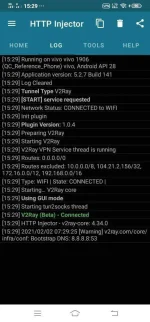
Na install ko na boss, connected pero no browse pano kaya setup? Wala kong makitang setup sa yt puro import lang sila, manual setup kase ginawa ko boss yung inimport ko kase yung json unsuccessful

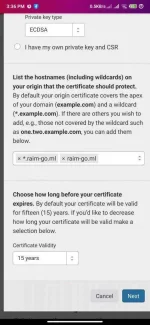
Kanina pa ko boss next ng next walang naggegenerate na certificate, sinubukan ko din palit data connection / Wifi same parin sinubukan ko na rin palit browse kagaya ng Firefox Focus same parin ano kaya problema nito
- Status
- Not open for further replies.
Similar threads
-
🔴 DITO SSH WebSocket Relay Using Railway | HTTP Injector, Cloudflare CDN & Bug Host
- Started by Noahclanman
- Replies: 7
About this Thread
-
942Replies
-
55KViews
-
142Participants
Last reply from:
Broofi
Broofi
New Topics
-
25 Linux tips you should know
- Started by KumaKuma
- Replies: 0
- 🐧 Linux Distributions
-
Linux Command Line: Tips & Tricks for Power Users
- Started by Paul25
- Replies: 1
- 🐧 Linux Distributions
-
Linux Distro Reco
- Started by v2clone
- Replies: 5
- 🐧 Linux Distributions
Trending Topics
Online now
- Members online
- 554
- Guests online
- 7,283
- Total visitors
- 7,837