 PH
PH-
Welcome to PHCorner Forums! Sign up for free to unlock full access and exclusive privileges, including:
- Asking questions about computer and mobile issues
- Discovering internet tips for your mobile network and computer
You are using an out of date browser. It may not display this or other websites correctly.
You should upgrade or use an alternative browser.
You should upgrade or use an alternative browser.
🔒 Closed Installing v2ray vmess + websocket + TLS using Cloudflare CDN setup
- Thread starter Bon-chan
- Start date
- Status
- Not open for further replies.

CyberCrusaderz
Forum Expert
[XX='Min3, c: 755247, m: 1310892'][/XX] Sipag at tyaga boss hehe nakuha ko din
CyberCrusaderz
Forum Expert
[XX='Min3, c: 755251, m: 1310892'][/XX] worth it Naman Kasi solo baka gagawa nako makakalapag na din Maya deploy other server hehe



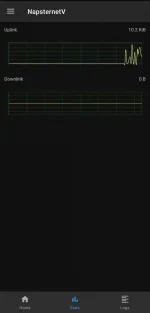


PHC_Jayvee Paps baka alam mo to
PHC_Jayvee
nakatapos din sa research😂🤣
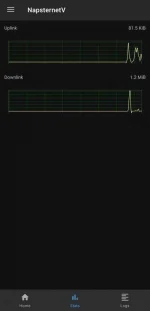
Sadya po yan
To fake visitor
Nasa nginx config po mababasa nyo bakit ganyan
Nakalagay dun
If port 80 redirect to globe.com.ph
Tas if protocol not websocket redirect to globe
Pero if port equal to 443 and protocol is websocket reroute to v2ray
To fake visitor
Nasa nginx config po mababasa nyo bakit ganyan
Nakalagay dun
If port 80 redirect to globe.com.ph
Tas if protocol not websocket redirect to globe
Pero if port equal to 443 and protocol is websocket reroute to v2ray
PHC_Jayvee
nakatapos din sa research😂🤣
[XX='basilan99, c: 755782, m: 499832'][/XX] wc
Shinki gami
Elite
boss matanong lang saan makikita server listen ba yun yung nasa step 10 di ko alam san sya i dedelete e
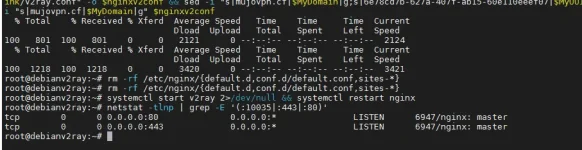
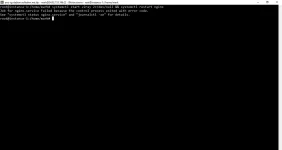
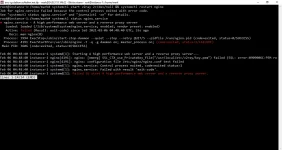
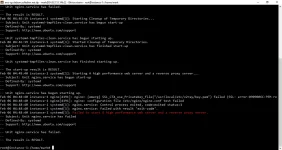
Sa mga nakakaexperience ng nagfafailed sa nginx.service, ito ang mga ginawa kong troubleshoot para maayos:
-Main site on Cloudflare (yoursite.ml) must be connected/pointed to a working http like FaYou do not have permission to view the full content of this post. Log in or register now.ok's IP (31.13.95.36)
-Add or modify DNS of yoursite in Cloudflare like You do not have permission to view the full content of this post. Log in or register now.ml or test.yoursite.ml and point it to the IP address of your VPS and not the main IP of your domain (yoursite.ml) which has the IP Address of Facebook.
-on You do not have permission to view the full content of this post. Log in or register now., use expire in 1 day instead of destroy when read so that You do not have permission to view the full content of this post. Log in or register now. can be read when downloaded on step #6, based on my experience
-after step #6, make sure to use cat command on terminal after downloading the cert files to see if it has texts inside:
-dont kill port 80 when nginx is already using it on step 10
-proceed with
-Main site on Cloudflare (yoursite.ml) must be connected/pointed to a working http like FaYou do not have permission to view the full content of this post. Log in or register now.ok's IP (31.13.95.36)
-Add or modify DNS of yoursite in Cloudflare like You do not have permission to view the full content of this post. Log in or register now.ml or test.yoursite.ml and point it to the IP address of your VPS and not the main IP of your domain (yoursite.ml) which has the IP Address of Facebook.
-on You do not have permission to view the full content of this post. Log in or register now., use expire in 1 day instead of destroy when read so that You do not have permission to view the full content of this post. Log in or register now. can be read when downloaded on step #6, based on my experience
-after step #6, make sure to use cat command on terminal after downloading the cert files to see if it has texts inside:
Code:
cat /usr/local/etc/v2ray/cert.pem
cat /usr/local/etc/v2ray/key.pem
-dont kill port 80 when nginx is already using it on step 10
-proceed with
Code:
systemctl start v2ray 2>/dev/null && systemctl restart nginx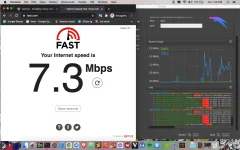


- Status
- Not open for further replies.
Similar threads
-
🔴 DITO SSH WebSocket Relay Using Railway | HTTP Injector, Cloudflare CDN & Bug Host
- Started by Noahclanman
- Replies: 7
About this Thread
-
942Replies
-
55KViews
-
142Participants
Last reply from:
Broofi
Broofi
New Topics
-
25 Linux tips you should know
- Started by KumaKuma
- Replies: 0
- 🐧 Linux Distributions
-
Linux Command Line: Tips & Tricks for Power Users
- Started by Paul25
- Replies: 1
- 🐧 Linux Distributions
-
Linux Distro Reco
- Started by v2clone
- Replies: 6
- 🐧 Linux Distributions
Trending Topics
Online now
- Members online
- 1,152
- Guests online
- 6,538
- Total visitors
- 7,690