 PH
PHMr Brightside
Contributor
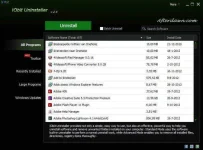
Description
Standard and Advanced Uninstall - While Standard Uninstall works as the Windows built-in Add/Remove Programs function, Advanced Uninstall function helps you scan Windows registry and hard drive for any possible installation leftovers.
1-Click Toolbars Removal - Annoyed by so many toolbars in your system? Here's the simplest and fastest solution.
Forced Uninstall - Even a program is not listed in Windows built-in Add/Remove Programs, this feature still can help you automatically find the program's leftovers and traces in your system and remove them completely.
Log Manager and Restoration - Easily view what has been changed by IObit Uninstaller. Every time an "Advanced Uninstall" is performed, a restore point image will be automatically set for possible future system restoration.
You do not have permission to view the full content of this post. Log in or register now.
App Notes
Later Versions: The publisher does not wish for versions 8 and later to be portablized.Support
For help with this app, please see the following:- You do not have permission to view the full content of this post. Log in or register now.
- You do not have permission to view the full content of this post. Log in or register now.
- You do not have permission to view the full content of this post. Log in or register now.
- You do not have permission to view the full content of this post. Log in or register now.
- External: You do not have permission to view the full content of this post. Log in or register now.
- PortableApps.com Forum: You do not have permission to view the full content of this post. Log in or register now.
You do not have permission to view the full content of this post. Log in or register now.