PH
PH1nn0c3ntv5
Fanatic
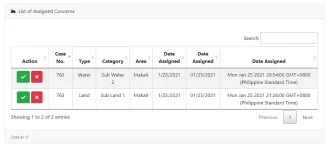
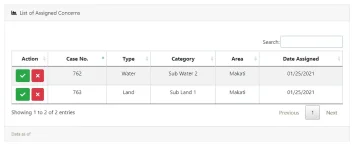
Kapag sa typical view yung table ko nirerender na yung date
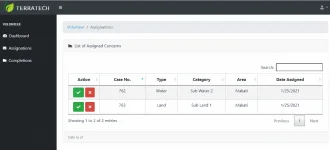
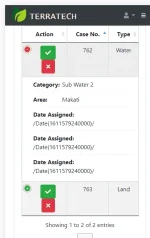
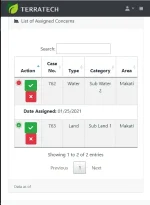
Pero kapag nasa responsive version naman hindi siya na rerender ng function ko
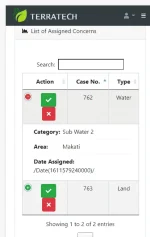
As much as possible ayoko sana gumamit ng mga additional na library. Possible po ba to ma render pag nasa responsive version?
[CODE lang="javascript" title="Jquery Table"] function LoadVolunteer() {
table = $('#VolunteerTable').DataTable({
bLengthChange: false,
destroy: true,
responsive:true,
order: [[1, 'asc']],
ajax: {
type: "GET",
"url": "/DataGet/GetAssignedConcerns?VolunteerID",
data: { VolunteerID: @ViewBag.UserInformationID},
dataSrc: function (json) {
var a = new Array();
for (var b = 0; b <= json.length - 1; b++) {
var c = json;
a.push({
'VolunteerID': c.VolunteerID,
'FamilyName': c.FamilyName,
'GivenName': c.GivenName,
'MaidenName': c.MaidenName,
'FullName': c.GivenName + " " + c.MaidenName + " " + c.FamilyName,
'Notes': c.Notes,
'UserInformationID': c.UserInformationID,
'DateReported': c.DateReported,
'CaseLocation': c.CaseLocation,
'EnvironmentalConcernID': c.EnvironmentalConcernID,
'XCoordinates': c.XCoordinates,
'YCoordinates': c.YCoordinates,
'UpdatedStatusDate': c.UpdatedStatusDate,
'PhotoLink': c.PhotoLink,
'SpecificEnvironmentalConcernID': c.SpecificEnvironmentalConcernID,
'CaseReportID': c.CaseReportID,
'Concern': c.Concern,
'SubCategory': c.SubCategory
});
}
return a;
},
},
columns: [
{
title: "Action",
"render": function () {
var del = "<a class='btn btn-danger btn-xs btnReject' title='Delete' style='color: white'><i class='fas fa-times'></i></a>";
var approve = "<a class='btn btn-success btn-xs btnUpdate' title='Edit' style='color: white'><i class = 'fas fa-check'></i></a>";
//var view = "<a class='btn btn-primary btn-xs btnView' title='Edit' style='color: white'><i class = 'fa fa-1x fa-address-card'></i></a>";
// return view + " " + approve + " " + del;
return approve + " " + del;
},
width: "80px"
},
{
title: "Case No.",
data: "CaseReportID"
},
{
title: "Type",
data: "Concern"
},
{
title: "Category",
data: "SubCategory"
},
{
title: "Area",
data: "CaseLocation"
},
{
title: "Date Assigned",
data: "UpdatedStatusDate",
"render": function (value) {
if (value === null) return "";
var pattern = /Date\(([^)]+)\)/;
var results = pattern.exec(value);
var dt = new Date(parseFloat(results[1]));
return (dt.getMonth() + 1) + "/" + dt.getDate() + "/" + dt.getFullYear();
},
},
],
'columnDefs': [
{
"className": "dt-center", "targets": "_all"
}],
});
return table;
};
[/CODE]
Pero kapag nasa responsive version naman hindi siya na rerender ng function ko
As much as possible ayoko sana gumamit ng mga additional na library. Possible po ba to ma render pag nasa responsive version?
[CODE lang="javascript" title="Jquery Table"] function LoadVolunteer() {
table = $('#VolunteerTable').DataTable({
bLengthChange: false,
destroy: true,
responsive:true,
order: [[1, 'asc']],
ajax: {
type: "GET",
"url": "/DataGet/GetAssignedConcerns?VolunteerID",
data: { VolunteerID: @ViewBag.UserInformationID},
dataSrc: function (json) {
var a = new Array();
for (var b = 0; b <= json.length - 1; b++) {
var c = json;
a.push({
'VolunteerID': c.VolunteerID,
'FamilyName': c.FamilyName,
'GivenName': c.GivenName,
'MaidenName': c.MaidenName,
'FullName': c.GivenName + " " + c.MaidenName + " " + c.FamilyName,
'Notes': c.Notes,
'UserInformationID': c.UserInformationID,
'DateReported': c.DateReported,
'CaseLocation': c.CaseLocation,
'EnvironmentalConcernID': c.EnvironmentalConcernID,
'XCoordinates': c.XCoordinates,
'YCoordinates': c.YCoordinates,
'UpdatedStatusDate': c.UpdatedStatusDate,
'PhotoLink': c.PhotoLink,
'SpecificEnvironmentalConcernID': c.SpecificEnvironmentalConcernID,
'CaseReportID': c.CaseReportID,
'Concern': c.Concern,
'SubCategory': c.SubCategory
});
}
return a;
},
},
columns: [
{
title: "Action",
"render": function () {
var del = "<a class='btn btn-danger btn-xs btnReject' title='Delete' style='color: white'><i class='fas fa-times'></i></a>";
var approve = "<a class='btn btn-success btn-xs btnUpdate' title='Edit' style='color: white'><i class = 'fas fa-check'></i></a>";
//var view = "<a class='btn btn-primary btn-xs btnView' title='Edit' style='color: white'><i class = 'fa fa-1x fa-address-card'></i></a>";
// return view + " " + approve + " " + del;
return approve + " " + del;
},
width: "80px"
},
{
title: "Case No.",
data: "CaseReportID"
},
{
title: "Type",
data: "Concern"
},
{
title: "Category",
data: "SubCategory"
},
{
title: "Area",
data: "CaseLocation"
},
{
title: "Date Assigned",
data: "UpdatedStatusDate",
"render": function (value) {
if (value === null) return "";
var pattern = /Date\(([^)]+)\)/;
var results = pattern.exec(value);
var dt = new Date(parseFloat(results[1]));
return (dt.getMonth() + 1) + "/" + dt.getDate() + "/" + dt.getFullYear();
},
},
],
'columnDefs': [
{
"className": "dt-center", "targets": "_all"
}],
});
return table;
};
[/CODE]