 PH
PHso itong trick na ito ginaya lang sa pang laptop/pc guys hehe credits sa nag post ng pang laptop/pc
step 1. Punta sa settings ng android smart phone
step 2. more settings
step 3. mobile networks
step 4. click access point names
step 5. click active access point
step 6. edit the access point
step 7. Proxy:webproxy.net Proxy Port:80

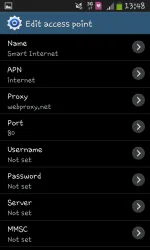

yan lang gagalawin the rest wag ng galawin
na try ko na ito sa talk n text itong gamit ko ngayun pero hindi ko pa po na try pang download medyo mabagal pero puwede na as long as merong magamit
step 1. Punta sa settings ng android smart phone
step 2. more settings
step 3. mobile networks
step 4. click access point names
step 5. click active access point
step 6. edit the access point
step 7. Proxy:webproxy.net Proxy Port:80
yan lang gagalawin the rest wag ng galawin
na try ko na ito sa talk n text itong gamit ko ngayun pero hindi ko pa po na try pang download medyo mabagal pero puwede na as long as merong magamit
 tnx..
tnx..

