 PH
PHTamad talaga ako gumawa ng tutorial pero I'll make this tutorial, maiksi pero sobrang naiintindihan.
Things needed:
Hardware tools:
Precision screw
Tweezers
IDs or any kind of thin cards
USB Cable
-----------------------------------------------------------------------------------------
Software:
Note: Don't install portable QFIL)
QFIL/QPST You do not have permission to view the full content of this post. Log in or register now.
Installation You do not have permission to view the full content of this post. Log in or register now.
Qualcomm USB Driver / Qualcomm HS-USB QDLoader
(For 32bit: You do not have permission to view the full content of this post. Log in or register now. | For 64bit : You do not have permission to view the full content of this post. Log in or register now.)
Installation You do not have permission to view the full content of this post. Log in or register now.
Vivo Y11 firehose to remove password: You do not have permission to view the full content of this post. Log in or register now.
-----------------------------------------------------------------------------------------------------------------------------
Get your hardware tools and software ready! Let's get started!
I assume na download mo na yung mga needs(ofc softwares)
So let's start! You have to disassemble your Vivo Y11 first and find its testpoint/pinout pero di mo pa need i EDL mode ang phone mo.
Nasa picture kung paano i EDL mode cp mo:
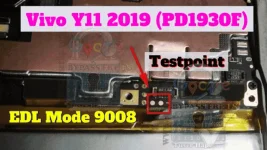
So now since alam mo na kung saan yung need pag dikitin or kung para saan yung tweezers, let's go with the QPST.
You have to manually go to: C:/Program files(x86)/Qualcomm/bin/QFIL.exe and run it as Administrator.
Once na ma open mo na yung QFIL, connect mo na yung phone mo na naka EDL mode, ganito diskarte jan, since naka open na yung QFIL, kuhain mo yung tweezers then i pinout mo na yung Vivo Y11 mo, dapat naka tanggal yung batt ha, tsaka mo i connect yun sa pc para ma detect ni QFIL.
Pagtapos nyan, punta ka na sa QFIL, click mo yung: Flat Build then click mo yung "browse ..." sa Programmer Path tapos select mo yung na download mong firehose.
After mo magawa yang mga yan, click Tools > Partition Manager > wait mo lang kase medyo matagal mag load sa umpisa yan, then pag nag load na, scroll down till you reach the bottom part, may makikita kang "userdata" dun, right click then press "Manage Partition Data" > Erase > Yes.
After nyan may mag popop up, Yes ka lang ng Yes then mag popop up ulit yan na mag rereset yung EDL mode, go lang, wag mo galawin, pag nag reset na, tsaka mo i kabit batt tas power on mo na tas yun! Tanggal na yung Password ng Vivo Y11 mo.
Note: Ma eerase data nyan.
 Para kang nag factory reset.