PH
PHCoolPatatas
Enthusiast
May alam po ba kayong iba pang paraan para mabura lahat ng past posts ko sa timeline ko, mahirap kasi pag paisa-isa lang. Gusto ko lang kasing linisan para mukhang fresh na uli FB acc ko. Salamat!
 You do not have permission to view the full content of this post.
Log in or register now. tapos delete mo. Problem solved.
You do not have permission to view the full content of this post.
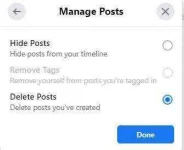
Log in or register now. tapos delete mo. Problem solved. com/basics/2020/07/01/how-to-delete-your-old-facebook-posts-in-bulk/
 Open the Facebook app on your phone.Got to your profile, and tap on the three-dot menu.Go to Activity Log > Manage Activity and tap on the popup that says Your Posts.select all then tap delete or trash icon